

Aula AU75 Wireless Mechanical Keyboard, 75% Compact Layout with Knob, Hot-Swappable RGB Backlit Gaming Keyboards, Custom PBT Keycaps, Bluetooth/2.4G/USB-C for PC, Mac, Gamers(LEOBOG Seiya Switch)
$7.99
Related Products



Product description


1 Scientific layout
2 Advanced Structure
3 Full RGB Backlit


Elevate Your Gaming Station to Pro Level: Meet the AULA AU75 – where cutting-edge wireless technology meets deep personalization. It’s not just a keyboard; it’s the centerpiece of your ultimate battle station, engineered for gamers who refuse to compromise.
Total Freedom, Zero Compromise: Break free from the cable chaos. Switch instantly between ultra-stable 2.4GHz for competitive gaming, energy-efficient Bluetooth for a clean setup, and wired mode for uninterrupted power. Conquer your enemies without a hint of latency.
Command with a Twist: The innovative control knob puts crucial functions at your fingertips. Adjust audio on the fly or scrub through timelines with a simple twist. Combined with the space-saving 75% layout, you get maximum efficiency and minimal clutter.
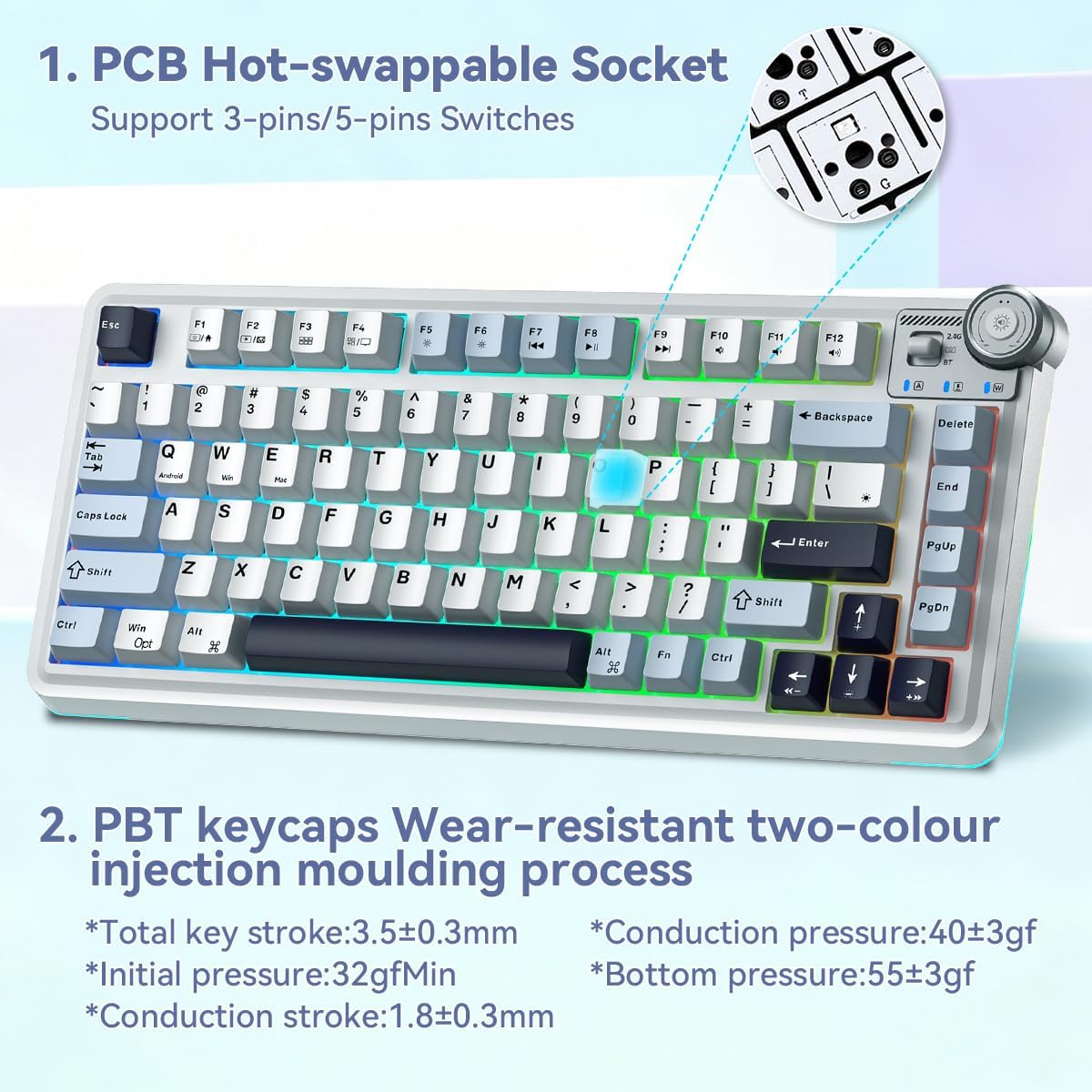
Your Signature Sound & Feel: The hot-swappable design unlocks a universe of customization. Experiment with hundreds of switches to find the exact tactile feedback and acoustic profile you love. This is the gateway to the custom keyboard hobby.
Durability Meets Dazzling Visuals: Battle-ready PBT keycaps defy oils and abrasion, while the brilliant RGB lighting syncs to your gameplay or mood. Built on a solid foundation with intelligent sound-dampening, every keystroke feels premium and sounds incredible.
4 reviews for Aula AU75 Wireless Mechanical Keyboard, 75% Compact Layout with Knob, Hot-Swappable RGB Backlit Gaming Keyboards, Custom PBT Keycaps, Bluetooth/2.4G/USB-C for PC, Mac, Gamers(LEOBOG Seiya Switch)
Add a review

$7.99
Link –
Extremely Happy with My Purchase!
This item arrived exactly as described and the quality is even better than I expected. Shipping was super fast, which was a nice bonus. Overall, a really smooth and satisfying experience—I’d definitely recommend this to others!
Steve –
Awesome keyboard, just haven’t figured out how to adjust the backlighting.
I’m really dating myself here, but I’ve written code professionally since really before a PC existed. The feel and the sound of a mechanical keyboard just can’t be beat in my opinion.To top it off you can use this on multiple devices including your phone and switching devices by just making a couple of keystrokes. Setup can be as easy as plugging in a cable or going totally wireless being my preference as Bluetooth connected to one device and/or the included USB receiver on another. I tried all connection types and they all work. Another thing that’s great about these are the built in quick keys to launch apps or whatever, plus easily switch between operating systems. You can even completely change the look by swapping out the keycaps.One place I was disappointed was the description mentioned this supported a knob, but it said it in text and didn’t show it in any of the pics. Not a real biggie and could be just I misunderstood it. I’ve been doing this stuff for a very, very long time, but by no means do I know everything. Not even close, but there is place I have a problem with. It says that you can change the backlighting and tried everything that I knew to do it with no luck. I did some google searches, tried everything I could find including downloading a couple of apps, one called OpenRGB and another was SignalRGB. I also disabled the one that came with my system as suggested on one try and neither could find this keyboard even when I went to a wired connection. The description does say it can be done with software, but doesn’t mention what app. Maybe I missed a step. That is possible. There are also different protocols and knowing that would have helped. The manual doesn’t really make any mention of it that I saw. That’s why I removed one star.There is another issue I have with this, but I’m not taking a star away for, it’s kind of a hassle, but I’ll actually use this thing and will spend a couple more bucks to get the proper charger. In the manual it suggests to only charge it from a PC and not any type of fast charger. I have so many USB devices, using a PC port is kind of a pain. It’s the standard 5 volts, but the amperage is <= 500 millivolts. Some of the ones that are rated at 2A say no problem but using one may void the warranty since there are ones sold that meet with the specs.This is a cool keyboard and one I'll use all the time. I'm also one of the first nerdy types in the computer age and will eventually take time and figure out something on how this to get the backlighting to work when I get bored or something. I'm not a gamer, just an old programmer and maybe some of you all young'uns out there can point me to what I may have missed. There's a good chance it's simple and just second knowledge to some of you all out there.
SC –
Good keyboard
This wireless keyboard did not have the signal instability and unsmooth input issues I encountered before. The color markings are a new experience for me and quite good.
Keeton K Fagnani –
Fast, Loud, and Built for Click-Addicts — Red Switch Fans Will Love It
SOLID– Tri-mode connection works great (Bluetooth/2.4G/USB-C)– Red switches feel fast and responsive– Full number pad is a win if you’re tired of compact boards– RGB looks clean in the dark, even without messing with modes– Hot-swappable switches if you want to change the feel laterSUSPECT– Loud click-clack profile — not ideal if you prefer a muted “thock”– Sound is sharper than higher-end boards– Lighting modes can be a bit much if you don’t like rainbow chaos– Keycaps and stabilizers aren’t as refined as enthusiast setupsEXPERIENCENever thought I’d be that guy with a growing keyboard collection, but here we are — third tri-mode wireless board and I’m starting to understand why people obsess over this stuff. This Aula S100 Pro leans hard into the classic red-switch personality: fast, snappy, and loud enough that coworkers will hear you typing from the hallway. Personally, I lean toward the creamy, muted “thock” like my purple keyboard from the video, with my grey board as a close second. This one is more clickity-clackity than I prefer, but that’s the red switch life.The funny thing is the keys do feel faster. I can’t explain it scientifically, but they have that lightweight, quick-actuation feel that makes sense once you start learning switch types. Ended up talking keyboards for an hour at work with a guy who knew everything about switch profiles — apparently red-switch fans love exactly this sound and feel. So if that’s your flavor, you’ll be right at home.What I really appreciate is the number pad. My other two boards don’t have it, and I miss it more than I expected. RGB looks solid in the dark — I’m a simple man, I like one steady color instead of tasting the rainbow — but it can do the full light show if that’s your thing.It’s another fun addition to the collection, and the fact that it’s hot-swappable means I can drop in some thocky switches later and maybe turn this into my main daily driver.VERDICTConditional Buy. Great board if you love fast, loud red-switch action. If you want a soft, creamy thock, plan on swapping switches.PRO TIPIf you’re new to switch swapping, grab a cheap switch puller and try a mixed setup first — thocky linears on the main keys, reds on the numpad. Best of both worlds.