

GHome Smart Switch, Smart Wi-Fi Light Switch for Lights Work with Alexa and Google Home 2.4Ghz, Single-Pole, Neutral Wire Required, UL Certified, Voice Control (4 Pack)
$5.99
Related Products


From the brand


GHome started as a vision to create a world where environmental preservation and home automation could unite. GHome offers devices that provide convenience to people in their daily lives while also helping them reduce their carbon footprint. With a focus on environmental sustainability and comfortable living, GHome is committed to manufacturing smart home products using low-carbon materials and following sustainable practices.
Top Sales
Smart Plugs
Smart Switches
Plugs and Switches
Smart Bulbs
Product Dimensions : 6.1 x 10.08 x 2.52 inches; 1.12 Pounds
Item model number : KG5-4
Date First Available : October 26, 2021
Manufacturer : GHome
ASIN : B09LLNT3KR
Best Sellers Rank: #11,694 in Tools & Home Improvement (See Top 100 in Tools & Home Improvement) #50 in Electrical Light Switches
Customer Reviews: 4.3 4.3 out of 5 stars 1,931 ratings var dpAcrHasRegisteredArcLinkClickAction; P.when(‘A’, ‘ready’).execute(function(A) { if (dpAcrHasRegisteredArcLinkClickAction !== true) { dpAcrHasRegisteredArcLinkClickAction = true; A.declarative( ‘acrLink-click-metrics’, ‘click’, { “allowLinkDefault”: true }, function (event) { if (window.ue) { ue.count(“acrLinkClickCount”, (ue.count(“acrLinkClickCount”) || 0) + 1); } } ); } }); P.when(‘A’, ‘cf’).execute(function(A) { A.declarative(‘acrStarsLink-click-metrics’, ‘click’, { “allowLinkDefault” : true }, function(event){ if(window.ue) { ue.count(“acrStarsLinkWithPopoverClickCount”, (ue.count(“acrStarsLinkWithPopoverClickCount”) || 0) + 1); } }); });
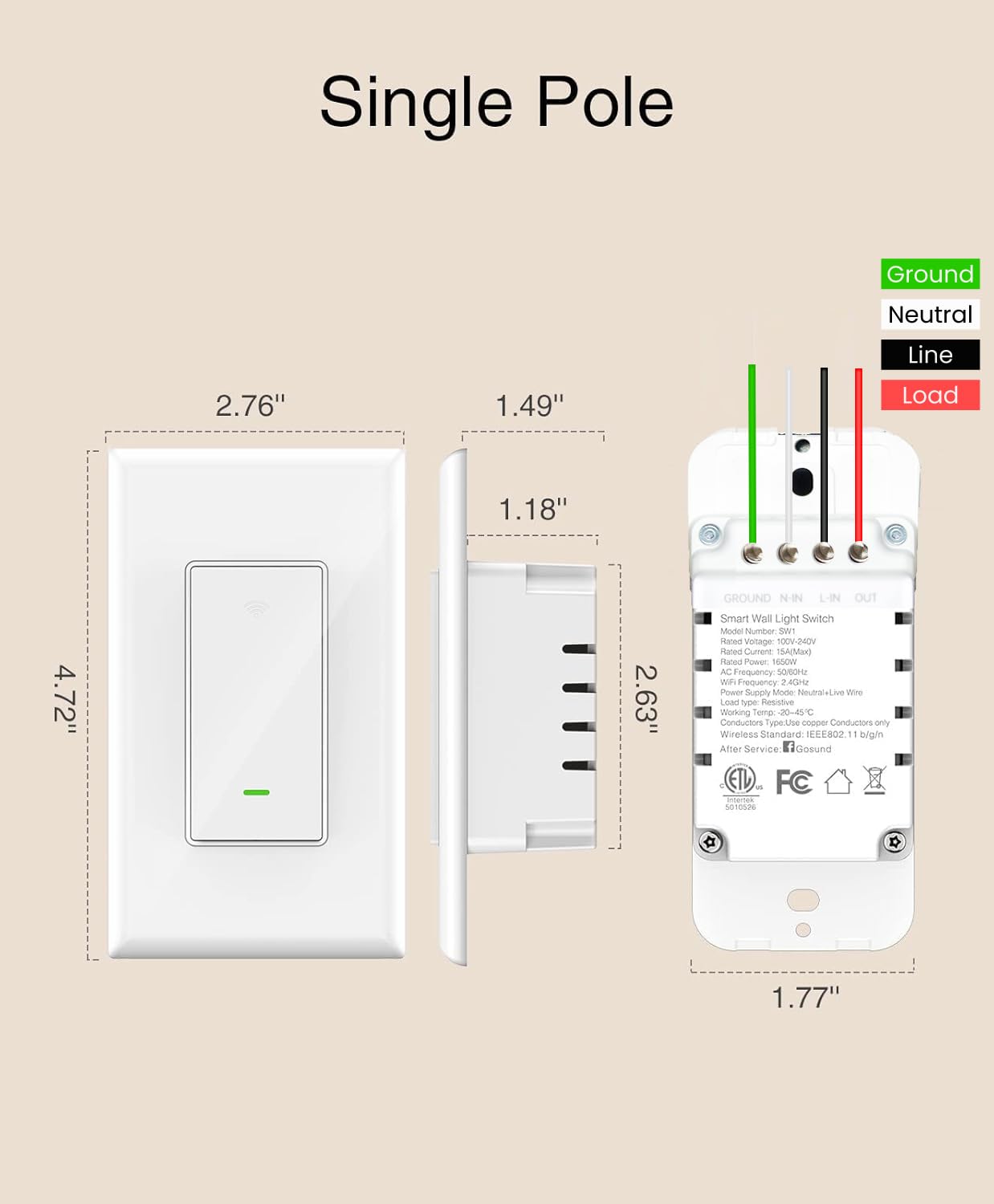
NEUTRAL WIRE REQUIRED: Single Pole (Not 3-Way), 2.4G WiFi only. Output: 120Volts 15A Max, 1800 Watts. UL& FCC certificated. Neutral Wire Required. Note: jumper wires provided, but this smart light switch cannot be used with a smart bulb.
VOICE CONTROL: This Wi-Fi light switch works with Amazon Alexa and Google Assistant and Smart Life APP. When your hands are full or you enter a dark room, just say “Hey, Alexa, turn on the light.” Enjoy a hands-free moment with just one simple command!
SCHEDULE YOUR LIGHTS: Automatically turn on/off default to sunset or sunrise.Turn on your lights at random as if you were home. Set a timer automatically turn off the bedroom light in the evening. Schedule your home lights even if you are going out. More smart functions waiting for you to design.
REMOTE CONTROL: Forgot to turn on/off the power? Don’t worry, you can control your lights via the app anytime, anywhere. View the status of all your room lights and control them remotely.
GROUP CONTROL: On the home page of the APP, tap the switch and then tap the “edit icon” in the upper right corner to create groups for all your smart switches. You can control all switches at the same time with one click.
11 reviews for GHome Smart Switch, Smart Wi-Fi Light Switch for Lights Work with Alexa and Google Home 2.4Ghz, Single-Pole, Neutral Wire Required, UL Certified, Voice Control (4 Pack)
Add a review

$5.99
Jim Ferguson –
They work with the Smart Life app
Finally after 5 different switches that didn’t work with Smart Life, I found these were flawless. Easy setup, no problems with control, and they work with scheduling. Keep up the good work. THANKS!
Amazon Customer –
It works.
Devices work as intended. However, setup was a little challenging even thought the instructions make it look as easy as 1,2,3 and it wasn’t. The great part is that customer service is very helpful and everything in the end was great. I’m happy to have purchased these devices.Notes: 1. Make sure when connecting these devices thru your smart phone, that your smart phone is connected to the same WIFI you want to connect the light switches to. I have multiple WIFI’s and that was a time consuming issue to figure out.2. When using the Gosund app to connect your switches, every time i tried to connect, the app said it wasn’t successful and it times out. This is is not true, even though the app times out, I learned that the switches were connected regardless of this error. This wasted a lot of my time of trying to reconnect my switches when they were already connected.3. When connecting these switches to Google Home, make sure you label the switches correctly, and I found that connecting one switch at a time works best instead of waiting for all of the switch to be active online at one time.
JeffLearman –
Great switches, but tricky to set up on some 5G networks. Great value.
I have lots of Gosund smart plugs and have had no problems with them, so I didn’t hesitate to get Gosund smart switches.I had one issue: my router has both 5G and 2.4G networks, but both have the same wifi name, and I can’t directly control which speed my phone uses when it connects: it always picks 5G if I’m close enough to my router. However, these devices only work if your phone is connected to the 2.4G network. The instructions explain how to give your 5G and 2.4G networks different names, but that’s old-school; things have gotten better these days.The good news is, there’s a workaround (and it’s sad that the instructions don’t mention this.) I had to pair the devices at the end of an extension cord, outside my house. I brought up my (Android) phone’s wifi settings and clicked on my network name, which showed the current status (5G vs 2.4G, and signal strength, etc.) I found a place where the connection went from 5G to 2.4G, and walked a bit farther in that direction.I put a wire nut on the switch’s red wire and plugged the black and white wires into the extension cord, watching the LED on the switch to make sure it was connected. I then followed the instructions.I believe it would have worked fine to install the switches first, and then just walk with my phone out to the same spot (no extension cord.) But I wanted to make sure they’d work before wiring them in. Plus it’s helpful (though not necessary) to be nearby so I can see the LEDs during the process.Once paired, there is no need for my phone to be on the 2.4G network, and after installation, everything works perfectly. Integration with Google Home is easy; once you give the permissions between Google and the Smart Life app, any Smart Life devices automatically appear in Google Home. (The only problem with the Smart Life app is that it does NOT provide a way to move a device to a new home: you have to delete it and add it again. That was a nuisance when I moved. In the future I won’t be using the “home” features of Smart Life. But this is not Gosund’s fault, and it’s not really a problem because I can use the Google app’s features for which device is in which home.)I have other smart devices that don’t need my phone to be on a 2.4G network, and that saves a bit of trouble, so while I like Gosund products, I doubt I’ll be buying more of these particular switches.
marvin hearndon –
Great product, easy to install
These exceed expectations, easy to install and they come with extension wires in case your existing wiring isn’t long enough. Software wise, they install even easier than the previous versions and integrate with Alexia and Google Home well. The only downside that I can list is that the extension wires are solder tinned so that they are solid instead of stranded, making it difficult to wire nut them to the solid house wiring. This is mostly a personal preference and not necessarily a safety issue. Just make sure that the wire nut is secure and doesn’t come off easily.
Jaime Martinez –
Does require use “White Common Wire”
Smart Dimmer Switches work great. They are easy to set up, install and program. Price is extremely reasonable!!
Kurtis –
100% failure rate within 60 days
I installed three of these switches two months ago. Last week, one stopped responding to the switch. It could still be controlled by the app, but the physical switch did nothing. Last night, the other two wouldn’t work when I tried to turn them on. Again, the app works but the switch itself is useless. Now I get to remove and replace them with something else.They are out of the 30 day return window, and the support number goes directly to voicemail. I emailed them, hopefully I get an answer backUPDATE:I received this response from the company-Hi,Thank you for your email. We apologize for the inconvenience.Don’t worry, we are here to help you.Could you please try these steps?1. Please kindly turn off the breaker and turn it back on. This usually fixes this type of issue.2. If not working, please try to knock the switch 5-6 times continuously using your knuckle. After knocking, turn the switch on/off to see if it works. If you don’t knock the switch again, please repeat this 4 times.3. Then, press it to turn on and off to check if it is working this time.Please let us know whether this helps.Thank you!I turned the breaker off and on , they did start working. I’ve never had to do this with any other switch, so that doesn’t bode well for their quality.I’m not sure how I feel about their go-to for fixing electronics being basically “Punch the switch repeatedly until it works”. That doesn’t give me that warm fuzzy feeling either.
Daniel Carson –
Even if this wasn’t a smart switch it would still be in the Top 5 easiest electrical switches I’ve ever installed in a home. I ended up cutting the ground wire off the old dimmer which was junk anyway to save myself a heck of a lot of time.When I do a full power off of the light switch the top kinda sticks and I have to put my finger on the top of the switch to wiggle it slightly. This is no doubt from the lack of room in the junction box from where I sloppily jammed all the wires back in (the switch itself is very short and a normal person should have way more room than me in the junction box) I just don’t feel like taking it apart since the switch will only be used by me and I’m mostly going to control the lights with my Google Assistant and my Home Theatre PC setup (which dims the lights when I start a movie)
SR. CEDILLO –
En México existen en la mayoría de las casas solamente dos cables para conectar cualquier interruptor. Las instruccionesdeberían de ser específicas para esta conexión. Si uno va a utilizar focos controlados por Alexa o aplicación este etá de sobra, no se necesita.
luis Manuel Soto Alvarez –
El producto es muy bueno pero el embalaje llegó en mal estado
Vanessa ~ –
So far, I have installed two of the switches. Very reliable switches. They work very well, and the app control is user-friendly with different formats of control. I would like to buy more but I discovered the seller crazily increased the price by over 250% to $100. Then, I totally don’t think it worths that new price.
Del J. H. –
Easy hookup. Requires quite a bit of room in the box just like all wifi switches