

Insta360 Link 2 – PTZ 4K Webcam for PC/Mac, 1/2″ Sensor, AI Tracking, HDR, AI Noise-Canceling Mic, Gesture Control for Streaming, Video Calls, Gaming, Works with Zoom, Teams, Twitch & More
$16.99
Related Products




Product description
The video showcases the product in use.The video guides you through product setup.The video compares multiple products.The video shows the product being unpacked. Insta360 Link2 KV Merchant Video


1 4K Resolution
2 1/2″ Sensor
3 HDR & Low Light
4 True Focus
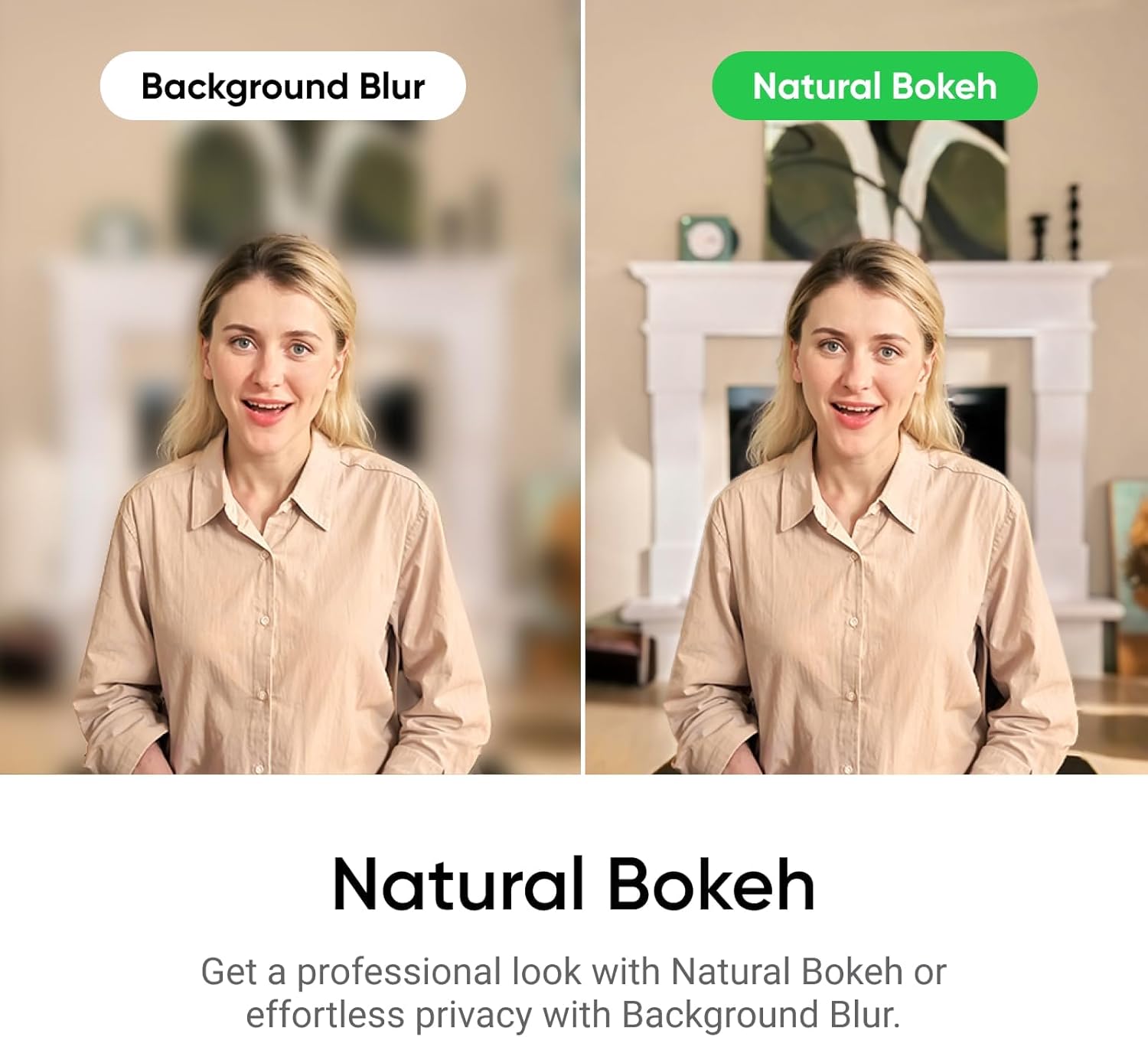
5 Natural Bokeh


1 Professional Audio
2 AI Noise-Canceling
3 Intelligent Audio Modes


1 AI Tracking
2 Pause-Track Area
3 Gesture Control


1 Smart Whiteboard Mode
2 Whiteboard Mode
3 DeskView Mode
4 Portrait Mode
5 Privacy Mode

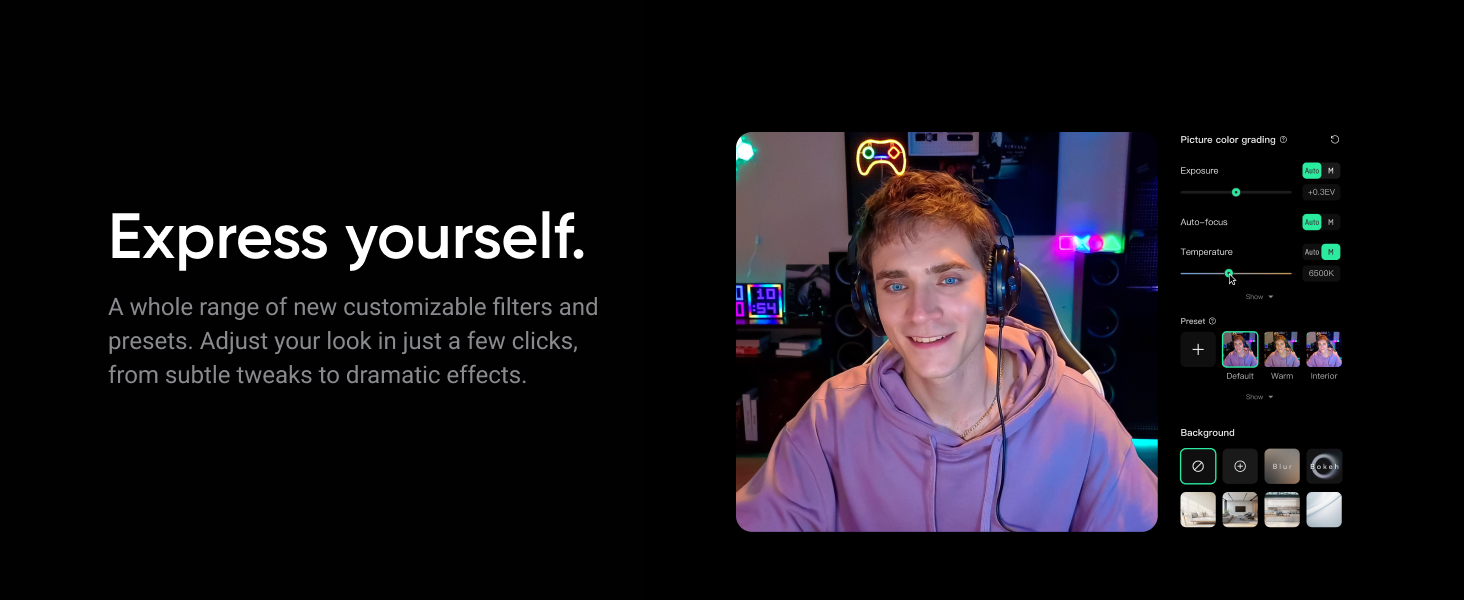

1 Virtual Backgrounds
2 Creative Filters
3 Remote Smartphone Control
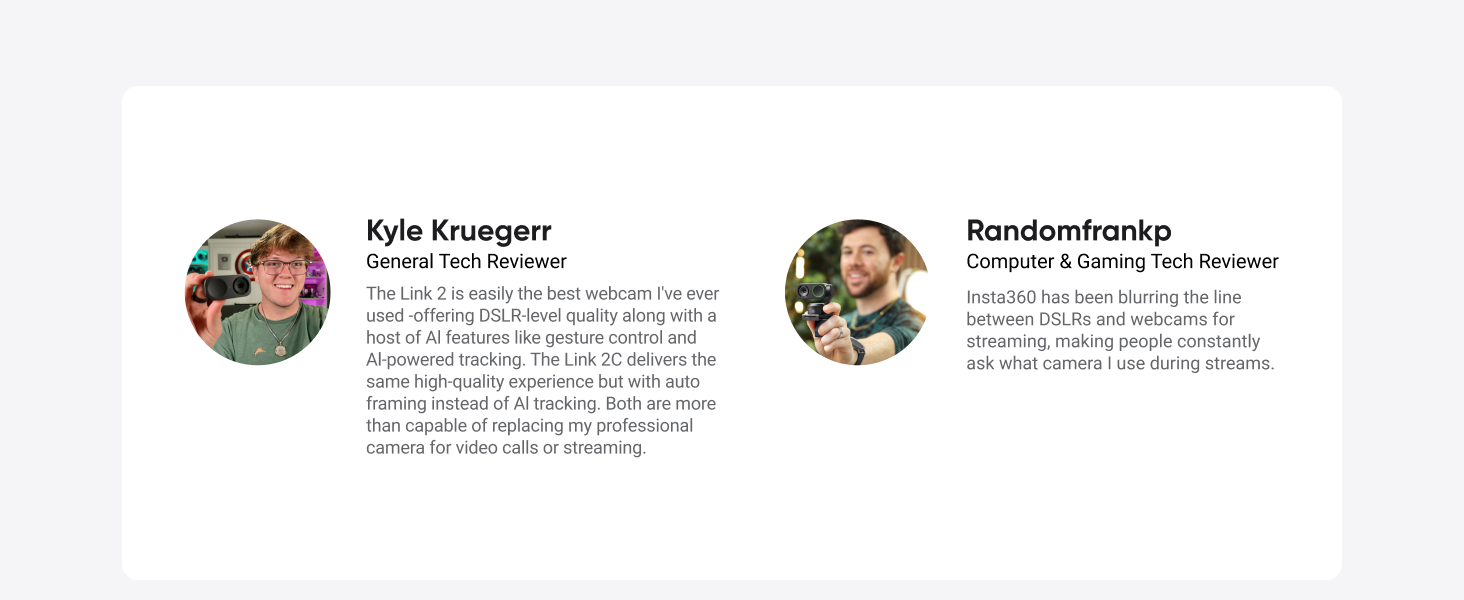

Premium Image Quality: Capture every detail with an impressive 1/2″ sensor, balanced, true-to-life 4K visuals with HDR and exceptional low light performance for quality videos in any light.
Professional Audio: Experience best-in-class audio with advanced AI noise-canceling algorithms. Filter out unwanted background noise for clear communication, even in busy environments.
True Focus: Keep your audience engaged with faster, more accurate Phase Detection Auto Focus (PDAF). No more blurry shots, just fast focusing and crisp video.
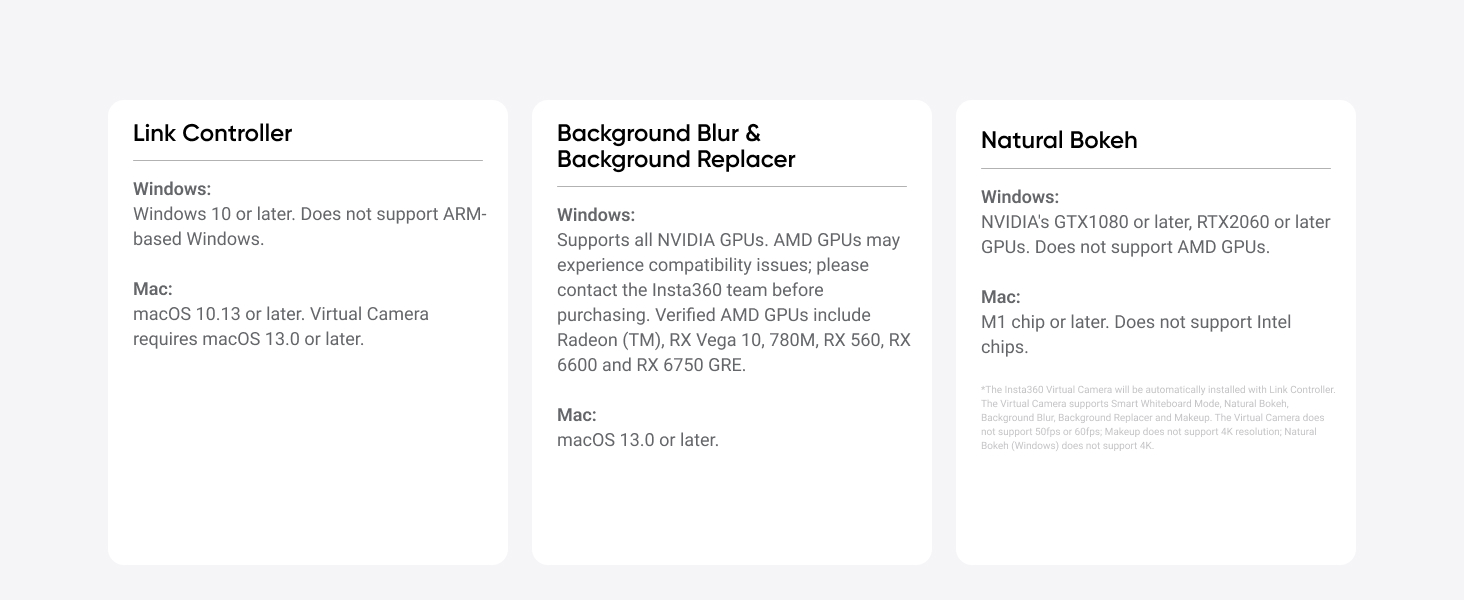
Natural Bokeh: Get a professional look by replicating a DSLR-like depth of field. Provides a realistic and natural bokeh effect, straight from Link Controller.
AI Tracking: Insta360 Link 2 physically pans and tilts to follow your movements around the room, keeping you or your group perfectly in frame.
Gesture & Remote Smartphone Control: Control your webcam remotely from your smartphone, or use simple hand gestures to start AI Tracking/Auto Framing, zoom in or out and activate Whiteboard Mode.
Specialized Modes: Adapt to every scenario with versatile modes, including DeskView, Whiteboard and 4K Portrait Mode.
Advanced Desktop Software: Fine-tune settings, access advanced features and personalize your experience with the free dedicated Link Controller software.
Privacy Mode: Insta360 Link 2 automatically tilts down after 10 seconds of inactivity, or you can manually adjust it.
Universal Compatibility: Fully compatible with all major video conferencing software and live streaming platforms, including Microsoft Teams, Zoom, Twitch and more, for a seamless experience.
11 reviews for Insta360 Link 2 – PTZ 4K Webcam for PC/Mac, 1/2″ Sensor, AI Tracking, HDR, AI Noise-Canceling Mic, Gesture Control for Streaming, Video Calls, Gaming, Works with Zoom, Teams, Twitch & More
Add a review

$16.99
dr Frank –
Impressive 4K Webcam for Calls and Content Creation – Insta360 Link 2
Insta360 Link 2 WebcamThe Insta360 Link 2 has quickly become my favorite webcam, and that is saying a lot after trying many over the years. Even with just a few weeks of use, the quality has genuinely impressed me. Setup was simple, firmware updates were straightforward, and it performs flawlessly for Zoom, Teams, and other webcalls, as well as talking-head videos and content creation.The 1/2″ sensor delivers crisp, clean 4K video, and the AI tracking and gesture controls work far better than I expected. Both the video and audio quality are outstanding, especially considering its sale price under $150. For anyone who wants a reliable, high-quality webcam with smart features that actually work, this is an excellent buy.
Ajtrek –
Insta360 Link 2: The Ultimate Web Cam
The Insta360 Link 2 is an incredible device. I bought this even though my Apple Studio Display has a built-in Web Cam; however the video quality is subpar. Another reason is that I use a BenQ Halo monitor lamp that covers the camera.FYI, I had to purchase the device in the link to mount it on the BenQ Halo. However, it’s not needed if you don’t use a monitor lamp. BenQ’s proprietary Webcam mount is out of stock with no date of re-stock.https://www.amazon.com/JCWINY-Accessory-ScreenBar-Adjustable-Computer/dp/B0CQFSVW7NBack to the Insta360 Link 2. Setup is easy and straight forward. Great functionality. The size is appropriate for a Web Cam of this type with powered mechanisms inside. However, it’s not overtly huge.The tracking feature is nice with three (3) levels of speed. However, most will remain seated in one position; but it will compensate for slight movements. Auto focus is great to keep you looking pristine.4K video can introduce a bit of video noise for objects in the background. It can be lessened by reducing the frames per second down from 30fps to 25fps or 24fps. 1080p video is the sweet spot.Upon starting your computer, it will go through a calibration sequence of about 5 seconds with no video. A privacy lens is not needed when the camera is not in use as it returns to a downward facing position. Background choices are nice when your room is a bit unsightly; or you’d rather not have your audience know you’re in the bedroom or another area you’d rather not reveal.FYI, on my Mac Mini M4 I had to go into settings and activate “camera extensions” to use backgrounds as they are unavailable upon Initial install of the software. 24/7 tech support guided me through the activation process which I contacted at 1AM CST. Another great reason to purchase the Insta360 Link 2.The Insta360 Link 2 is sightly expensive at $199_USD. However, if you’re looking for a Web Cam with great video and audio (other features aside) you won’t be disappointed. I highly recommend this product. In fact, I ordered a second one for my other Apple Studio Display.
Zeverence –
Very well made! Great value! Even better customer service!
Camera works really well. I was surprised by the video quality. Its honestly better than a big name streaming Webcam I also have. And this product is cheaper than that one by a decent amount! Great value. The ai tracking feature is even better. Works really well. Is proving to be valuable when I do live recorded trainings for work. The software is intuitive and works well. I had one issue with a download and decided to check out how good tech support is. I was very impressed with their attention and service. Solved the problem. And made sure before they closed the case that I didnt have anything else I would like them to look into. I tested that, they actually meant it. Should I be in need for any of their other products I won’t hesitate to try them out. Ill check back in after ive worked the camera through its paces longer. But ive already put several hours of use already on it and am not disappointed.
Walking the Precipice –
Great Picture – Easy to Setup – Kind of Costly – Doesn’t Do Windows Hello (BUT it’s a GREAT WEBCAM)
Great webcam! What an amazing picture! I honestly love this webcam and how easy it is to set up and use. The autofocus is perfect and displays all my skin blemishes and everything that I normally hide. So, bravo on that… It is a bit expensive but worth it. Windows 11 Pro found it instantly, so it is compatible.DON’T do what I did though. I spent a couple hours looking for a high-end webcam that works with Windows Hello Facial Recognition…so many webcams that when I ordered I THOUGHT this was one of the several that I found. IT IS NOT WINDOWS HELLO compatible, my bad and I accept that I made the mistake. I will keep the webcam despite that issue because it is my fault, not the seller, for choosing one that doesn’t work with Windows Hello. SO, if you need Windows Hello, pick a different webcam. If you don’t need Windows Hello, this webcam is amazing, get it!
Ron Armijo –
Great 4k cam. Easy to use software. Magnetic mount is awesome. No issues with Zoom like Brio had.
This is a great webcam. The auto-follow works great and the software is very easy to use. I bought this because I got tired of dealing with the Logitech Brio issues with Zoom and Teams. Unlike that cam, this Insta360 stays at whatever setting I choose in the software when I get on a virtual call. It doesn’t need any adjusting and you don’t suddenly see my entire messy office in wide view lol.
P. Browning –
Good webcam but limited software app capabilities
This is a really nice webcam in terms of performance, clarity, and relative ease of use. It offers a lot of flexibility, and I look great on my ZOOM calls 😉 The software was easy to install, and the webcam is reliable.The only thing I don’t like about this camera is that the Link Controller software won’t let you take photos. This seems an odd thing to leave out of a camera functionality list. My workaround is to go into Microsoft Camera and reassign the camera to this one. It’s an unnecessary step that the Link Controller software should be able to incorporate.Other than this issue, I’m happy with the webcam.
Reem almazrooei –
It is great cam if you are streaming or recording content, but i got it for my zoom meeting but it didn’t help me with the quality
Ha********ri –
High quality, easy setup.
Luca Gaddini –
Ho acquistato l’Insta360 Link 2 per migliorare la qualità delle videoconferenze e delle registrazioni, e devo dire che è stato un acquisto azzeccato! La qualità video è assolutamente sorprendente: immagini nitide, colori vividi e un livello di dettaglio che lascia a bocca aperta.La funzione di auto-tracking è incredibile: la fotocamera segue i miei movimenti con precisione, il che è perfetto per presentazioni o video dinamici. Inoltre, la gestione dei gesti è intuitiva e rende l’utilizzo ancora più semplice e divertente.Il supporto per la risoluzione 4K garantisce una qualità professionale, che fa davvero la differenza rispetto a webcam standard. Anche le prestazioni in condizioni di scarsa illuminazione sono eccellenti, grazie al sensore avanzato.Il design è compatto ed elegante, e l’installazione è stata facilissima: plug-and-play, senza bisogno di configurazioni complicate. La compatibilità con diversi software e piattaforme (Zoom, Teams, OBS, ecc.) la rende estremamente versatile per ogni tipo di utilizzo, sia professionale che personale.In sintesi, l’Insta360 Link 2 è una delle migliori webcam sul mercato.La consiglio vivamente a chi cerca una soluzione innovativa, di alta qualità e con funzionalità avanzate.
Jose Miguel Albesa –
La Insta 360 Link 2 me ha sorprendido por la calidad de imagen que aporta, la utilizo para videoconferencias y reuniones online, todos me preguntan por la cámara que utilizo ya que se quedan sorprendidos por la calidad de imagen que perciben, tiene muchísimas funciones que yo no uso por el tipo de trabajo que tengo, pero que seguro son útiles para muchas personas o para según que tipo de videos o grabaciones quieras hacer, el seguimiento al sujeto es super fluido no te pierde por más que te muevas, el sonido es muy bueno, tiene varios ajustes para eliminar ruidos de ambiente o el de los ventiladores o aires acondicionados muy efectivo. Muy recomendable.
Carbonracer –
Die Cam ist der Hammer. Und ich möchte “kurz” darlegen, warum ich das so sehe.Was habe ich gesucht?======================Bislang habe ich Billig-Webcams benutzt. Mein Anspruch: gesehen werden, wenn ich im Home Office an Meetings teilnehme. Da ich aber auch regelmäßig meinen shit ansprechend präsentieren muss, bin ich auch schnell auf die Verwendung von OBS gekommen. Und hier wurde (mir) schnell wichtig, mich freistellen zu können und in die virtuellen Umgebungen einpassen zu können. Meinen gesamten Arbeitsplatz darauf auszulegen, war mir dann aber doch zu viel des Guten. Und das bedeutet, der Webcam eine schwierige Situation vorzusetzen. Zum einen (und am schwerwiegendsten) ist da die Gegenlicht-Situation: ich sitze genau vor einem Fenster. Dazu habe ich nicht viel (künstliches) Licht zu bieten. Das haben mir bisherige Cams echt übel genommen (was ich diesen wieder nicht wirklich übel nehmen kann). So habe ich weder eine gescheite Freistellung noch ein besonders nices Bild hinbekommen. Nicht sehr überraschend, dass auch der Fokus normalerweise nicht sonderlich treffsicher war. Es sollte also eine Webcam her, die genau das besser hinbekommt.Wie bin ich auf diese Cam gekommen?====================================Da nun aber gefühlt alle Hersteller über ihr Produkt behaupten, genau die erwähnten Probleme handlen zu können, nützt einem die einfache Amazon- oder Google-Suche nicht viel. Also hab ich mich mal durch etliche hilfreiche Rezensionen und Vergleichstests auf YouTube gewühlt. Und um eine lange Story mal etwas kürzer zu machen: ich habe mich letztendlich zwischen der OBSBOT Tiny 2 und dieser Cam hier entschieden, da ich während der Recherche Lust auf eine PTZ (Pan-Tilt-Zoom) Cam bekommen habe. Warum nun also diese, und nicht die OBSBOT? Zum einen ist letztere momentan deutlich teurer (Amazon), ohne dafür ein nennenswert besseres Bild zu liefern – zumindest, soweit man das anhand von YT-Material beurteilen kann. Zum anderen haben mir die Möglichkeiten der mitgelieferten Software von Insta360 deutlich besser gefallen. Spoiler: ich lag damit goldrichtig – zumindest für meine individuellen Ansprüche.Ich möchte jedem Interessierten entsprechend wärmstens empfehlen, die zahlreichen Vergleichstests au YouTube zu konsumieren. Das schafft sehr viel Klarheit und noch mehr “Aha!”. 🙂Meine Beurteilung==================Jetzt hab ich die Cam nun. Was kann ich also darüber sagen? Zunächst einmal: ich werde nicht alle Features beschreiben, die die Cam bietet. Das tun sowohl Hersteller als auch Amazon und YouTube bereits hinreichend. Nur so viel vorab: die damit einhergehenden Versprechen über das Produkt werden erfüllt.Deutlich interessanter könnte mein eigener Eindruck einzelner Features sein. Insbesondere die Hauptmerkmale wie Bildqualität & Co. Ein paar Worte werde ich außerdem über die Software verlieren.Es gibt etliche Features, die ich selbst nicht nutze und aus naheliegenden Gründen entsprechend nicht beschreiben werde. Als wichtigstes derer: der Ton / das Micro. Aus demselben Grund gehe ich auch auf die Gestensteuerung nicht ein.Hardware———Schön klein und leicht ist die Cam. Und das ist nicht ganz irrelevant. Denn wenn das Teil einmal am Monitor klemmt (eine der Montagemöglichkeiten neben dem 1/4” Gewinde für Stativmontage), ohne dabei den heutzutage meist sehr schmalen Rahmen zu überragen, bleibt die Cam an Ort und Stelle, ohne zu wackeln. Egal, wie aktiv der Gimbal gerade arbeitet.Verarbeitung und eingesetzte Materialien (Aluminium(-Optik?)) inkl. Oberflächen-Finish machen einen wertigen und langlebigen Eindruck. Die Cam inkl. Gimbal wird magnetisch auf der Monitor-Klemmung fixiert. Auch das wirkt überraschend stabil. Die Klemmung wird für die Montage der Cam auf einem Stativ weggelassen. Eine saubere Lösung, wie ich finde.Bild—–Wie erwähnt kam es mir ja besonders auf das Bild und dessen Verarbeitung an. Und, oh boy, ist das ein Bild. Wie gesagt: inzwischen ja durchaus kein Alleinstellungsmerkmal mehr. Aber wenn man von (älteren) Billigcams und schlechten Mid price Cams (Logitech StreamCam – what a pricey crap) kommt, darf man schon geflasht sein. Zum einen ist da die Lichtempfindlichkeit. Ich habe ja bereits erwähnt, dass die Cam bei mir mit recht wenig Licht und auch noch Gegenlicht auskommen muss. Und diese Cam scheint sich damit sogar richtig wohl zu fühlen. Nicht nur erfasst sie alle Details meiner Silhouette perfekt. Auch bliebt das unter diesen Umständen unvermeidbare Rauschen echt erträglich. Ob Kontrast, Weißabgleich und so etwas nun perfekt sitzt, ist mir ziemlich egal, da ich per OBS ohnehin nachfiltere, um es dem jeweiligen Hintergrund anzupassen. Bei dieser Cam muss ich da i.d.R. jedoch extrem wenig machen. Das Bild passt.Ich war gespannt auf die 4K-Auflösung, da meine bisherigen Cams max. 1080p konnten. Aber wie meinem Einsatzzweck zu Beginn zu entnehmen ist, profitiere ich von dem Mehr an Details nicht. Zudem kann die Cam (besser: die Software) in 1080p Dinge, die ich sehr zu schätzen weiß, die jedoch im 4K-Mode fehlen. So kann die Cam nur in besagtem 1080p das Bild automatisch horizontal gerade richten.Übrigens habe ich ja bereits mehrfach erwähnt, dass ich mich freistellen möchte. Einen Greenscreen habe ich jedoch nicht (und müsste für diesen ohnehin mächtig an der Beleuchtungssituation schrauben). Bisher habe ich stattdessen NVIDIA Broadcast benutzt. Der hat die Person erkannt, freigestellt und auf Wunsch ohne jeglichen Hintergrund ausgegeben. Das war für OBS sehr nützlich, da ich dort den Hintergrund nicht umständlich entfernen musste. Die Insta360 Software bekommt die Freistellung mind. genauso gut hin, bietet mir allerdings – und das finde ich echt schade – lediglich die Möglichkeit, den Hintergrund zu ersetzen. Ersatzlos entfernen funktioniert hier nicht. Ich behelfe mir nun damit, als Ersatzhintergrund eine einfarbige (grüne oder blaue) Füllfarbe zu benutzen und diese über die Chroma Key Funktion in OBS wieder zu entfernen.PTZ—-Für mich und meinen Einsatzbereich ist das Verfolgen meiner Person / meines Gesichtes nicht in dem Maße wichtig, wie es das für “On stage” Presenter wäre. Aber auch in dem kleinen Rahmen, in dem ich es nutze, ist das schon echt nice. Dabei dreht sich die Cam über einen 2-Way-Gimbal immer so, dass ich in dem von mir gewählten Bildausschnitt bleibe. Das ist besonders dann nützlich, wenn ich mich in OBS beim Screensharing in einem sehr kleinen Frame darstelle, aus dem ich ohne diese Funktion allzu leicht verschwinden würde. Die Motoren, die das bewerkstelligen, arbeiten unhörbar leise, schnell und ohne das Bild zu verwackeln.Und so richtig nützlich wird dieses Feature dadurch, dass ich mehrere Ausschnitte festlegen, abspeichern und so jederzeit auf den gewünschten Ausschnitt wechseln kann (inkl. desk view). Eine kleine Kritik gibt es an dieser Stelle aber dann doch zu erwähnen: es werden bei diesem Feature nur die Bildausschnitte gespeichert. Die meisten der weiteren Einstellungen wie z.B. die Tracking Modes, die Hintergrund-Einstellungen und so weiter merkt sich die Cam/Software leider nicht.Es gäbe noch deutlich mehr über das PTZ und insbesondere über das AI-Tracking zu sagen. Haben aber bereits erwähnte YouTube-Videos und Online-Artikel ausführlich getan. Nur so viel: die Berichte übertreiben nicht!Software———Viele der Fähigkeiten der Software zur Steuerung und dem Setup der Webcam habe ich je bereits angesprochen. Und ebenso, dass die umfangreichen Möglichkeiten hier überzeugender schienen als bei der Konkurrenz. Und ja, mir fehlen hier tatsächlich keine Features. Alles, was ich können möchte, kann ich mit dieser Software auch. Inklusive Firmware-Updates & Co. Lediglich das ersatzlose Entfernen des Hintergrundes fehlt mir. Da das ja aber nur eine Software-Angelegenheit darstellt, stünde dem Nachreichen einer solchen Funktion nicht viel im Wege (looking at you, Insta 😉)Es sei mir in diesem Abschnitt noch der Hinweis erlaubt, dass auch die Übersichtlichkeit und Bedienbarkeit (kurz: User Experience – UX) der App vorbildlich ist. Die meisten Funktionen sind intuitiv erfassbar und zu verstehen. Zu weniger intuitiven Einstellungen gibt es eine kleine Inline-Hilfe. Alles in allem schön gemacht.Die gesamte Software lässt sich auch auf eine Toolbar verkleinern, die das Steuern der Cam und das Umschalten zwischen den Voreinstellungen etc. erlaubt. Das kann schon ziemlich praktisch sein.Zur Software im weitesten Sinne gehört auch die Möglichkeit, die Webcam über das Smartphone remote zu bedienen. Das geschieht über den Smartphone-Browser über das eigene lokale Netzwerk. Die Funktionen hier sind allerdings einigermaßen überschaubar. Eine dedizierte App hierfür gibt es anscheinend nicht. Da ich die Cam aber nur benötige, wenn ich auch am Rechner sitze, bin ich auf eine Fernbedienung nicht angewiesen. Schön aber, dass es sowas gibt.Mein Fazit===========Für das, was die Webcam bei mir zu leisten hat, ist das Gesamtpaket aus Cam und Software perfekt. Bild und Qualität ist über alle Anforderungen erhaben. Und das Angebot an Funktionen und Fähigkeiten beeindruckt. Ich bin froh, dass ich mich für dieses Produkt entschieden habe.Meine Bewertung basiert allerdings auf erwähntem Anforderungsprofil und auf einem Testzeitraum von 2 Tagen, ist also recht subjektiv.Erwähnenswert ist außerdem, dass mir zum einen der Vergleich zu den Mitbewerbern in dieser Webcam-Kategorie fehlt. Da verlasse ich mich – wie erwähnt – auf Vergleichstests anderer.Apropos Vergleich: die Link 2 ist keine DSLR-Cam. Weder hat sie einen ähnlich großen Sensor noch vergleichbar wertige Objektive, die zudem noch wechselbar wären. Man kann trotzdem einmal festhalten, dass einem für ein Zehntel des Preises deutlich mehr als nur ein Zehntel an Bildqualität und Funktion geboten wird. Ob sie trotzdem zu den Ansprüchen professioneller Streamer / Content Creators passt, bleibt am Ende eine individuelle Entscheidung.Disclaimer===========Aufgrund der vielen gekauften und anderweitig beeinflussten Rezensionen auf Amazon ist es leider notwendig geworden, auf die Unabhängigkeit meiner Rezensionen ausdrücklich hinzuweisen. Ich schreibe selten genug Rezensionen. Diese fallen meist etwas ausführlicher aus und spiegeln meinen höchst persönlichen Eindruck vom eigens zur eigenen Nutzung erworbenen Produkt wider. Die Produkte sind voll bezahlt und nicht gesponsort. Und keiner der Hersteller und/oder Verkäufer verlangt meine Rezensionen.Sollte sich an meinen Eindrücken zum bewerteten Produkt im Laufe seiner Nutzungszeit etwas ändern, korrigiere ich meine Rezensionen nachträglich.