

Laptop Screen Extender,Upgraded 15.6″ Portable Monitor,FHD 1080P Triple Laptop Screen Extender,Detachable Dual Monitor for 13”-17” Laptops,Plug & Play,Compatible with Mac/Wins/Chrome/Dex
$36.99
Related Products




Product description


Connection Methods:
A: If your laptop has 2 full function USB-C ports (supports video output & power supply):
Screen 1: USB-C to USB-C cable*1
Screen 2: USB-C to USB-C cable*1
B: If your laptop has 1 full function USB-Cport + 1 HDMI port (support video output) +1 USB-A or 1 Non-functional USB-C port (Support power supply):
Screen 1: USB-C to USB-C cable*1
Screen 2: HDMI to USB-C cable*1 + USB-A to USB-C cable*1
Only one monitor works, the other doesn’t work?
1. If it lights up and shows ‘No Signal’, just connect an HDMI to C cable to the ‘USB-C with DP’ port for it.
2. If it doesn’t light up at all, it means that there is no power supply. Connect the USB cable to the USB-C port for power.
The screen is black, flickering or enters power saving mode?
It may be that the laptop power or voltage is too low to support 3 screens working at the same time. Please use an additional USB-A to USB-C cable or an external power supply (5V/2A or above) to power the expansion screen.
Only Blue Light On Means Working!
Note:
All HDMI cables in the above connections must be plugged into the Screen Expander USB-C with DP port.
(If the screen shows no signal after connecting with the HDMI+USB-A cable, try unplugging the HDMI cable and plugging it in again.)
The laptop monitor extender supports a wide range of devices and operating systems, including Intel, AMD, ARM, Android, Windows, Mac (M1 Pro/Max chips, Mac M2 Pro/Max chips ,Mac M3 Pro/Max chips,Not for M1/M2/M3 chips), Chrome, Linux, Switch,,and other processors.
Please feel free to message us with any questions. (In case of product connection problems, you can directly provide the specific model of your laptop and photos of both sides of the ports (need to unplug all the cables), and we will check the compatibility and provide a solution for you.)


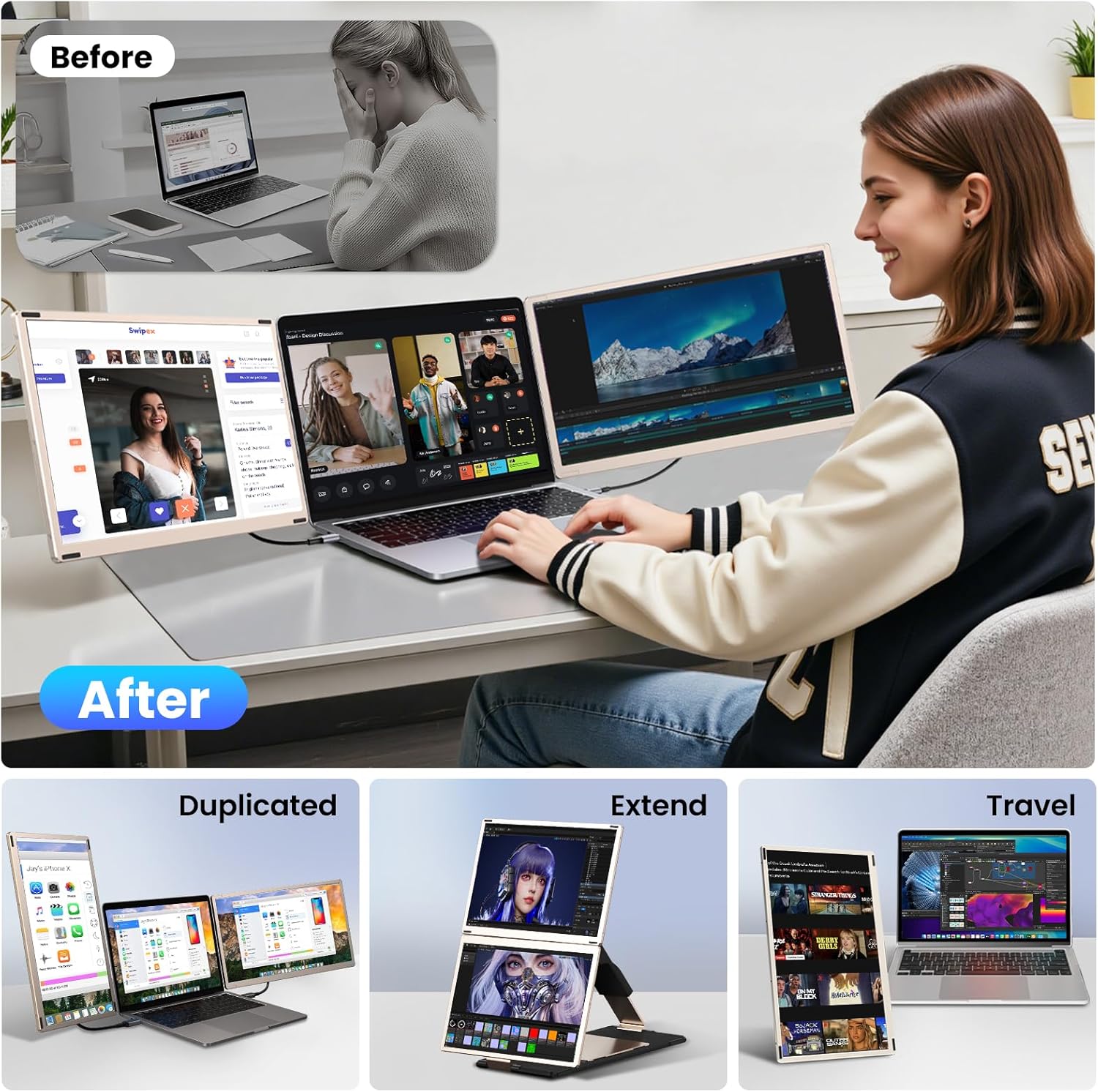
If you are a frequent traveler or businessman, all you need is a screen, just carry a screen with a stand to make your trip more convenient and lightweight.

【Wider Visual Experience 】This display has been upgraded to a 15.6” 1080 FHD IPS laptop monitor extender, offering a wider view, more vivid colors, and a more comfortable viewing experience. Additionally, the multi-function keys allow you to customize settings such as brightness, volume, contrast, and other parameters for each screen according to your preferences.
【2 Detachable Screens Design】15.6″ triple portable monitor laptop with 2 additional detachable screens, supports 90°, 235° and 360°rotation with the single stand. Easily folded, you can put it in the provided storage bag and take it wherever you want. Horizontal mode, portrait mode, mirror mode and other combinations to provide you a variety of viewing angles, enables you to open multiple windows at the same time. Working on different screens, video conferencing, watching movies, etc.
【Achieve 300% Increased Efficiency】This portable monitor for laptop supports both extended and mirrored modes, no need to constantly switch windows on a single laptop screen, enabling multitasking across multiple displays and boosting productivity by up to 300%. It’s ideal for video conferences, presentations, home office, or travel.
【1080P FHD IPS Panel and Plug & Play】The upgraded larger 15.6-inch size brings better visual effects, with 300 nits brightness, 80% NTSC color gamut, 1920×1080 resolution and 1000:1 contrast, and can independently adjust brightness, sound, contrast and other parameters.The external monitor for laptop portable comes with every cable needed(2* USB-C to USB-C cable, 1* HDMI to USB-C cable, 2* USB-C to USB-A cable ). You just need to connect the portable screen for laptop via USB-C cable or HDMI to USB-C cable and USB-A to USB-C cable directly without any additional driver download. Please Note: the USB-A to USB-C cable is just support power supply!
【Wide Compatibility】Our new laptop monitor extender supports a variety of devices and operating systems, Compatible with Windows, Mac (does not support M1/M2/M3 chip), Chrome, Android, Linux, Dex and Switch and other devices, please read the instructions carefully before use. If you have any questions, feel free to contact us and we will get back to you within 24 hours.
7 reviews for Laptop Screen Extender,Upgraded 15.6″ Portable Monitor,FHD 1080P Triple Laptop Screen Extender,Detachable Dual Monitor for 13”-17” Laptops,Plug & Play,Compatible with Mac/Wins/Chrome/Dex
Add a review

$36.99
Christopher M –
Best Technology Purchase Ever!
This has been my most favorite technology purchase by far. I am a big believer in you pay for what you get. This product right here was amazing for the cost. Very lightweight, easy to travel with, easy to set up, and more importantly, great quality.The picture quality is amazing, the functionality is very easy to set up and my productivity has doubled since having the three monitors. I have already recommended this exact device to two other colleagues who work remote, but also travel from time to time.I love the rotation feature, I will mention that there was an additional piece I needed to purchase in order to have enough ports. I found the adapter at Walmart for 100$, but the only reason I needed to purchase an additional piece is because the laptop I have has limited ports for all my paraphernalia.it comes with all the cables for connection, and gives you options between HDMI or USB-C. With the adapter, I was able to use the HDMI cables, which I believe to have better quality.I was hesitant at first to purchase the device, but ultimately extremely happy with the product. One thing that I will mention, is that purchased the device with the idea that it directly connects to the laptop, after receiving the device it’s on a stand that you can adjust the width, which ultimately performs much better than it connecting to your laptop and causing additional stress to the hardware.
mac.ruiz0986 –
Reliable and Flexible Monitors for Work on the Go
I’ve been using these laptop monitors since November, and so far they’ve been working flawlessly. Setup is easy—the variety of cables provided and stand options allows me to configure them for a variety of workflows. I typically connect both monitors to my laptop using the two USB-C ports, with the power cable passing through one monitor to charge my laptop so I don’t have to worry about draining my battery.I rely heavily on having ample screen space, even while traveling. These monitors strike a perfect balance between screen resolution and power consumption, providing the functionality I need without being overly demanding. They’re highly portable, and everything fits neatly into the included carrying case. While the dual-monitor stand is a bit heavier and bulkier, I love that I have the option to bring just one monitor with the kickstand for lighter travel. It’s a well-thought-out design that offers flexibility without compromising usability.The build quality feels solid, which is impressive for such portable monitors. Of course, they’re sensitive equipment, so you’ll want to handle them with care, but they seem appropriately durable for travel. I’ve used them regularly since purchasing and haven’t encountered any issues at all. The quality and functionality truly justify the price, and they’ve allowed me to maintain my full workflow while on the move—just like in my home office.One thing worth noting is that the dual stand doesn’t attach directly to the laptop screen. Initially, I wasn’t sure how I felt about that, but it turned out to be a smart design choice. Attaching the monitors to the laptop screen would likely put unnecessary pressure on the hinges or screen, even though the monitors themselves are lightweight. The freestanding design feels safer and prevents any risk of accidental damage.My only minor wish is that the package included a second kickstand, so I could leave the heavier dual stand at home more often. But overall, I’m extremely satisfied with these monitors. They’ve made working remotely and traveling so much easier without compromising my productivity.
Amazon Customer –
versatile and easy to transport
I am quite pleased with these! They have a travel case, stay together nicely when packed up and have a bunch of options for how to set them up. My only challenge is that I have a cooling base for my laptop, so having these as wingson either side doesn’t work a well as I would like for my personal setup. Fortunately the other configurations work great gor me needs and space limitations.Spendy, but happy with my purchase.
Iman Anderson –
Easy to setup. Great screens
I love the setup. I only have a hdmi port that supports video. These were compatible with my laptop which I loved. (HP). In order for both to work with my laptop, I need to get hdmi transmitters. That was my fault for not checking completely. I thought I knew. It was refreshing to know that they were compatible with my device. I’ll buy again if necessary. Screen looks great. Colors are sharp. They pack up nicely and sturdy. It was worth the purchase being I work remotely and can travel.
Micah Best –
One screen worked for a day and is now shorting out.
Second screen is blinking or shorting out and not working. Worked for a day and one screen stopped working. Returning!!!
Gwennie Tam –
Great addition, nice and sleek
This is great. I travel with it and at home I use as my 4th and 5th screen. Very nice quality. Power must be plugged it or it will drain battery pretty fast
Robert –
Power Guzzlers
I am modifying my review to 4 stars because of their customer service. Their customer service usually responds within 2 to 3 business days. Which is really good because most companies could care less and won’t respond. Their team was in constant contact with me trying to fix my issue, while it may not have been resolved, the effort they put in was above and beyond.Monitors are good, clear images and resolution is very good.I only gave this product 3 stars because I could get them to work. But it did take some figuring out.If you follow the instructions and use your computer as your power source. You should be able to use these with no problem. I could only use them for between 6 and 7 hours. then my battery would be at 19 percent.I used its USB ports to connect the extension to the monitors and i used an external splitter to get both monitors connected. Each monitor must have its own power source. But, now everything works.These monitors are plug and play, no extra software needed. But if you any issues, customer service will be there to help you.