

SideTrak Swivel 12.5″ Portable Monitor for Laptop, Patented Swivel Hinge, Triple Screen Laptop Setup | FHD Dual Screen w/Kickstand, USB-C & HDMI, Mac, PC, Chrome Compatible (Triple Monitor)
$84.99
Related Products




Product description


Accomplish Anything, From Anywhere
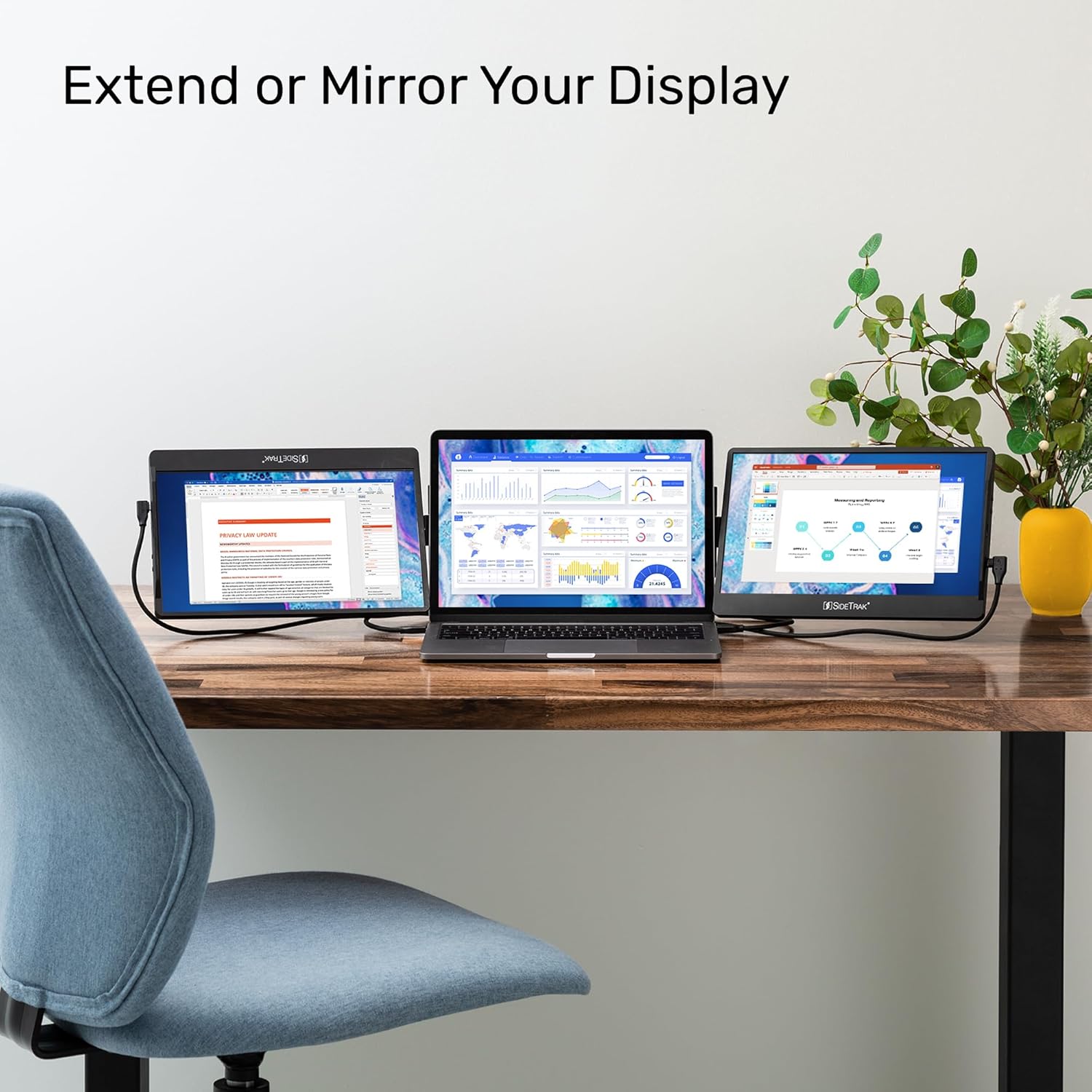
Enjoy a change of scenery without losing productivity. Swivel monitors stay attached to your laptop and do not require a table so you can work anywhere with three screens.

Customize Your Setup
You can use your Swivels as freestanding monitors and customize your setup to your preference. Set them up in either portrait mode or landscape mode.

Unleash Endless Productivity
Whether you are on a zoom call or working on an important project, three screens allow you to easily reference documents and take notes with more screen real estate.

Transform the Way You Collaborate
Effortlessly screen share with coworkers and clients with the only portable monitor designed to swivel 360°, rotate 270°, and autorotate – making working together a breeze.


SideTrak Swivel Triple Screen
Maximize your productivity with the patented SideTrak Swivel triple portable monitors! They are the perfect laptop companion whether you are working from home, in the office, or on-the-go. Easily connect, get started, and customize your setup with the SideTrak Swivel triple screen.
FAQ – Answers
When your monitor is placed on the left side of your laptop, the logo will show upside down. However, the screen displayed on your monitor will be right side up.
Swivel 12.5” and 14” triple screens cannot be nested on the back of the laptop.
The metal plates on your laptop can be removed. These metal plates have a strong hold to provide stability to your monitor when attached, so removing the metal plates might require a bit of strength and patience.
Compatibility Operating System: Windows, Chrome, Mac, Linux, PS4, Xbox, Switch, iPhone, & Android Ports Required: USB-C or USB-A and Mini HDMI for each monitor Download: Not Required Device Size: Any M2 MacBook Air is not compatible – it only supports one external display

Add to Cart
Add to Cart
Add to Cart
Customer Reviews
4.0 out of 5 stars 993
4.0 out of 5 stars 993
4.0 out of 5 stars 1,391
3.7 out of 5 stars 1,313
4.3 out of 5 stars 77
3.7 out of 5 stars 28
Price
$549.99$549.99
— no data
— no data
$79.99$79.99
— no data
$159.99$159.99
Attachable
✓
✓
✓
✓
no data
no data
Freestanding Mode
✓
✓
✓
no data
✓
no data
270° Screen Rotation
✓
✓
✓
✓
no data
no data
360° Screen Swivel
✓
✓
✓
no data
no data
no data
Adjustable Brightness
✓
✓
✓
no data
✓
no data
Screen Autorotation
✓
✓
✓
no data
no data
no data
Download Required
no data
no data
no data
✓
no data
no data
Compatible Laptop Size
Any laptop Any laptop Any laptop At Least 11.25″ x 8.5″ and cannot have a kickstand Any no data
Touchscreen
no data
no data
no data
no data
no data
no data
Display Size
12.5″ 12.5″ 14″ 12.5″ 15.6″ no data
Technical Specifications
Screen Size 12.5″ Panel Type IPS Display Type LCD Resolution 1920×1080 Brightness 300cd/m2 Response Time 30ms Refresh Rate 50Hz Aspect Ratio 16:9 Contrast Ratio 600:1 Power Consumption 4.5W Dimensions 12″ x 8″ x 0.37″ Weight 1.5lbs Patent Number 11,531,374
Triple Screen Laptop Setup for Maximum Productivity – Instantly triple your workspace with this innovative portable monitor. The SideTrak Swivel 12.5″ securely attaches to your laptop, providing the productivity of a triple screen setup while maintaining portability, perfect for multitasking whether you’re in the office, at home, or traveling.
Patented 360° Swivel Hinge for Flexible Viewing – The patented hinge design offers 360° swivel and 270° rotation, giving you the freedom to adjust the laptop screen extender to your preferred viewing angle. The hinge is perfect for collaboration and screen sharing, ensuring a comfortable and versatile setup.
Attachable with Sleek Magnetic Design – Securely attach this laptop monitor extender using a device-safe magnetic plate that preserves your laptop’s slim and sleek appearance. Designed for easy mobility, you can fold one monitor onto the back of your laptop and travel with the second separately, ensuring effortless portability.
Innovative Screen Extender for Seamless Multitasking – Use this laptop screen extender to expand your display for improved multitasking or mirror your screen for impressive presentations. With autorotation and a built-in kickstand, the monitors adapt to horizontal or vertical configurations for freestanding or laptop-attached setups.
Broad Compatibility with Easy Connectivity – Compatible with Mac, PC, and Chrome OS, this portable laptop monitor connects effortlessly via USB-C, USB-A, or HDMI. This portable laptop monitor offers a plug-and-play setup with no downloads required, ensuring seamless integration into any workspace. Supplemental power may be needed to power both monitors.
9 reviews for SideTrak Swivel 12.5″ Portable Monitor for Laptop, Patented Swivel Hinge, Triple Screen Laptop Setup | FHD Dual Screen w/Kickstand, USB-C & HDMI, Mac, PC, Chrome Compatible (Triple Monitor)
Add a review

$84.99
Amazonian –
Never leave for work without it
I think about how long I have traveled for work and not had a second screen and wonder how did I work off a single screen for so many years. I don’t leave home without this screen. This screen works great on my company issued Lenovo with the USB C cable. However, it does not work on my personal MSI without the power adapter and mini HDMI cable. Not a big deal. I really only need it for work.
Carolina Sierra –
On The Go Office
This portable screen is perfect for when on the go. It’s the perfect size and it’s not heavy on the computer. It’s easy to install and I travel with the monitor attached to my laptop. The quality and the color of the screen is perfect. With my job requiring to travel this works perfect when having to work from outside locations. It’s in the higher end of pricing but you really get what you pay for. I do not have any regrets with this purchase.
louie –
I wish I had this sooner
This is something I did not know I NEEDED in my life. Honestly, this is not a want it’s a NEED. My productivity has greatly increased with this portable monitor, and portable it is! It’s now a part of my daily setup. Quick run down.Pros: VERY portableEasy to setupAdjustable (can move to left or right side)EfficientCost effective (if you buy used. I got mine for $240 and it did not have any damage at all, everything included in package except mounting guide.Cons: A bit pricy for a portable monitor but you’re definitely paying for the technology and portability aspectIt’s a bit heavy and strains my laptop hinge, not sure of long term repercussions, however I’m sure it’ll be fineIf you have to plug in both cables, there’s wires everywhereDisplay isn’t as crystal clear as the laptops monitor, not horrible quality but definitely noticeably less than my laptops (however it’s a portable monitor so it’s okay)Screen isn’t as bright as I would have hoped for but it’s not badOVERALL: I love it and I couldn’t imagine NOT having a portable second monitor like this with my laptops now.I honestly wish I would have had this in my life sooner! 5/5. When setting up PLEASE make sure you have it on perfectly, like a prior review says you’ll have to tilt it a little bit to make sure it’s perfectly aligned.If you’re on the fence on the price point like I was, if there are any used ones buy it! Essentially the same as new and almost 30% cheaper or so. I have absolutely no regrets and am a happy customer.I look forward to see if this company will create a newer version in the future, as I am going to get it.
Allen W. –
DO NOT BUY THIS ITEM – I AM A PHYSICIAN
I AM A PHYSICIAN AND HAVE A BUSINESS DEGREE – SO I HOPE YOU LEARN FROM MY MISTAKES. SEE BELOW.DO NOT BUY FROM THIS COMPANY.DO NOT BUY THIS SPECIFIC ITEM.I bought this item twice. The first time the cable stopped working after about a month. I bought my own replacement cable hoping that would solve the issue but it did not. I returned this item and got a replacement one hoping things would be different. Sure enough, after several weeks, the replacement item stopped working as well. I tried to replace the cable again, one that I bought myself and one that was issued to me by the seller, but the item still would not work. I tried to get a replacement from the company directly. They were initially answering my emails when I requested a different cable, but completely ignored me when I tried to get technical help for the item once I realized none of the new cables worked. I talked to a computer engineering buddy of mine who said there is a design flaw in the charging port and that this would keep happening with any device I bought from this company. Of course when you try to return the item through Amazon, the warranty period is expired and they would not refund the price of the original item. Never buying from this company again. Otherwise, when it did work, it worked okay. I would probably price this item at $30-40, not more, for the quality and the perishability.
Revin –
Loved it, but returned it.
Overall, I work remote and thought it would help make the 3weeks away from my double-monitor desktop a little easier. Aside from using it at home to get familiar with it first, on the actual trip.. I ended up using it the first and second day, and not a day more.I really can, and still do, see the benefits of having this additional screen. The few times I did use it really made an interesting difference in working. However, the few times I did use it showed me that the difference it made was not substantial enough to keep… nor did it add THAT much convenience.I did love this look more than the others that take up the entire back of your laptop.Screen:Nice LED Screen, but was a yellowish hue darker than my ThinkPad. Not that big of a deal but there is an obvious distinction I could not let go of. Also, I didn’t have it open all the time, so the hassle of taking it on and off – let alone keeping up with it – was cumbersome. The magnet is strong, and I’m tinder-handed with certain electronics, so swiveling and moving it around was not an issue.Connection:There was always a bit of a lag when attempting to move a file or window over to the Sidetrak. As in, I had to drag/force it over to the external screen because it would not smoothly slide over. Sometimes it would glitch which was worrisome. I could not figure out how to make the text bigger on the Sikdetrak either. I work in law, so having to move in close every other minute just to read something seemed unnecessary. The cord is rather cheap too.Weight:I positioned mine to align with the top of the laptop. My ThinkPad isn’t that heavy (14in I believe, bigger than the 12.5 here), so if it wasn’t sitting up in an exact position (especially when on my lap or mount), then it would dramatically pull my screen backwards in a scary fashion. I feared that if it fell while I wasn’t around, then it would snap my laptop in-half. So I never left it alone. Also, I walk around with my laptop a lot, I couldn’t do that with this. The weight is so one sided that I almost dropped the entire setup a few times when first using it.Travel:I left it on my laptop, and it packed away into my backpack with no issues. Doesn’t take up much space at all.Cool overall, but just not functional for me. I definitely say try it for yourself buuut don’t wait too long to return it. If you’re not using it EVERYDAY, for even a portion of the day, I don’t think it’s worth it.
PacificSpirit –
I spent a lot of time in meeting rooms and was finding myself constrained by my MacBook Air M1’s screen. I read the reviews and the negative ones worried me because of the price. I hummed and hawed but finally decided to give it a try for myself and I’m glad I did. It attaches securely to the metal plate, and I have no concerns that it will fall off. It also stays in place, and so does the MacBook Air’s screen. Note I have some flip-out feet on the bottom of the laptop for a better viewing angle and I think this helps shift the center of gravity forward, helping the SideTrak balance better. The resolution is good, a tiny bit fuzzy but nothing that bothers me. The brightness is fantastic and I actually keep it quite low. The only negative is the cord is a bit unwieldy – to be honest, the whole thing is a bit clumsy to pack up and set up, but I don’t think that can really be avoided for an after-market accessory so I didn’t take away any stars. I just remove the monitor rather than spin it around and close it up – but I think that’s because it is so large/thick relative to the MacBook Air. I expect it will do better on a larger/heavier laptop. All that being said, I think it is a well-thought out and designed product and I hope it will last – I’ll update this review if it doesn’t!
curtis –
Works great! Only downside is the resolution isn’t the greatest but that’s not a big deal to me since I just needed a second screen when doing quotes and invoices.I have a MacBook 13inch and it was a plug and play…no setup required. Plugged it in and automatically had usage of the second screen4 stars because missing a better resolution other than that I would have done 5 star
Xeleenah –
Just got this today and I immediately tried to check if it is working. Yep, it does work with my Macbook air as per picture. I know it is pricy but I bought this because it says that this can stand on its own and not sticked to the laptop. It also can stand vertically and horizontally either way you preferred. Giving it a 5 star because I’m happy with the product. I will update once it has problems on how long did it take to have one too. But for now, I’m happy with it.
Sonja –
I bought this product 1 day ago and it is already malfunctioning. The screen glitches and then turns off. Doesn’t work, a complete waste of money!!!!!