

4K Capture Card for Streaming, Recording & Gaming – HDMI Video Capture Device with USB 3.0, 1080p 60fps, Zero Latency for PS5, Xbox, Switch, OBS, PC, Mac – Plug & Play, No Driver Needed
$19.99
Related Products


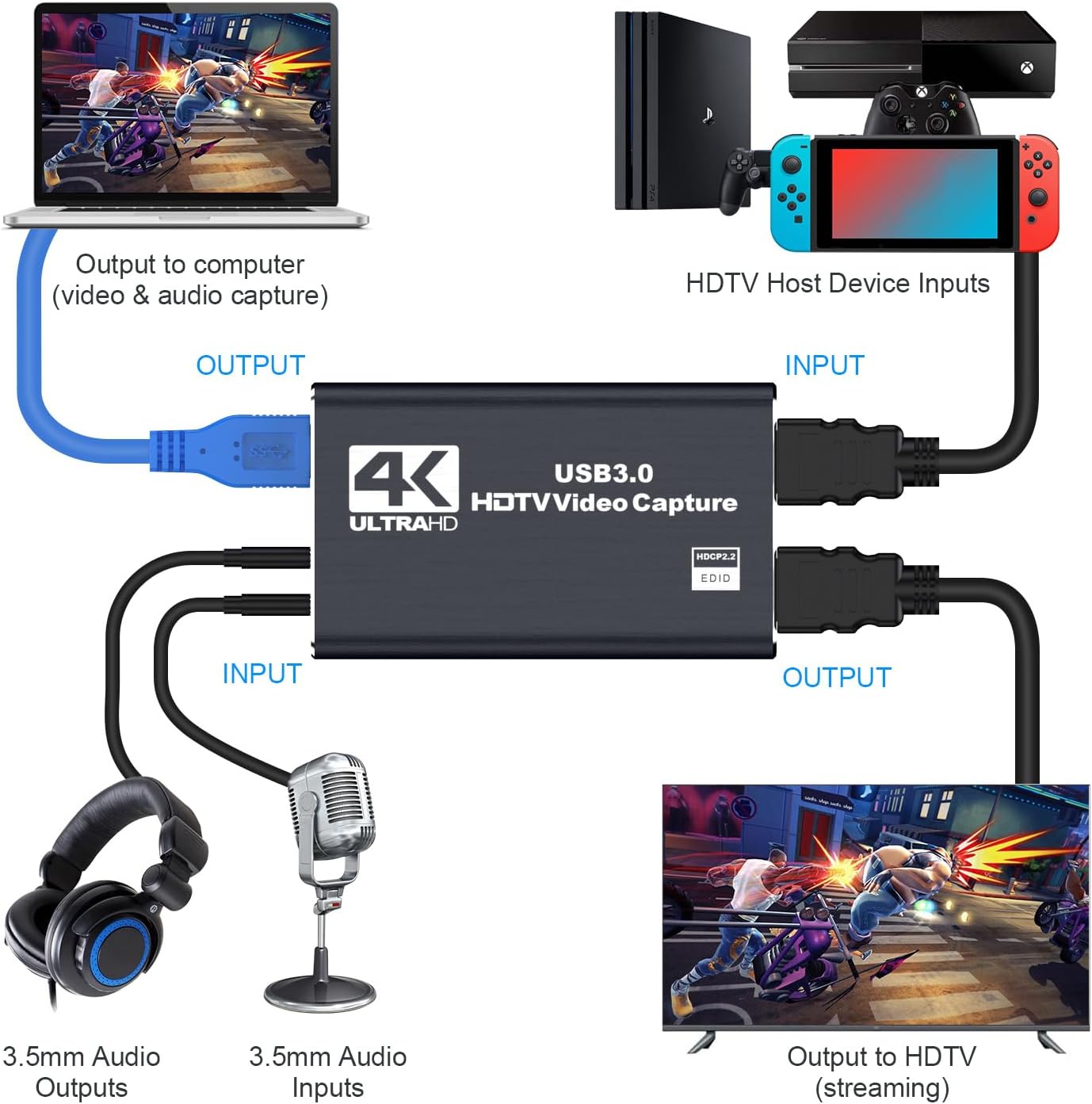


Product description


【Smart Design】The Dobestyou Game Capture Card features a sleek, premium design with an aluminum alloy shell and advanced processing chips. Supports 4K@60fps HDMI input, perfect for game streaming, live broadcasting, video recording, and more.
【Easy Audio Setup】Connect headphones to the 3.5mm audio output or plug in a microphone directly to the capture device for crystal-clear voice transmission. Easily add live commentary during recordings.
【Stunning, Lag-Free Performance】Delivers 4K@60fps resolution and 1080p@60fps video signals through USB 3.0 interface for ultra-smooth, stutter-free visuals. Compatible with cameras, PS4, OBS, and other devices.
【Universal Compatibility】Works seamlessly with both Windows and Mac systems. High-speed USB 3.0 technology combined with ultra-low latency ensures flawless streaming to YouTube, Facebook, PotPlayer, VLC, Twitter, OBS and other platforms.
【What’s Included & Support】Package includes: 1x HDMI capture card, 1x USB 3.0 cable , 1x 1m HDMI cable, and 1x user manual. Not satisfied? Enjoy easy platform returns or contact us directly – we guarantee a satisfactory solution.
13 reviews for 4K Capture Card for Streaming, Recording & Gaming – HDMI Video Capture Device with USB 3.0, 1080p 60fps, Zero Latency for PS5, Xbox, Switch, OBS, PC, Mac – Plug & Play, No Driver Needed
Add a review

$19.99
Tiffany medina –
Great quality for affordable price!!
Great capture card for beginner streamers. Easy to hook up and works great with PC. Very affordable. I didn’t get very much lag between gameplay and stream. Some is to be expected between connection and internet speeds. Compatible with PS5 and Nintendo Switch.
Juan Miguel –
8/10, está bien
Es una buena tarjeta capturadora, puedo usar mi PS5 con la laptop
Zain Ackroyd –
AMAZING CAPTURE CARD
WISH I COULD GIVE IT 1MILLION STARS!! It’s amazing and affordable, easy to setup, sound is amazing, everything is amazing I could write a 10 page essay!!
Jaden Edwards –
Spend a little more money for something better.
This product Is not the best capture card you can get It has allot of audio glitches and other problems I did all I can do as far as adjusting my settings on my PC and doing all the troubleshooting I can It simply cuts the audio out around 15 minutes to my stream I have high doubts that the issues are my USB ports but It Is a possibility.
Marc Coro –
Excellent
Excellent product, all cables work and it is compatible with my computer.
Aitana –
Amazing
Perfect. I have been using this for a while and it is very user friendly, and easy to understand. 10/10 would recommend.
Geospart –
Capture HDMI Video and Audio in OBS on Linux Mint
I have only had this for a few hours, but so far so good… tested using an old Chromecast [my phone as a source] ,Linux Mint [On an HP Zbook with an I7, 32GB-Ram] and OBS. I only tested 1920×1080 as the chrome-cast is not 4K. Made some OK test videos. I will give it a few months and I may update this with additional information.
Derrick Gunarh –
Capture card review
So far so good
Glen –
I bought this for my son and haven’t gotten any complaints
Rafael Santos Perez –
Excellent product, easy-to-use, I’m using it with a hdmi splitter with 3 different source, a ps3, ps4 and another computer and is working well, with the ps3 and ps4 I don’t notice the lag, with the computer there is a little lag when I use the mouse, but when I’m playing something this is not notorious, I’m a casual player, maybe an expert could notice it, but for my needs is perfect.
Joao –
Top demais
Sam –
I get screen tearing with default settings in OBS. Unfortunately, this is unusable.
A C –
This worked perfectly as expected and I’ve had it running great for almost a year now. It was the perfect unit and price to hep connect my firestick to my PC.