

CZUR ET24 Pro Professional Book Scanner, 24MP Document Camera, 3rd Gen Auto-Flatten & Deskew Tech, A3 Document Scanner, 180+ Languages OCR, Support HDMI, for Windows/MacOS/Linux
$93.99
Related Products




From the brand



Professional Book Scanner
Elegant Book Scanner
Portable Document Scanner
Mobile Document Camera
Flattening Technology Upgraded: ET24 Pro computer scanner applies CZUR’s latest technology that can flatten the 3D curved surface after pixel transformation to complete flattening of the book page
Camera Upgraded: 24MP HD camera, 320 DPI, 5696*4272 Resolution. Note: Very glare papers are NOT recommended
System Compatibility Upgraded: Document scanner for desktop/laptop, support macOS 10.13 or later AND Windows XP/7/8/10/11, also support Linux system(Only for Kubuntu 22.04/Linux mint 21.2/MX-3.1/Ubuntu 16.04/Ubuntu 18.04.2/Ubuntu 20.04/Ubuntu 22.04/TUXEDO-OS-2)
CPU and Graphic Algorithm Library Upgraded: We have upgraded ET24’s CPU and CZUR’s Algorithm Library, ensures ET24’s stable performance; faster Graphic Processing Procedure; High OCR Accuracy
HDMI Supported: As a document camera, ET24 Pro support HDMI connection ensures faster & stable data transform
Optical Character Recognition: Powered by ABBYY’s OCR technology, JPG files can be converted into editable PDF; Excel; WORD; etc. 180+ languages supported. Notice: TIFF files need to be converted from scanned JPG images
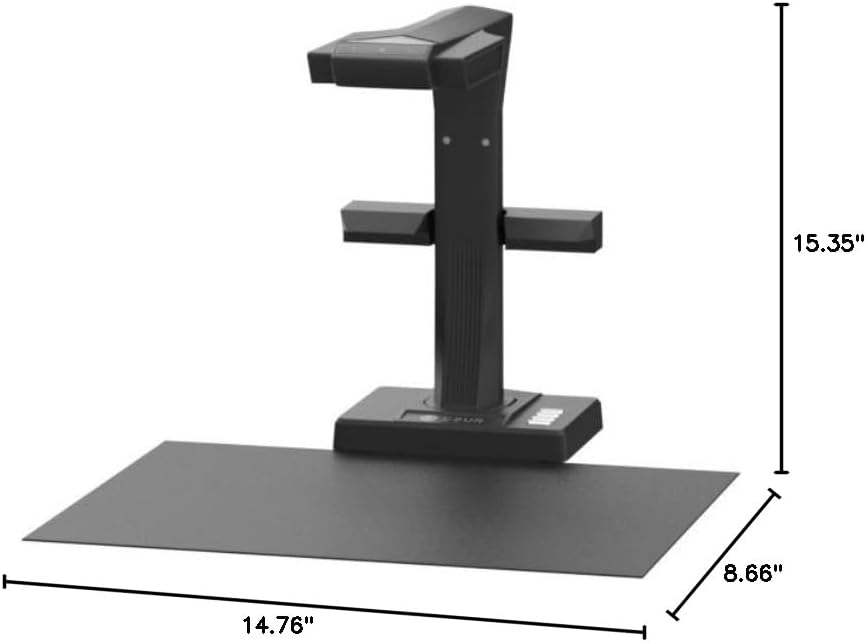
A3/A4 Large Format Scanner: The ET24 Pro can scan any documents up to A3 size (16.5” x 11.7”) that needs to be digitized. Easily digitize all kinds of materials, such as books; documents; receipts; business cards; paintings; magazines, etc
Side Supplement Light: ET24 Pro has 2 Side Lights and a Head Light, illuminating from 3 angles, making less reflection on glossy papers (try head light OFF, only use side light for glossy paper)
Preview Screen: Real-time preview of your scanning process via the 2.0-inch display on the head, making sure you know what you are doing anytime
8 reviews for CZUR ET24 Pro Professional Book Scanner, 24MP Document Camera, 3rd Gen Auto-Flatten & Deskew Tech, A3 Document Scanner, 180+ Languages OCR, Support HDMI, for Windows/MacOS/Linux
Add a review

$93.99
Sean K –
So far, so GREAT!
I have been an avid reader and lifelong “hoarder” of information that I’ve found to be useful. These resources can come from anywhere (books, letters, magazines, greeting cards, receipts) so you can imagine that instead of storing them in boxes or on a bookshelf where I have to be there to read it, I’ve enjoyed digitizing them to store them on the computer, my phone or float them into the cloud for easy access or sharing.Along the way, different scanners have come along to make this possible for people like me. I own a Fujitsu Scansnap S1500 for documents, receipts and individual pieces of paper that I can feed into it, an Epson – Perfection V39 II for photos, documents and previously for full books and magazines and now the Czur ET24 Pro which has surprised me with its approach of scanning books and such.The setup was a breeze and the results have been amazing. Not only does the scanner have great image quality, it saves your scans as jpegs and also allows you to convert them into separate or grouped PDFs, MS Word documents or other formats. Being it’s basically a camera with lots of open space below it, you could also “scan” items other than papers. You could photograph a kids toy before disposing it or giving it away. Use your imagination and share ideas here for others.As I fool around with it more, I’ll revise my review but this is a genuinely useful tool for people looking to organize and digitize information they find important in their lives.I realize my review makes it appear that I work for the company. I don’t! Just really happy to have such a timesaver in my life with a company that seems like they’re into their customers and making well built products.
B. Bernous –
Excellent Book Scanner – Perfect for Archival and Presentations
I have been using the CZUR ET24 Pro and I’m thoroughly impressed. It’s fast, reliable, and very handy for scanning old and valuable books without causing any damage. The image quality is excellent, and the scanning process is smooth and efficient.One of my favorite features is the HDMI output, which allows me to connect it directly for live demonstrations or to create high-quality presentations for social media. The software is also very powerful, especially for post-processing and batch processing, making file management and editing effortless.Overall, this is a top-tier scanner that combines speed, precision, and versatility. Highly recommended for anyone serious about preserving books, documents, or creating digital archives.
Amazon Customer –
A Great Tool for Researchers Using Old Books and Other Material
I bought the CZUR ET24 as I had watched a few videos and read a few reviews of it, after I had narrowed my search to a CZUR product. It is drop dead simple to set up and use.I am writing a history of my small hometown and much of the material I have from that era, for direct use and for time period reference, is in the form of old and mostly out of print books and images I got from old newspapers – from fifty plus year old microfilm.I have a small book I was using, about 150 pages. I set up the ET24, downloaded the software in a few minutes and scanned it, my first attempt, in 12 minutes, using the auto-scan feature. You can turn a page and when the software detects that movement has stopped for a couple of seconds, it will scan. This means if you have to adjust the book, or fumble with turning a page, the scanner won’t fire and get an image of your hand.I did some editing and adjusting of images, which took another 13 minutes. This is while learning to use the scanner. I was able to save it as a searchable PDF and I could upload that to my Kindle reader. I also uploaded it to my Voice Dream Reader, and I had an over 100-year-old, out of print audio book, as well. Just being able to highlight as I go on the Kindle is a tremendous time saver, not to mention the fact I can use the Kindle’s search feature. I can also share this material with others or draw from it for on-line forum posts.I had previously gotten images of newspapers, from 1897 to 1931, that I saved as jpg images from microfilm at a public library. I have them in folders by year. I was able to upload these folders, combine all images into one searchable pdf and now I can search the newspapers for any words or phrases. This just involves the software, and not the scanner- even if I did not have the scanner this software is well worth the purchase price, for me. I can now search, literally thousands and thousands of images and I do not have to read and index each interesting thing for future reference. It was literally a few clicks to get this done. Those few clicks saved me days of effort in finding what I wanted.With the scanner I can get images of things such as old scrapbooks, and photographs. I can also get images of 3D objects- in my case some old photo print blocks from a long-ago newspaper from the early 1900’s. I can save these scanned images as Word Docs and then copy and paste them into the text of the book I am writing.I can also easily take this with me to sites where material is stored and do my scanning there. Previously I was capturing images with my phone, then downloading and spending a lot of time putting them into files and tagging them with the names I could reference in a search. I can now capture the images, tag them all at the same time e.g. “1927 Scrap Book-Mary Smith” and the software will number them in the order in which they are scanned. I can save all images as singles, and/or save them as Word Docs/pdfs- or both.I do woodworking and I do not buy the cheapest tool. I always say, “If you buy a cheap tool it will work just well enough to tick you off and you’ll wish you’d bought the better one.” The ET24 with the adjustable overhead lights and the lights on the post of the scanner make it possible to get good images from e.g., glossy objects or 3d objects, where you’d want light on the sides as well directly overhead.If you find yourself ruminating over if you want to buy the $600 one, over the $300, then you, like me, probably really want and need the $600 one.
Alex Harcourt –
We purchased this scanner to scan documents in our accounts office, as we wanted something that would scan quickly compared to our Epson printer/scanner. This book scanner scans very quickly and documents are a good quality.It does take some working out exactly how to use the scanner and the videos provided are not that useful in relation to basic set up and operation.You need to make sure that the mat is right up to the scanner or you end up with a scan of the surrounding area and not just the document that you are trying to scan.You can scan using the button on a wire connected to the scanner, or you can use the software on your computer to trigger the scanning.I would recommend this scanner as an easy to use stand alone scanner that takes high quality images of your documents, which are easy to convert to PDF documents and save to your computer.It also comes extremely well packaged and looks very high quality before you have even started to unpack it all!
Wasim –
Its not translating Arabic language
B. Bose –
The product is excellent. The packaging by CZUR is top class. The assembly is quite easy. The Scanner is great. The software works properly as well. It is a game changer when one needs to scan thick hardcovers and create OCR(multiple languages support) enabled PDFs. I have scanned text heavy hardcovers containing 3000 pages… The camera captures every minute detail of each page perfectly. The OCR capability of the PC/Mac CZUR SCANNER APP takes care of each and every word. Creation of a searchable PDF bearing 3000 pages is no joke. There are many thick and dense hardcovers that don’t have digital prints. CZUR ET24 PRO is a Godsend in such scenarios. The camera is pretty fast when it comes to processing the captured images of the pages… One could scan hundreds of pages in no time effortlessly at any instant. The user has to position the book properly first on the black mat and then start capturing the images by pressing the foot pedal.To get started.. One just needs to attach the side lights, foot pedal, PC/Mac connector cable, power adapter to the apt ports on the main camera stand. Then the user has to postion the stand appropriately on the black mat for taking the pictures accurately. Once the user turns on the camera, the software recognises the device. But prior to it, one needs to connect the Scanner to the PC/Mac via the connector cable and enter the serial key(printed at the bottom of the main camera stand) on the CZUR Scanner app for product registry and gaining access to all the app controls. The live camera view can be directly accessed from the CZUR Scanner app. The Scanner comes with all the accessories (side lights, black mat, foot pedal, connector etc).Kudos to the Amazon seller, Scanners India, for doing a great job in delivering the product. I highly recommend the seller. In fact, I would recommend every prospective buyer to buy from Scanners India by its fair pricing of the product. It cost me around ₹74k.
Jason Tremblay –
I am absolutely blown away by the CZUR ET24 Book Scanner! As an avid reader and researcher, I’ve always struggled with finding an efficient way to digitize my books and documents without damaging them. This scanner has completely revolutionized my workflow.The setup was a breeze – it took only a few minutes to get everything up and running. The software interface is intuitive and user-friendly, making it easy to adjust settings and capture high-quality scans. The built-in LED lights ensure that every page is scanned evenly and clearly, even for older and fragile books.One of the standout features for me is the OCR (optical character recognition) capability. This scanner accurately converts scanned text into editable and searchable content. It has saved me countless hours of manual typing when I need to quote or reference specific passages from my scanned materials.The scanning speed is impressive, and the auto-flatten and finger removal features work like magic. I no longer have to worry about distorted pages or unwanted artifacts in my scans. Plus, the CZUR ET24’s ability to scan in color adds another layer of versatility to its capabilities.Not only is this scanner perfect for personal use, but it’s also a game-changer for researchers and academics. The ability to easily create digital archives of rare books and manuscripts is invaluable. The CZUR ET24’s design is sleek and doesn’t take up much space on my desk, which is a big plus for my cluttered workspace.In summary, if you’re looking for a high-quality book scanner that delivers on both performance and functionality, the CZUR ET24 is the answer. It has exceeded my expectations in every way and has become an indispensable tool in my reading and research endeavors. I can’t recommend it enough – a true 5-star product!
Cliente de Amazon –
Excelente! ¡Muy fácil de instalar y operar! . El programa es muy intuitivo y la calidad de las imágenes es excelente. Aún estamos aprendiendo cómo se usan todas sus funciones, pero hasta ahora no es nada complicado.Muy recomendable