

Uniden Bearcat BC125AT Handheld Scanner, 500-Alpha-Tagged Channels, Close Call Technology, PC Programable, Aviation, Marine, Railroad, NASCAR, Racing, and Non-Digital Police/Fire/Public Safety.
$16.99
Related Products


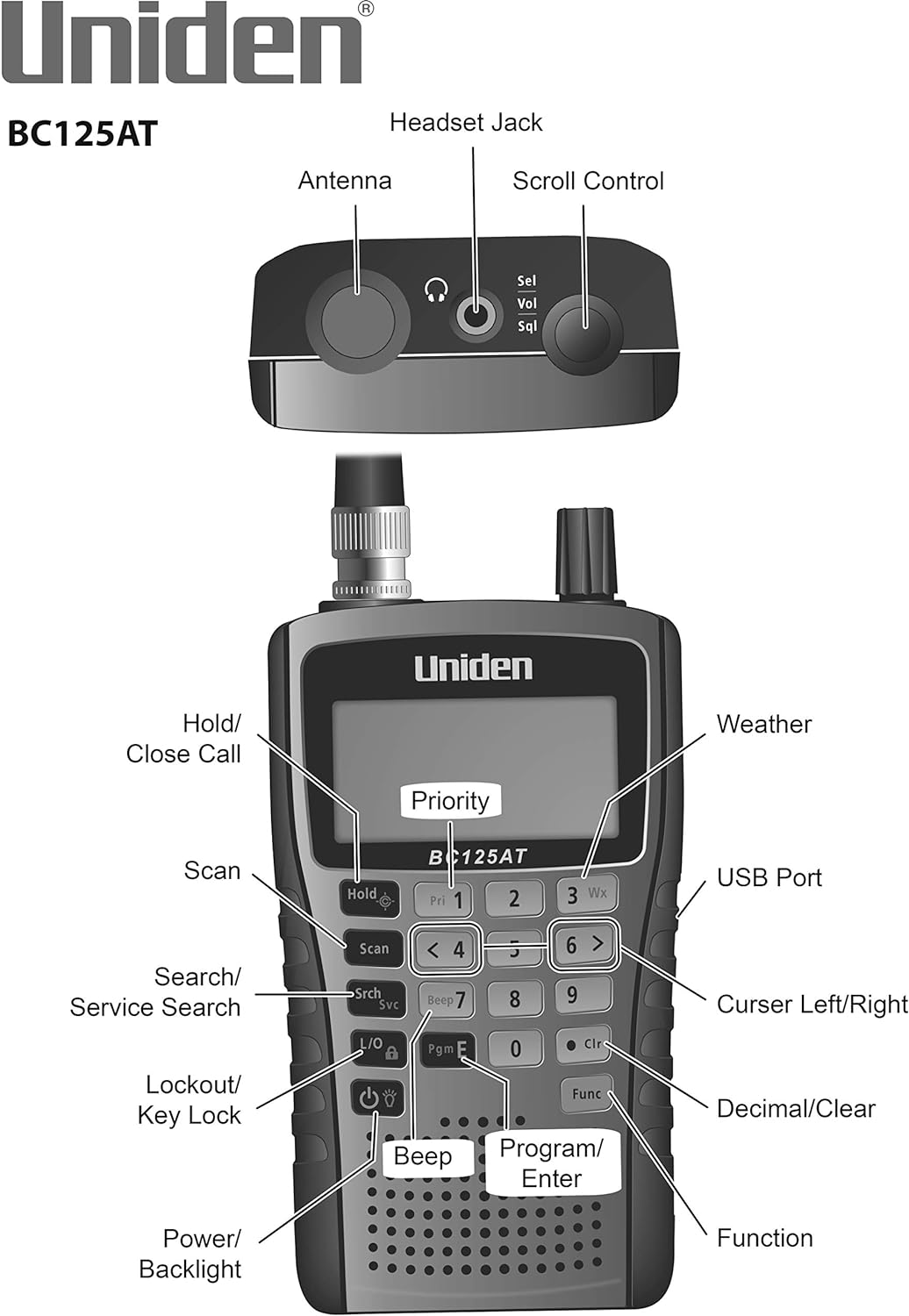


“The Bearcat BC125AT Handheld Scanner has a feature called Close Call Technology. The Close Call RF Capture instantly tunes to signals from nearby transmitters and the Close Call Do Not Disturb Mode prevents close call checks during a transmission. This radio is compact and features Weather Alert technology and is capable of attaching to civilian and military air bands.Receives conventional channels on the following frequencies: (25-54 MHz) (108-174 MHz) (225-380 MHz) (400-512 MHz) “. Pre-Sets for Popular Channels
ANALOG HAND-HELD SCANNER (Please note: model BC125AT is NOT digital, and is not suitable for trunking or digital radio system monitoring, (e.g. Project 25, DMR, NXDN). Some Police/Fire/Emergency/Public Safety Agencies in larger cities are switching over to DIGITAL Trunking systems. If you live in an area where Digital radio systems are used, you need to upgrade to a Uniden Digital model (“D” stands for Digital), such as models SDS100, SDS200, BCD436HP, BCD536HP, BCD996P2, BCD325P2, or HomePatrol-2.
LISTEN TO OVER 40,000 FREQUENCIES, you can listen to both civilian and military bands, including Non-Digital Police, Ambulance, Fire, Weather, Marine, Aircraft, Railroad, Civil Air, Amateur radio services, and Racing events.
SEARCH MORE EFFICIENTLY with 500 Alpha-Tagged Channels finding the channel you want to listen to is easy, with 500 channels divided into 10 storage banks. Organize your channels by department, location, area of interest, or any other way you prefer. Alpha Tagging lets you assign names to your channels, so you can keep track of who you are listening to.
LIGHTWIEGHT PORTABLE DESIGN, take this Bearcat handheld radio scanner with you on the road, or on outings. It packs plenty of features, the orange backlight display is easy to read, even in low light conditions.
GET STARTED LISTENING RIGHT AWAY with convenient Pre-sets for the most popular searches. Frequencies are preset in ten separate Non -Digital Police/Fire/Emergency, Ham, Marine, Railroad, Civil Air, Military Air, CB Radio, FRS/GMRS/MURS, and Racing search bands. This makes it easy to find channels that interest you.
NOTE: The product does not have 2-way communication, is only a scanner for receiving Non-Digital radio transmissions
How can we help? Uniden Customer Support web site is designed to conveniently walk you through product setup and troubleshooting, Contact customer support phone: 1-800-297-1023.
10 reviews for Uniden Bearcat BC125AT Handheld Scanner, 500-Alpha-Tagged Channels, Close Call Technology, PC Programable, Aviation, Marine, Railroad, NASCAR, Racing, and Non-Digital Police/Fire/Public Safety.
Add a review

$16.99
Scott –
Good scanner so long as you know what you want out of it
If you are looking for a scanner and understand that this is not meant for the general police and fire/emergency bands, it will fit that niche nicely. Most of the above services are not only in a digital format (which you could get a more advanced scanner for), but are also increasingly encrypted (which you can do nothing about). However, there are some occasional entities in the above that you may still find on analog.I was looking primarily for an aviation band scanner, plus amateur radio, CB, Marine, and GMRS scanning, and this fits very well. For aviation and amateur radio, it is best to find out which frequencies are in use in your area and set up custom memory banks for them, especially in aviation, since the preset scan bands are quite wide and you may miss local traffic.Before I got the scanner, I watched several YouTube tutorials, then downloaded the manual as a PDF. After reviewing those, you can avoid confusion about how to use it, especially the “All Channels Locked Out” or “Scan Mode All Locked” display readouts that throw many new users for a loop and lead them to think the radio is faulty.
J Ken Kuzenski –
Simple scanner with good performance and a bargain price
This inexpensive (non-trunking non-digital) scanner was a very pleasant surprise to me. I’ve got a big fancy digital trunking scanner, but using it involves a certain amount of fuss, and a lot of settings and controls that need adjusting. That has become too much bother for me; I just like hearing the local helicopters (medical, news, military), and the occasional train passing nearby.This Bearcat BC125 appeared online to be a popular choice for a simple scanner. After using mine for a few days, I see why. The BC125 is easy to use, and I’m also surprised by the performance–the Bearcat receives signals that aren’t audible on my expensive scanner, using the same antenna–the local airport’s tower, for instance. The two rechargable AA cells (included) run the scanner for 5-6 hours for me. An external antenna does not seem to overload the front end of the Bearcat. Audio is about average considering the small speaker.About the only complaint I would have is that the programming software Uniden/Bearcat offers as a free download is Windows only. I use linux almost exclusively, but I keep one laptop that can boot win10 when needed, so I have to do that for the radio programming. A native linux solution would be a nice feature. (No, I haven’t tried running the Uniden software under “WINE” but I’ll try that one day, I suppose–it isn’t a very big problem.)So: excellent performance from the BC125, it is indeed simple to use after one browse through the manual, it’s physically small enough to be easily portable when you want, and it cost about 20% of what my big fancy scanner cost me a few years ago. The BC125AT has been a pleasant surprise for me, as I said: I have absolutely no significant complaints about any aspect of it. Solid performance at a bargain price!
James Barrek –
Battery Life Sucks.
The Radio seems decent.I mainly only got it for Aircraft Recieve seems to work great 😊.I only have 1 problem with it,the battery life sucks. After 16 hours chargeing the batteries that came with it only last about a hour 😔.Overall I like the Radio,I’d say buy it if ya dont mind the battery life.Only gave it 4 stars cause of the battery life.
Jeff Knorek –
I would rate this 5 stars except for one very serious problem… When JIT debugging is enabled, any unhandled exception will be sent to the JIT debugger registered on the computer rather than be handled by this dialog box.” My expensive radio scanner is currently useless to me. There is no customer support available.
My Uniden BC125AT now reads “SCAN MODE ALL LOCKED!” when I turn it on after just one day of pretty decent reception of my local railroads. When pressing the Hold button twice, it then reads “ALL CHANNELS LOCKED OUT!”. The owners manual makes no reference to this particular set of problems. I have erased all programmed channels hoping that this would clear it up but it did not fix it. I have a number of frequencies ready to load into it from my PC, but when I attempt to use the “write to scanner” function I get an error, which I presume is related to this problem. The error reads as follows: “See the end of this message for details on invoking just-in-time (JIT) debugging instead of this dialog box. ************** Exception Text ************** System.Configuration.ConfigurationErrorsException: Configuration system failed to initialize —> System.Configuration.ConfigurationErrorsException: Unrecognized configuration section system.serviceModel. (c:WINDOWSMicrosoft.NETFrameworkv2.0.50727Configmachine.config line 134) at System.Configuration.ConfigurationSchemaErrors.ThrowIfErrors(Boolean ignoreLocal) at System.Configuration.BaseConfigurationRecord.ThrowIfParseErrors(ConfigurationSchemaErrors schemaErrors) at System.Configuration.BaseConfigurationRecord.ThrowIfInitErrors() at System.Configuration.ClientConfigurationSystem.EnsureInit(String configKey) — End of inner exception stack trace — at System.Configuration.ConfigurationManager.PrepareConfigSystem() at System.Configuration.ConfigurationManager.RefreshSection(String sectionName) at System.Configuration.ClientSettingsStore.ReadSettings(String sectionName, Boolean isUserScoped) at System.Configuration.LocalFileSettingsProvider.GetPropertyValues(SettingsContext context, SettingsPropertyCollection properties) at System.Configuration.SettingsBase.GetPropertiesFromProvider(SettingsProvider provider) at System.Configuration.SettingsBase.GetPropertyValueByName(String propertyName) at System.Configuration.SettingsBase.get_Item(String propertyName) at System.Configuration.ApplicationSettingsBase.GetPropertyValue(String propertyName) at System.Configuration.ApplicationSettingsBase.get_Item(String propertyName) at BC125AT_SS.Properties.Settings.get_ComPort() at BC125AT_SS.Main.writeToScannerToolStripMenuItem_Click(Object sender, EventArgs e) at System.Windows.Forms.ToolStripItem.RaiseEvent(Object key, EventArgs e) at System.Windows.Forms.ToolStripButton.OnClick(EventArgs e) at System.Windows.Forms.ToolStripItem.HandleClick(EventArgs e) at System.Windows.Forms.ToolStripItem.HandleMouseUp(MouseEventArgs e) at System.Windows.Forms.ToolStripItem.FireEventInteractive(EventArgs e, ToolStripItemEventType met) at System.Windows.Forms.ToolStripItem.FireEvent(EventArgs e, ToolStripItemEventType met) at System.Windows.Forms.ToolStrip.OnMouseUp(MouseEventArgs mea) at System.Windows.Forms.Control.WmMouseUp(Message& m, MouseButtons button, Int32 clicks) at System.Windows.Forms.Control.WndProc(Message& m) at System.Windows.Forms.ScrollableControl.WndProc(Message& m) at System.Windows.Forms.ToolStrip.WndProc(Message& m) at System.Windows.Forms.Control.ControlNativeWindow.OnMessage(Message& m) at System.Windows.Forms.Control.ControlNativeWindow.WndProc(Message& m) at System.Windows.Forms.NativeWindow.Callback(IntPtr hWnd, Int32 msg, IntPtr wparam, IntPtr lparam) ************** Loaded Assemblies ************** mscorlib Assembly Version: 2.0.0.0 Win32 Version: 2.0.50727.3649 (GDR.050727-3600) CodeBase: file:///c:/WINDOWS/Microsoft.NET/Framework/v2.0.50727/mscorlib.dll —————————————- BC125AT_SS Assembly Version: 1.0.0.0 Win32 Version: 1.1.0.0 CodeBase: file:///C:/Program%20Files/Uniden/BC125AT_SS/BC125AT_SS.exe —————————————- System.Windows.Forms Assembly Version: 2.0.0.0 Win32 Version: 2.0.50727.3645 (GDR.050727-3600) CodeBase: file:///C:/WINDOWS/assembly/GAC_MSIL/System.Windows.Forms/2.0.0.0__b77a5c561934e089/System.Windows.Forms.dll —————————————- System Assembly Version: 2.0.0.0 Win32 Version: 2.0.50727.3644 (GDR.050727-3600) CodeBase: file:///C:/WINDOWS/assembly/GAC_MSIL/System/2.0.0.0__b77a5c561934e089/System.dll —————————————- System.Drawing Assembly Version: 2.0.0.0 Win32 Version: 2.0.50727.3644 (GDR.050727-3600) CodeBase: file:///C:/WINDOWS/assembly/GAC_MSIL/System.Drawing/2.0.0.0__b03f5f7f11d50a3a/System.Drawing.dll —————————————- System.Configuration Assembly Version: 2.0.0.0 Win32 Version: 2.0.50727.3654 (GDR.050727-3600) CodeBase: file:///C:/WINDOWS/assembly/GAC_MSIL/System.Configuration/2.0.0.0__b03f5f7f11d50a3a/System.Configuration.dll —————————————- System.Xml Assembly Version: 2.0.0.0 Win32 Version: 2.0.50727.3654 (GDR.050727-3600) CodeBase: file:///C:/WINDOWS/assembly/GAC_MSIL/System.Xml/2.0.0.0__b77a5c561934e089/System.Xml.dll —————————————- ************** JIT Debugging ************** To enable just-in-time (JIT) debugging, the .config file for this application or computer (machine.config) must have the jitDebugging value set in the system.windows.forms section. The application must also be compiled with debugging enabled. For example:
Pig –
Works good for the price
Works good, took a few minutes to program, got it for local transmission only.
Jorge tirado chávez –
Pro:- Costo- Incluye baterías recargables AA- Diseño- PesoContra:- No tiene manual en español- la versión de software es del año 2012 (pero es funcional)- Para recargar las baterías es, a través, de equipo- Muchos botones multifunciones (pero es para ahorrar espacio)Conclusión: si lo recomiendo, pero deberán de ver muchos videos de su manejo o pasar algún tiempo traduciendo el manual
pedro bocchio barbosa –
vendedor ótimo, produto excelente…
Amazon Customer –
This handheld scanner is ideal for listening in on all frequencies (railway, CB, EMF, Marine etc). It’s relatively easy to add in your own frequencies and interest(s) using the scanner, however, easier and faster still with the free software that you can download from Uniden to programme the scanner using your computer then saving the files onto the scanner and in files on your computer for updates, and changes. Using the free software makes it easier to add/remove frequencies, text, preset lockouts, add banks and so on. Text tags for better identification with the frequencies is a plus (tedious if use the scanner to add this feature though). Range is quite good with the antennae that comes with the unit. The Close Call and Search features are useful especially for new frequencies not yet listed in books or at radioreference. It uses two rechargeable batteries (probably the better way) and you can recharge them while using your computer or better still to get one of those plug adapters from Apple and just plug into a wall outlet. Overall, with all the scanners I have had in the past this one is by the best in ease of use and programming, and clear audio. Well worth the purchase.
雷 –
日本語説明書が無いですが日本製の似たような品物を使った事が有れば弄ってれば割りと使い方は判ります(YouTube等の動画もありますし) 米国から出荷だったので時間は掛かりますが配達期限までには届くので問題無しでした梱包は海外からにしては簡素かな
René Chávez –
Me gusta la funcionalidad del scanner, cumple su función y es genial programarlo en la computadora al meterle las frecuencias, es muy rápido en el scan, combinado con una antena más grande es excelente para escuchar frecuencias en VHF y UHF