

ErGear Dual Monitor Stand up to 32 inches Screen, Load-Bearing Max 22 lbs Each Arm, Adjustable Dual Monitor Mount, Sturdy Steel vesa Monitor Mount with Stable VESA 75×75 100x100mm
$5.99
Related Products




From the brand


New Release
Ergear Standing Desk
ErGear Dual Monitor Mount
Ergear Single Monitor Mount
Ergear Multi Monitor Mount

Computer Compatibility – To ensure compatibility of the dual monitor stand, each of your monitors must meet three conditions: Firstly, computer screen size range: 17 to 32 inches. Secondly, screen weight range: 4.4 to 22lbs. Thirdly, there must be VESA mounting holes on the back of the monitor screen that are spaced 75×75 mm or 100×100 mm apart. Please make sure that your monitor meets all of the above conditions before purchasing.
Maximum Flexibility – The monitor stand features +/-90° left and right swivel for multi-screen co-driving, +90° to -35° up and down tilt for your office comfort, and 360° swivel for landscape and portrait modes.
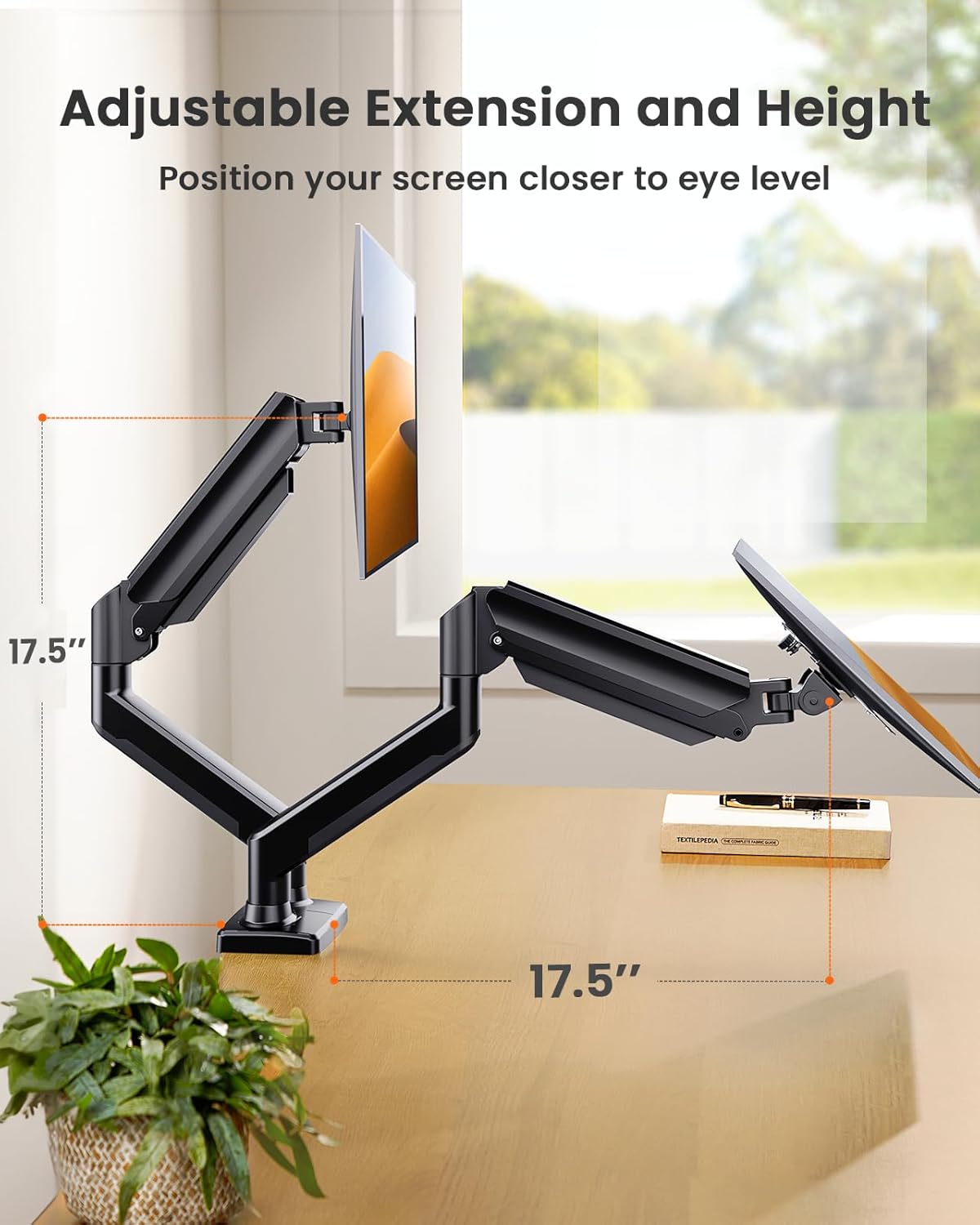
Height & Extension Adjustment – The dual monitor arm for 2 monitors can be positioned as high as 17.5″ above the desk surface, allowing you to raise your screens closer to eye level for more comfort. The flexible arms can extend the screens 17.5″ closer to you for a more immersive viewing experience.
Easy to install – The structured monitor stand is very easy to install, you can choose C-clamp or grommet hole as needed. For the sake of using experience, please check if your table meets the following three conditions: Material first, we only recommend wooden table. Table form secondly, The bottom of the table should preferably be free of any beams or panels that may interfere with installation. Table thickness thirdly,’C’ clamp fits 0.39″-2.56″ while grommet mount fits 0.39″-2.17″.
Advanced Technology -Tested for 20,000 cycles, our dual monitor arm holds the screen securely in place while allowing for smooth, easy adjustments. Additionally, the long service life of it will enhance your experience.
12 reviews for ErGear Dual Monitor Stand up to 32 inches Screen, Load-Bearing Max 22 lbs Each Arm, Adjustable Dual Monitor Mount, Sturdy Steel vesa Monitor Mount with Stable VESA 75×75 100x100mm
Add a review

$5.99
良い子 –
Effective Stands and Excellent Customer Service
I’ve used these for probably a year now and they’re excellently sturdy, secure, easily adjustable, easy to install, and easy to temporarily uninstall/disassemble if you need to adjust the desk or monitors in some way. The tilt and motion range are excellent, making it actually feel convenient to swap between vertical and horizontal orientations or move the monitor around (some other stands are so stiff you naturally limit yourself to avoid the hassle).Best of all when I called with a question, the support was prompt, knowledgeable, and very helpful. I’ll definitely look to this brand for future needs.
P. –
Surprisingly good for the price.
Firm hold, not to shaky, and can be adjusted for monitor weight.Really easy to set up and take down and I haven’t had a single issue with either arm.Zero complaints. It does the job and I don’t really notice it.
Amazon Customer –
Better than the triple monitor mounts, (if you combine with a single monitor mount)
This was a good solution to a quad monitor setup I have. Unlike all-in-one triple monitor mounts, these allow the monitors to be manipulated behind the desk, allowing for more desk space, (one of the main reasons you’d buy a monitor mount in the first place)I’d recommend this for dual or triple+ monitor setups. For triple: purchase this and a single monitor mount to save on additional desk space/configuration, and still get 3 monitors setup nicely. Since it’s 2 in 1 it means less monitor mount clamps feet on the desk taking up room.
Oz –
Gets the job done
Easy to assemble. Installed this in an atypical way and would have really liked for the arms to be capable of lowering a few more inches. It would also be nice if the mounting brackets had a longer horizontal range of motion, found it hard to get a pair of curved 32″ monitors to line up well because of this. It does seem sturdy, easily supporting about 38lbs worth of monitors right now. Despite what the instructions say, you can mount this to the front of a desk. (This assumes your desk is strong/thick enough, that it is anchored or won’t tip over, AND you’re willing to drill a hole. Don’t try to use the clamp method or it will end very badly…)
tjkolev –
Solid stand
Most two monitor setups discussed have the gap in front of the user. I prefer to have the main monitor in front, and the other(s) to the side of it. That way I don’t have to always turn my head to look at either monitor. Gives me neck strain. Also, that symmetrical setup can only be achieved if there’s enough space behind the stand so the arms of the stand can be position accordingly.My desk is against a wall. The base of the stand is off to the side – behind the secondary monitor. The main monitor’s arm is parallel to the wall. The back of the monitor is less than 4″ away from the wall, which leaves plenty of desk space between me and the monitor. The secondary monitor is off to the side with its arm having enough space to “bend”.Some notes:* Monitors (27″ and 24″) don’t shake when I type on the keyboard.* The C clamp is a single metal piece. It adds only a few millimeters to the back of the desk.* With the main monitor’s arm stretched out from the base, the monitor moves in an arc. Moving it up will also move it towards the base and into the secondary monitor. Not a problem for me, as my setup is static. I don’t need to reposition the monitors often if ever.* The cable management is… meh… I like the bottom screw-in cap better. The problem is that the lower screw is very close to the desk and the included “screw driver” wouldn’t fit in. I had the right screwdriver that did the job. It would’ve worked if I had swung the arm behind the desk. But I put the cap after I had everything setup nicely.* The lower arms have these screws at both ends to tighten those joints. The screws are metal, and they press on plastic tabs to increase friction. One should be mindful not to over tighten, as the metal screw could damage the tab.Overall it’s a solid stand.
bg3 –
Good monitor stand
Worked great for a couple of Sansui 32″ curved monitors. Does take a little space behind the desk if you want to place them so they near the edge of the desk. The adjustments for how easy the arms and swivels move are controlled with allen wrench screws. Very stable once it’s all setup. The cable keepers are a nice touch too.
AGC322 –
Solid product with easy assembly
For what i paid, solid product. Recommend buy.Awesone: material is good quality, adjustable settings is versatile, cord management strong, color (black) is perfect, most of all assembly is really easy (took 10 minutes), has good sturdiness and stable with monitors mounted. I have Dell monitors and it was a perfect fit. Saves so much space on the desk.Bogus: regular price is a bit on the high side, clamp could be a little deeper.
Tor Fromell –
Great value. The quality feels good, no complaints at all to a fair price.
نايف الشهري –
جميل وثقيل وثابت انصحكم فيه
Issy –
Llevo ya un tiempo usando este soporte doble y la verdad es que estoy encantado. Los materiales se notan de buena calidad y los brazos aguantan muy bien el peso de los monitores sin moverse ni ceder. Además, los movimientos son muy suaves, se puede ajustar la altura, la inclinación o girarlos sin esfuerzo.La instalación fue más fácil de lo que pensaba. Trae las dos opciones de montaje (con abrazadera o con el agujero del escritorio), así que se adapta a casi cualquier mesa. También tiene un sistema para pasar los cables que ayuda bastante a mantener todo ordenado.Desde que lo puse, tengo el escritorio mucho más despejado y puedo colocar las pantallas justo a la altura que quiero. Estéticamente queda genial, da un toque profesional y limpio al espacio.En resumen, muy buena compra. Si usas dos monitores, merece totalmente la pena.
Inspektor –
Die Bildschirmhalterung ist für mich perfekt. Sie ist super solide, sieht Klasse aus und ist sehr leicht montiert. Man kann dir Bildschirme vielfältig verstellen und so unterschiedlich nutzen. Sehr empfehlenswert und das Geld wirklich wert.
darius walters –
Monitor arms are always a gamble, these are not! For the price I’m blew away, currently holding a 32” ultra wide & 27” oled, I was worried incase of loose fittings / arms, once tightened holds both exactly where placed, highly adjustable, very sturdy, easy to setup, highly recommended