

GiGimundo LK10 USB3.0 Displaylink Docking Station Dual 4K 60Hz for M1 M2 M3 MacBook/PC/Laptop, Portable DisplayLink Adapter with 3xUSB3.2 Ports, 2xHDMI, 2xDP, USB-C PD100W, Ethernet, Audio, Silver
$23.99
Related Products




From the brand

LK10 DisplayLink Docking
GM7U USB 3.0 Hub Long Cable
High Power Data Cable
USB-C Dock
M.2 SSD Enclosure

Dual 4K 60 Hz Monitor Display: Breaking the limitation of single 4Kp60 external screens on new mac computers with M1, M2 and M3 basic chips such as M1/M2 Macbook Air, M3 Macbook Pro just get dual 3840x2160P 60Hz video output with this multi-screen extender with DisplayLink chip, thereby increasing productivity for both amateur and professional users
Super Compact and Portable: This display dock has a small size, is made of durable and textured aluminum alloy, and is pretty lightweight. It allows for easy switching between the office and home and is perfect for those on-the-go
Never Out of Juice: This dual monitor adapter has an extra USB-C port that supports maximum 100 Watts power delivery, you’ll never be out of juice. Keep your device charged and avoid losing any data due to power outages
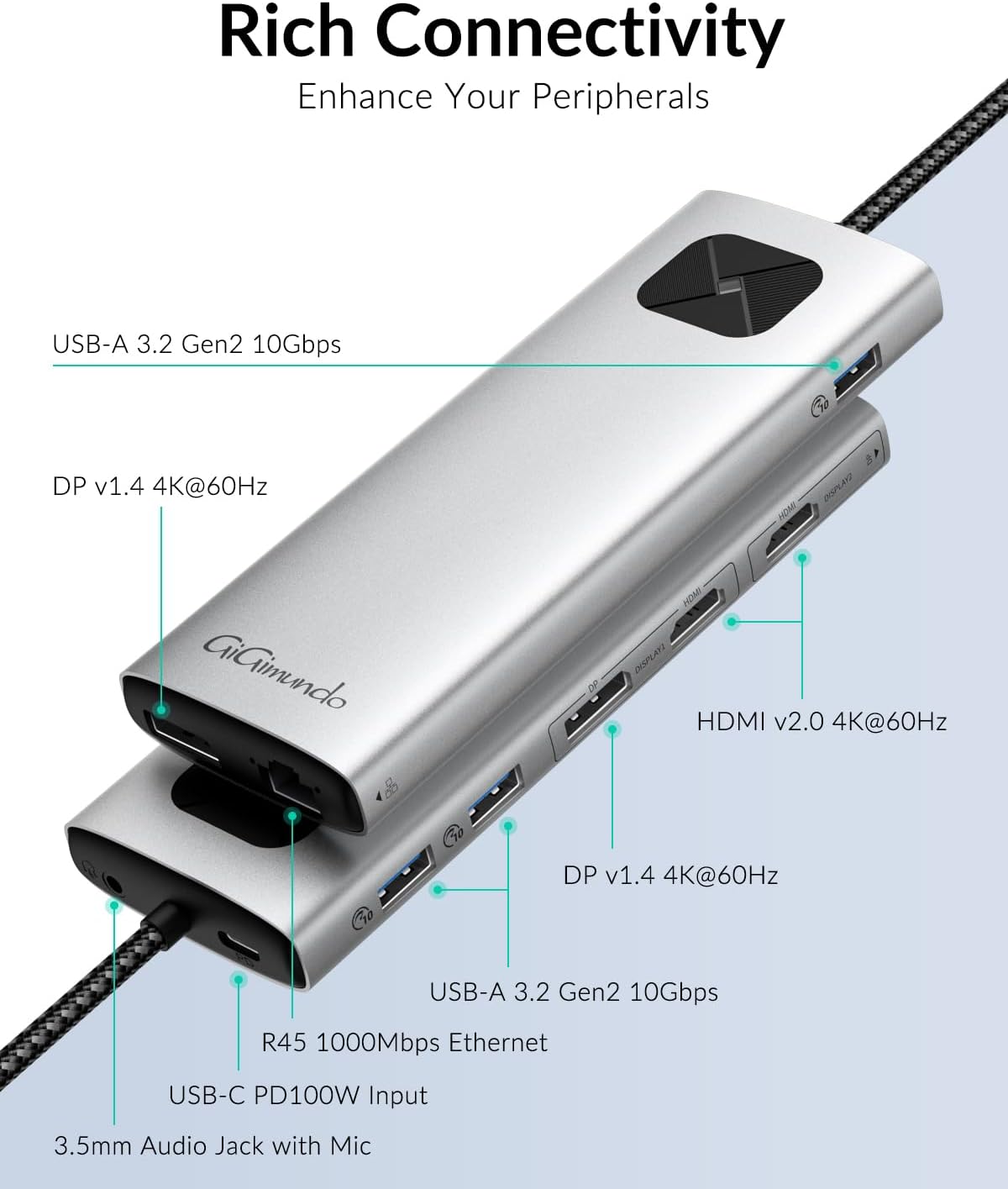
Rich Connection IO Ports: Experience plenty of interfaces with 1xUSB-C PD100Watts, 2xHDMI v2.0 4K 60Hz, 2xDP v1.4 4K@60Hz, 3xUSB3.2 Gen2 10Gbps, 1xRJ45 Gigabit Ethernet, and 1×3.5 mm Audio and Microphone Jack. Connect more peripheral devices, get more stable data flow, and avoid power crises
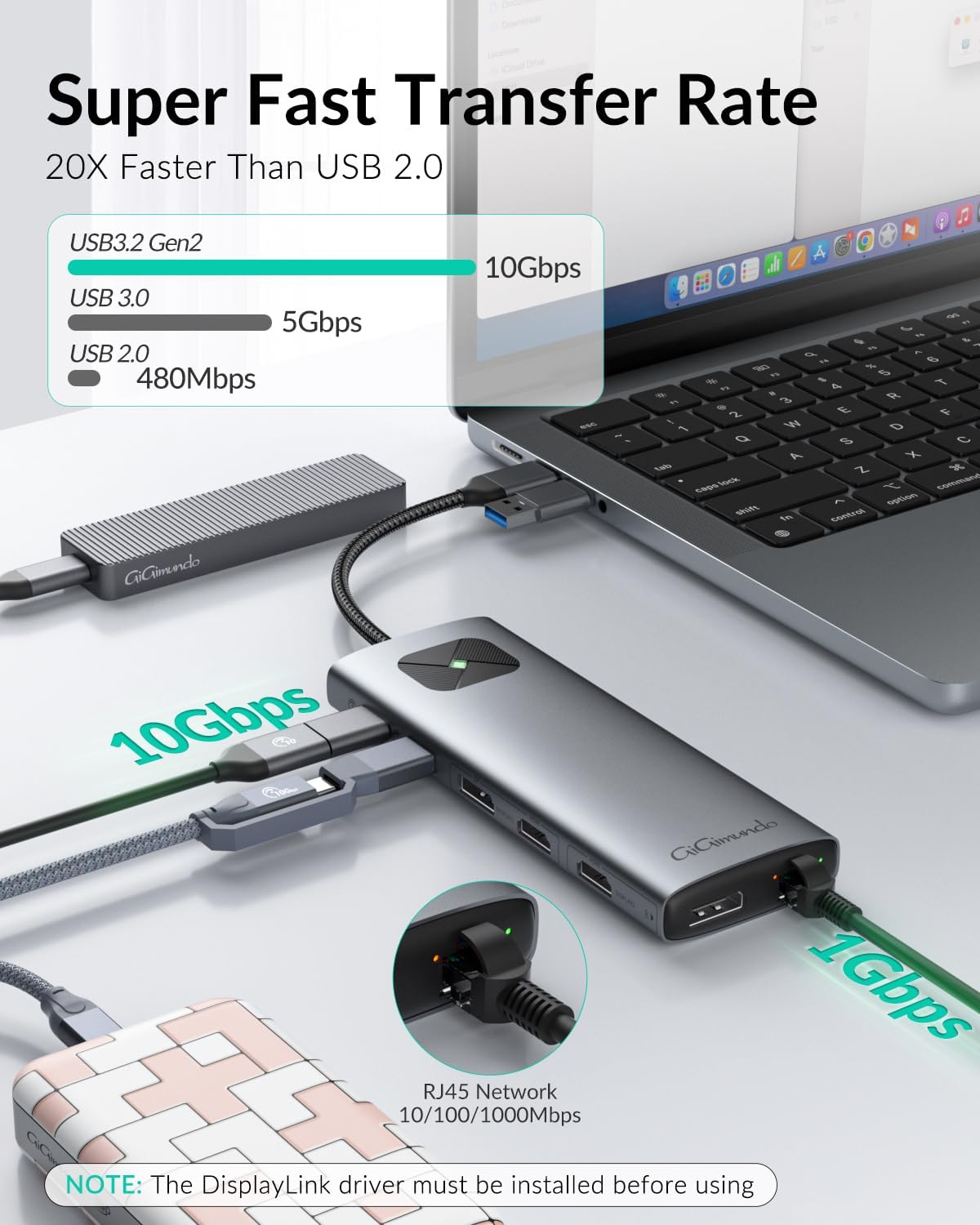
Super Fast Transfer Rate: Enjoy high-speed data transfer with USB3.2 Gen2, which has a bandwidth of up to 10 Gbps, better adapted to the Thunderbolt3/4 of mac computers. The triple USB type-A output ports also feature USB3.2 Gen2 and each has a powerful capability of 10 Gbps when transferring data through a single USB port
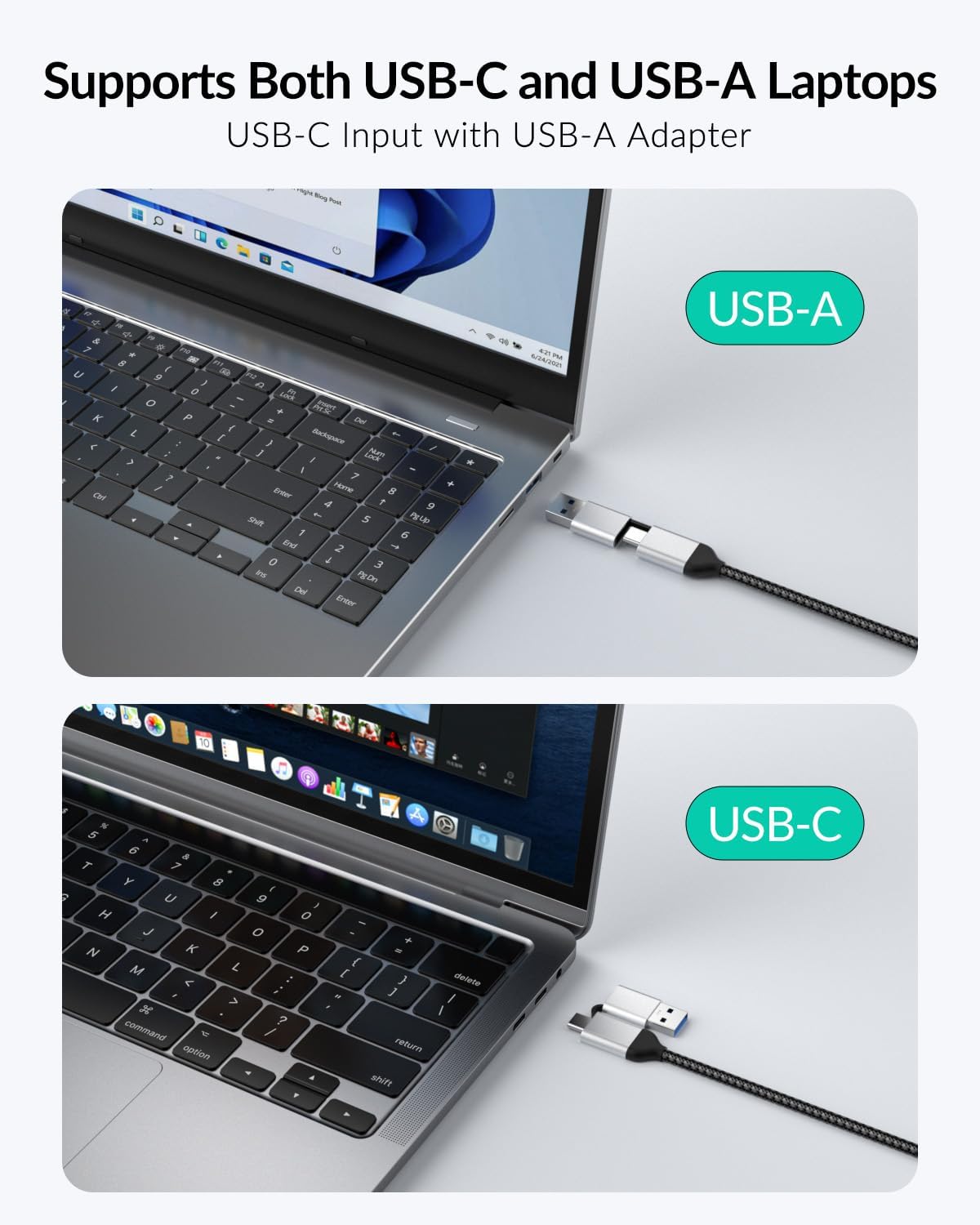
2-in-1 Source Input Cable: The perfectly short 8-inch wire is perfect for carrying while traveling or for business via laptop. The extra USB-C female to USB-A male adapter is helpful when you switch from a USB-C notebook to a USB-A desktop computer, and supports hot-swapping
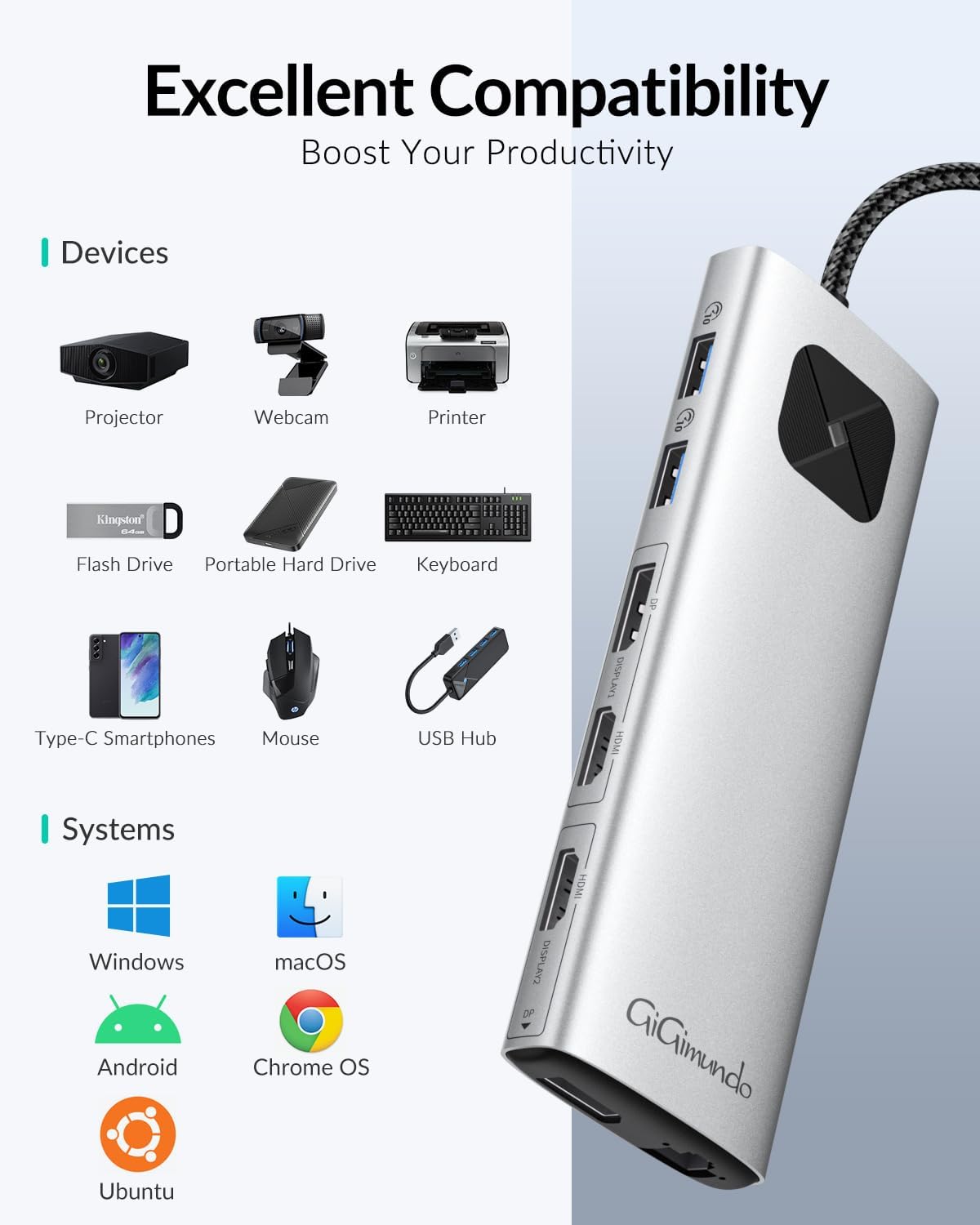
Excellent Compatibility: This macbook docking station offer an single-cable solution that enables you to take full advantage of up to two additional 4K 60Hz displays and triple USB3.2 Gen2 devices, including full sized keyboard and mouse, external storage, and mobile devices for power delivery fast charging and blazing fast data transfer
Others: (1).It required additional DisplayLink driver installation. (2).RJ45 wired network 1Gigabit didn’t compatible with wi-fi or BT. (3).Work with most windows laptops those produced in recent years. (4).The 3.5mm audio jack was 4-pole. (5).It didn’t support 3 monitors. (6).It can charge your laptop by-pass thougth with pd via USB-C while in use
13 reviews for GiGimundo LK10 USB3.0 Displaylink Docking Station Dual 4K 60Hz for M1 M2 M3 MacBook/PC/Laptop, Portable DisplayLink Adapter with 3xUSB3.2 Ports, 2xHDMI, 2xDP, USB-C PD100W, Ethernet, Audio, Silver
Add a review

$23.99
Jacob –
Great, but some small issues.
I was having trouble connecting two monitors to my MacBook Air, but the GiGimundo LK10 USB3.0 Display Adapter solved that issue perfectly. It allowed me to seamlessly connect both monitors, making my setup much more efficient. However, I’ve noticed that the adapter does get pretty hot during use. On the plus side, the Ethernet input is a great addition, providing a more stable internet connection than Wi-Fi. Overall, it’s a solid solution for dual monitors, with just a minor downside.
SK –
Dual externals on Windows 10/11 or M2 Macbook Air
My last dock from Zmuipng did fine on the Windows machines but would only display one external monitor on a new M2 Macbook Air. When the Zmuipng fried one HDMI port after 11 months and the company provided no support, I got this LK10 GiGimundo and it’s working great. A Win10 business laptop worked fine with two external displays without loading the Synaptics driver. The M2 Macbook Air worked fine after installing the Synaptics driver, although it scared me a little at first until I realized the display orientation is set in the menu bar icon. On a low-power but new Lenovo 14w on Win11, the driver was required, and at first the displays would go dark randomly, then it seemed to work fine via the USB-A connection, but switching back to the USB-C connection, it’s stable now. Maybe it was still configuring itself. I do sense some lag but I’m not gaming so normal tasks and streaming seem totally fine. Bought the extended insurance from Amazon just in case, but right now it’s worth the 3x price of the old dock to get two external displays on all the machines I use.
mom2shb –
Way too expensive for it not to work
Does not work! I’ve tried for several weeks off and on and unfortunately unable to get this to display 2 monitors, extended. So very disappointed as I really thought based on the YouTube video I watched this was going to be it. Just lying around and unfortunately unable to use.
WJH –
Easy install works well.
Easy install and setup of DisplayPort software and capability make it so a Mac with an M1 Chip will run 3 screens. Lots of USB A and display ports. Sadly only one USB C but it at least has power pass through. Very sturdy connection cable that is very short. Runs warm when using 3 displays. But doesn’t seem to be an issue. Price is a bit high. It should be about half IMO. Good quality over all.
Chance/Ellie –
I wish these were more affordable
This is a great item and a must have for the newer MacBooks if you need multiple displays situation. It’s very easy to set up with basically just plugging in and the computer recognizing it. It does get a little hot during operation, but not too bad, and I assume that’s due to the processor in the end of the item. I am using my MacBook screen and two external monitors for a total of three with absolutely no lag. Just use the Settings in your Mac to determine which position the other monitors are in and the mouse will flow freely. Highly recommend it just wish they were cheaper.
Lady –
GiGimundo
Very nice gadget
s. campbell –
Not so good
Doesn’t really work that well you have to keep resetting it every time you hook up the monitors
Craig Ward –
Works great with 2023/ 13in MacBook Air M2
I was looking for a solution to be able to “dock” my new MacBook Air and run two screens separate from it, I found this item in a youtube video, it works great, the screens are a little distorted, and there is a lag in my mouse, but I can live with that to be able to use the two screens, a bluetooth mouse and keyboard. Would recommend to anyone.
Kadir Comert –
Bu ürünü Türkiyede ilk alan benim galiba. M2 15 inc macbook air bilgisayarım için 2 adet monitör aldım ama sonradan anladım ki M2 işlemciler aynı anda sadece 1 mönitöre görüntü aktarabiliyormuş. Bu nedenle uzun uğraşlar sonucu bu ürünü buldum ve satın aldım. Ürün gayet güzel başarılı gerçekten iş yapıyor sorunsuz çalışıyor.Yalnız macbook görüntüsünü aktarırken o çok canlı kaliteli görüntünün kalitesini biraz bozuyor ve biraz ısınıyor çok el yakacak kadar değil ama ısınıyor. Onun dışında başka bir sorun görmedim
SZALONTAY Zoltan –
Using more than one extended monitors with an M1 or M2 Mac is not solved by default. Previously, I had been using an old, USB2 Plugable DisplayLink adapter, but the quality was mediocre (HD only on 4K Dell monitors).I also have a Dell WD22TB4 doscking station, but that one (not DisplayLink) only mirrors the screens. Dell documentation is not clear whether the latest firmware should fix the problem for M2 Airs or not.At this point I found a YT video that demoed this DisplayLink adapter. I was skeptic at first, because many other DL adapters can mirroring only or, at best, work at FHD only.Then I ordered it. The shipping took 3 days from Germany to Switzerland. Average.- The product is sturdy. I would prefer a flat bottom, but I could stick it to my desk with a monster tape even this one.- The documentation is close to non.existing. The most important part of it is an 8 row table with the supported combinations of the possible video outputs. But as I found, you can get any output on any connector at any resolution so a simple sentence would have done the job. (Especially, because on the next page, the is another list of not 8, but 9 items and it makes the impression those lists have something in common, but no.)- The connectors are fine. The connector placing is a bit odd: DP #2 connector is at the edge. Also, I would have welcomed if the USB-C/A connector for the PC/Mac wasn’t fixed. The cable is way too short for me and I don’t like extending USB cables.- The device delivers its promise: I already had the DL driver, so after a reboot, I immediately see the perfect, 4K screens.- I haven’t measured the speed, but for me, it’s absolutely acceptable for dev and home use.- Some say the device gets hot with time. I don’t think the temperature could couase any problems, I have many devices that are even hotter. It is definitely warmer than skin, but again, don’t worry about that.Altogether, I strongly recommend this product if you have the same probalem as I had. I would buy it again,
Ricardo Penatez –
Ok. Compré este dock para poder usar dos pantallas en mi MBA M2. Toca instalar unos drivers para que funcione y conectarlo como indican en las instrucciones. Sin embargo debo decir que aunque el funcionamiento con macOS va ok, en el momento de usarlo con mi otro laptop en Windows, no recuerdo haber tenido tantas pantallas azules en Windows 11 como las tuve con este dock. Intenté actualizar los drivers, reinstalar, cambiar de cables, etc. Todo lo que podría no estar funcionando. Y no se si me faltó algo por probar o simplemente he perdido el toque con la tecnología pero no lo pude soportar y terminé devolviendolo. Una lastima porque el motivo por el que lo compré me fue bien pero los efectos secundarios fueron demasiados
KRN ENGINEERING –
Je kan het gebruiken voor je MacBook Air m2 uit 2022. Let wel dat je een dosplaylink moet installeren om 2 extern schermen te kunnen gebruiken.
Başarılı bir ürün hiç problem yaşamadım –
Bu ürün çok işime yaradi . Çogu portunu kullaniyorum. Tek dez avantaji kablosu biraz kisa. Bence en az 40 cm olmaliydi