

Plugable 13-in-1 USB C Docking Station 4K Triple Monitor with 100W Power Delivery | USB C Dock for Windows, Mac, ChromeOS, Thunderbolt | Driver Required | 3X HDMI and 3X DisplayPort (UD-ULTC4K)
$24.99
Related Products





From the brand

Universally Compatible Docks

Find Your Docking Station
Windows Compatible Docks
Mac Compatible Docks
Shop for Business


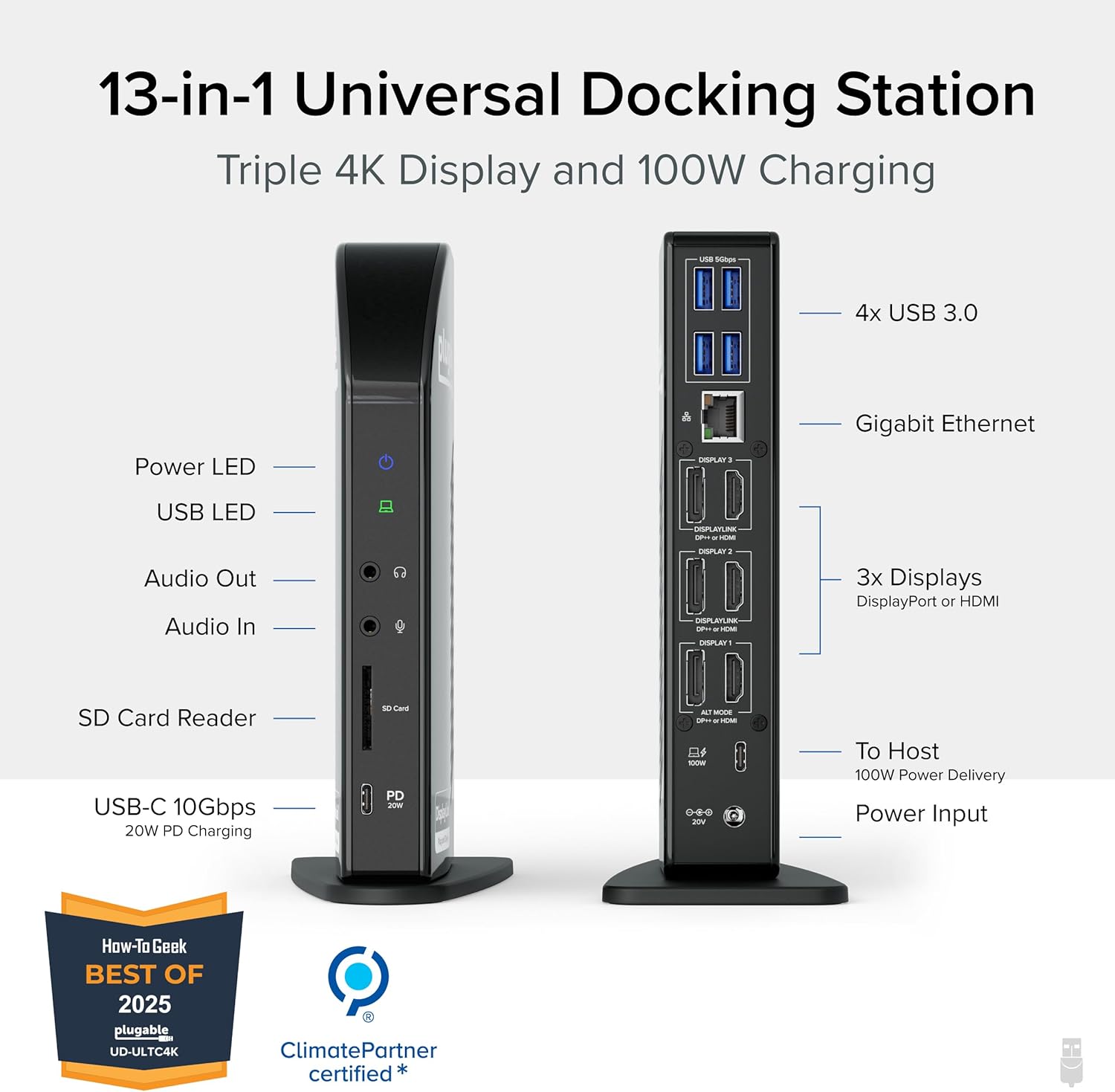
All in One USB C Docking Station with Power: This multi monitor docking station features 13 powerful ports including USB-C with 100W charging, 4x USB-A, Ethernet, SD card reader, and more- all through a single 10Gbps USB-C connection. Perfect for busy professionals needing a complete usb docking station setup.
Triple 4K: Extend your view with this triple monitor docking station featuring 3x HDMI and 3x DisplayPort outputs. Mix and match for ultimate flexibility – drive three 4K monitors at 60Hz on Thunderbolt, USB4, or Alt Mode laptops. No extra dongles or converters required.
100W Power Delivery: Power your laptop with up to 100W (96W certified) directly through the DisplayLink docking station, so you can leave your laptop power adapter in your travel bag.
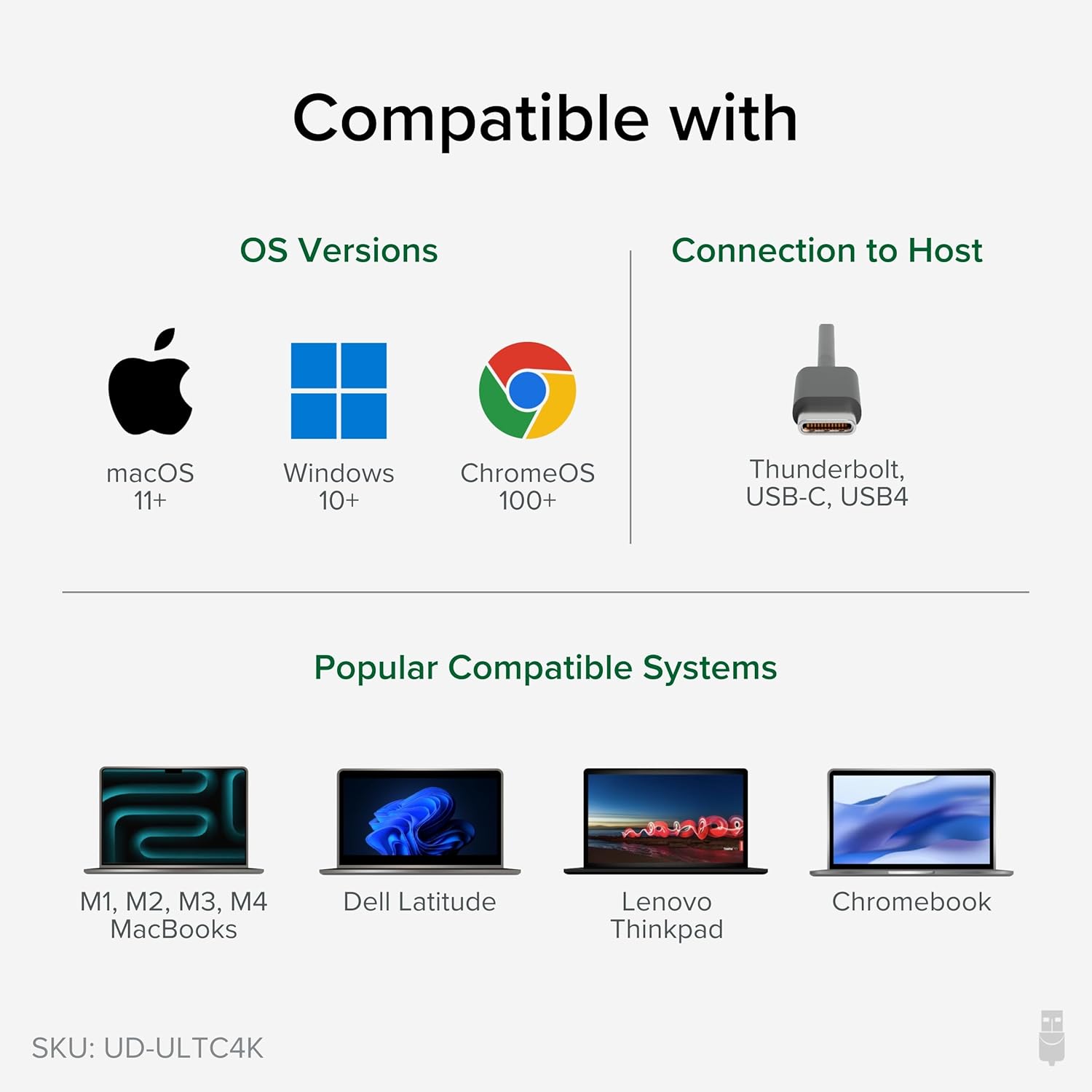
Compatibility: This USB-C dock is compatible with Windows 10 or later, macOS 11+, and ChromeOS (100.x or later) systems with Thunderbolt, USB4, or USB-C. Requires installation of DisplayLink Drivers, refer to the setup guide video in image gallery. HDCP (streaming services) not supported.
Connection Options: Triple display docking station lets you connect your phone or other devices with 1x USB-C (10Gbps, 20W PD), and keep expanding with 4x USB 3.0 (5Gbps), an SD card reader, Gigabit Ethernet, and audio in and out ports.
10 reviews for Plugable 13-in-1 USB C Docking Station 4K Triple Monitor with 100W Power Delivery | USB C Dock for Windows, Mac, ChromeOS, Thunderbolt | Driver Required | 3X HDMI and 3X DisplayPort (UD-ULTC4K)
Add a review

$24.99
Neal Hagglund –
Great Docking Station that works Great with MacBook Pro
I bought this docking stations two years ago to use with my MacBook Pro 13″ M2. It has worked great, giving me three stand alone monitors. When I had an issue, Plugable was very responsive and helped me solve my issue. I highly recommend Plugable if you want multiple free-standing monitors with your laptop/computer.
Peter Holt Hoffman –
Nice units! Recommended.
I’ve bought two of these and they’ve been very good. One seems to have developed glitches after several years but I would buy again. We use them with a Dell Latitude 3520 and a Dell Latitude 7390.
Bill Pi –
Works as advertised, 3 external monitors on LG laptop
The base laptop is an LG Gram 16Z90TL-H with Intel Core Ultra 9 and 32GB DRAM running Windows 11 Pro. I followed the plugable instructions and downloaded the drivers before connecting the docking station. Connected the docking station via Thunderbolt 4, then connected three external monitors via HDMI. Worked like a charm, three external plus the laptop display… just needed to configure the display order for the four displays in Windows setup, which was pretty straightforward. I’m not doing gaming, so can’t comment on the display bandwidth. The docking station provides laptop power through the Thunderbolt cable, and has room for four USB, gigabit ethernet, SD card, 20W Power Delivery, and headset/mic.
Placeholder –
Great but design could use improvement
Solid product and I want to give it 4 stars as the design needs improvement, however I believe this hub is better than the competition so leaving as 5 stars..Plugable take notes.I use it for work which prohibits 3rd party software installations (which you need as thunderbolt 4 (usb-c) based hubs generally rely on displaylink drivers), but once I got passed that hurdle it was all plug and play. I have it using 2x 2k monitors, one at 120h, one at 100hz (I am using hdmi and will eventually switch to DP but until then I’m willing to accept throttled frame rates), and a 3rd regular 1080p over hdmi. In addition I have power, ethernet, and three usb peripherals. With that being said, the device runs flawlessly, with one caveat… It gets pretty toasty.PLUGABLE PLEASE READ THIS:it would take very little to implement an exhaust fan or another thermal solution in your higher end/flagship workstations. I did it myself, but I know this now voids any warranty I hoped to have. Please consider adding a fan to the top of your products or something similar. If I was running the stated/rated three 4k monitors at 60hz this thing would likely get way too hot and compromise its longevity. Take a look at the pictures…. EZ!I traced and cut a hole for a 25mm usb fan by cooler guys (also purchased on Amazon, amazing..) and now have an exhaust fan atop the hub, and it works FLAWLESSLY with near zero noise. Could not be happier now. The heat from the hub had me nervous but now, no more heat :)Consider any modifications at your own risk as this will certainly void your warranty, but I’ll say mine works better than ever 🙂
Randall McFarlane –
DO NOT BUY THIS DOCK
Update:DO NOT BUY THIS DOCK. This dock is the worst experience in my entire life for buying accessories for a Mac. If you have any HDCP content you want to play, it will not play if the DisplayLink driver is installed. Even if you have a passthrough or even if you have an HDMI port. The driver disables any ability to play HDCP content. Talking to the Support team, their solution was to install Chrome. That isn’t a solution. That is a workaround. I can’t watch any of the movies I purchased through Apple TV or any other native app that uses HDCP. This isn’t a bug. This is how Virtual USB-C displays work. They need to say this in the product details. Hiding this is just shady as hell. You only find out when you search for a black screen for playing Apple TV or Netflix in Safari.The dock, for me, was constantly dropping connection. I used the supplied USB-C cable and tried a new verified TB3 cable heck, I even used a Verified TB4 cable, and yes, the wattage was above spec for this device. I thought maybe it was my M1 Macbook Air so I tested it on a Mac Mini M1, Macbook Pro, and it still has the same issue. I stream content and it was always frustrating that it dropped the connection. I thought it was my internet. To find out it was the dock. Even USB devices would randomly drop and connect. One display always turns off and turns back on.I contacted support and that is where this gets worse. The solution was always to try a new cable or install Chrome for HDCP content. I even sent them a log from their debug program they ask you to install to gather information. They say nothing is wrong with my dock. Working with support was one of the worst I have ever worked with. You think spending $300+ dollars on a dock the company would have better support.My Solution? I bought a new M2 Pro MacMini. This has support for 3 monitors(which is why I bought this dock). I have no issues with my monitors dropping in and out. My internet connection is stable, and I have no issues. So now the dock is in the basement collecting dust. I just want a refund for not only my frustrations with the hardware but for the support. But it’s too late. So my goal is to make sure no one will experience this frustration. DO NOT BUY ANYTHING FROM PLUGGABLE.
Debora –
Es un buen producto, elimina la limitacion de las mac mini m2 de solo tener 2 pantallas externas.Pude conectar 3 monitores en pantalla extendida sin problemas.
非公開 –
デザイン、性能、将来性、全て気に入っています。最初不安だったサポートも、迅速に日本語で日本人が対応いただけました。少し高価ですが、4K対応、HDMI3口同時利用、100W充電、サンダーボルト4対応等、永く使えそうです。注意点は必ず利用前にパソコンにドライバーをホームページからダウンロードしインストールしておくことです。それをしないと、モニター1台しかノートパソコンにつながりません。
Pascal Petitclerc-Plamondon –
Work almost flawlessly ! Its expensive but well worth the price for your work setup if reliability and stability is what you are looking for
Cody Glen Barrett –
Was worried as some reviews were hit and miss, but this works amazingly, 3 screens all working, charging at the same time, able to plug in peripherals and as cards all at once, and no delay, much better than other models I’ve used (using razer blade 17 2022)
TW –
Perfect for multiple monitors and Surface Pro