

Selore USB C Docking Station Dual Monitor – 13-in-1 Triple Display 3 Monitors with Dual HDMI, DP, 100W PD, Gigabit Ethernet, 10Gbps USB A/C Ports -Laptop Docking Stations for Dell, HP, Lenovo, MacBook
$6.99
Related Products


![Detroit Axle – 4WD Front Wheel Bearing Hubs for Ford F-250 F-350 Super Duty 2005-2010, 2006 2007 2008 2009 [SRW; w/ABS] Wheel Bearing and Hubs Assembly Replacement](https://deviceden.co/wp-content/uploads/2025/11/718nqDmyC3L._AC_SL1500_.jpg)




Product description


Do I need to install drivers to connect the docking station to my laptop?
Ideal for Thunderbolt 3/4 laptops or USB-C devices supporting charging and video output. No driver installation required—simply plug in and start using hassle-free
Can I implement Extended Mode on my Apple laptop?
Mac notebooks do not support Multi-Stream Transport (MST). Displays connected via HDMI/DP/VGA (if these video ports are available) will mirror the display to show the same image
Does this usb c docking station compatible with my laptop?
If your laptop is Windows, Mac OS, Chrome OS, Linux, iPad OS, iOS, Harmony OS, Android, etc., please check if your laptop’s Thunderbolt 3/4 or USB-C port supports charging and video output, and if it does, you can use our Docking Station
After connecting the docking station, there is no signal from the external monitor, how to solve it?
Ensure your laptop’s USB-C port supports video output. Ensure that the HDMI or DisplayPort cable is working properly, check that the device’s display settings detect an external monitor, and adjust the display mode (e.g., Copy or Extended)
How can I achieve optimal connection stability with the docking station?
Always use a genuine, high-power power adapter to charge your laptop and connect your keyboard and mouse to the docking station’s USB 2.0 port.
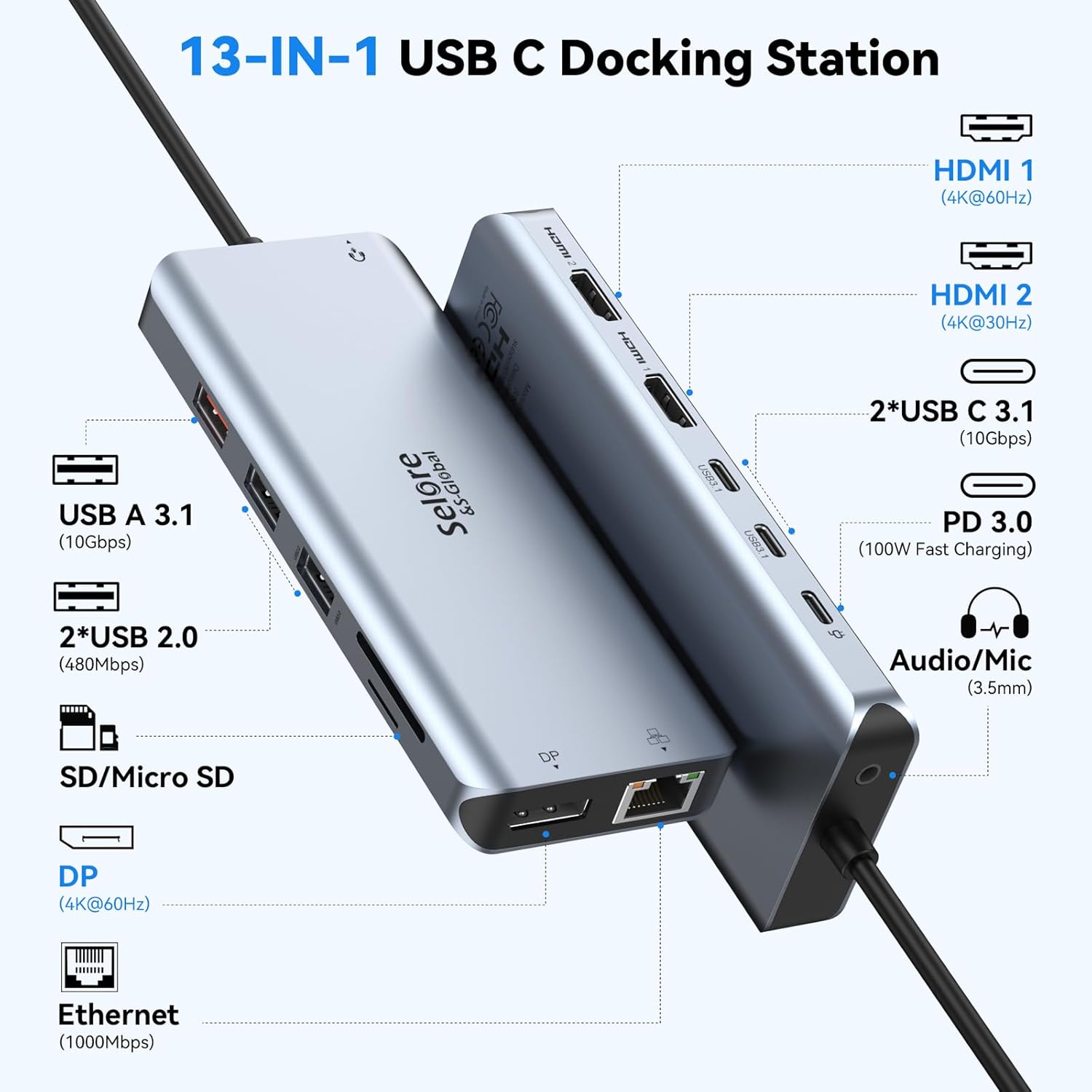
【13-in-1 USB C Docking Station Triple Monitor】This USB C docking station dual monitor connects via a single USB-C/Thunderbolt 3 port to drive 3 external displays (2x HDMI + 1x DisplayPort). Single HDMI supports 4K@60Hz, dual HDMI delivers 4K@30Hz, triple monitors run at 1080P resolution. As a docking station 3 monitors solution, Windows supports extended mode via MST/SST while MacOS offers mirroring only. Ideal for students and professionals who need expanded screen real estate for multitasking, online classes, or data analysis. Critical: Verify your device’s USB-C port supports DisplayPort Alt Mode before purchase
【13 Ports USB-C Hub Multiport Adapter】This USBC docking station features: 2x HDMI ports + 1x DisplayPort + Gigabit Ethernet + SD/TF card reader + 3.5mm audio jack + 3x Fast USB ports (up to 10Gbps) + 2x USB 2.0 ports + 100W Power Delivery port. This plug-and-play laptop docking station requires no drivers for most devices—simply connect to transform your laptop into a full workstation. Perfect for office and school settings, reducing cable clutter and increasing productivity
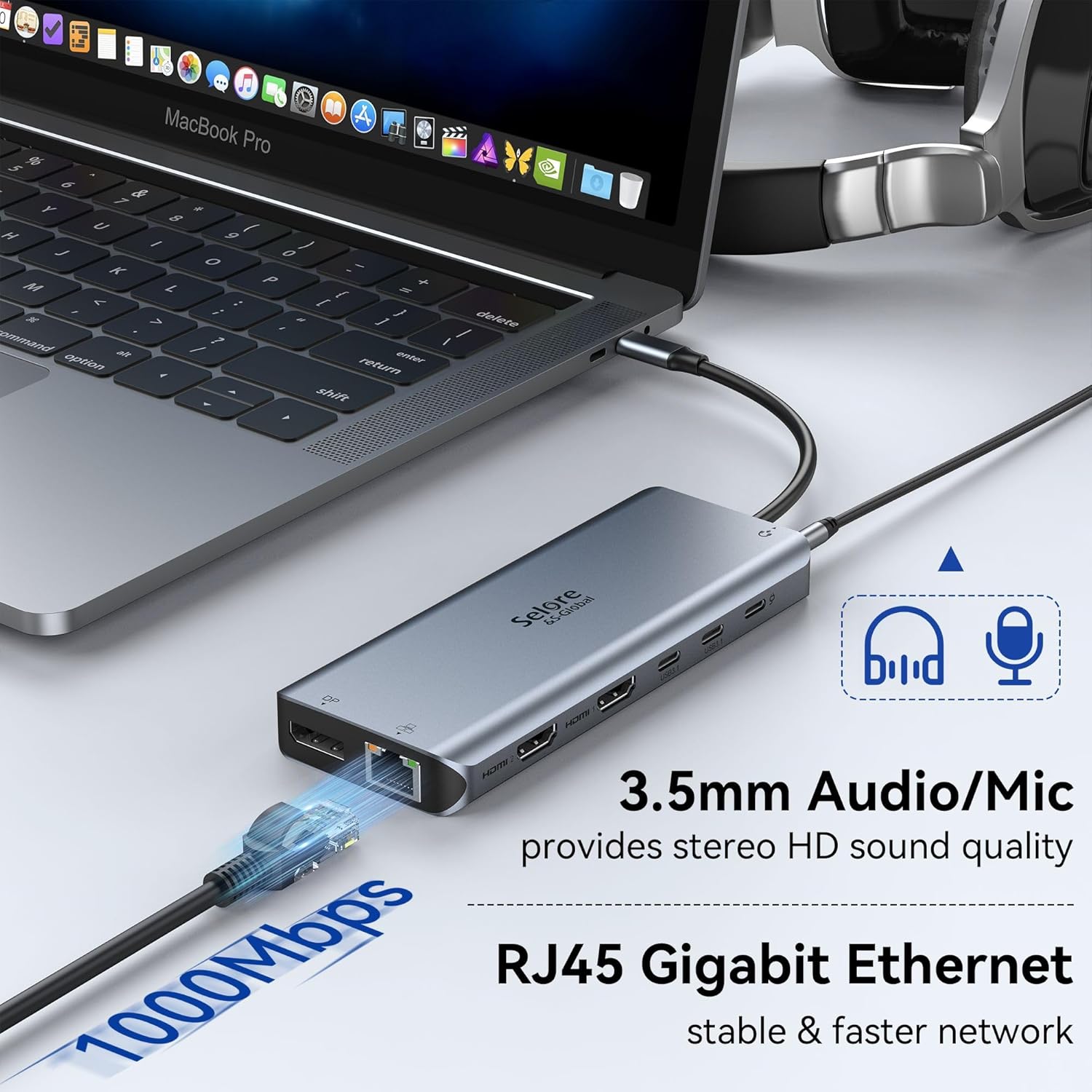
【Fast 10Gbps Data Transfer】This docking station equipped with USB C port and USB-A 3.1 ports achieves transfer speeds up to 10Gbps, allowing you to move large files quickly. Dedicated USB 2.0 ports ensure reliable connectivity for peripherals. A built-in SD/TF card reader provides convenient access to media files.This laptop dock have 3.5mm Mic/Audio jack for your wired headset
【Gigabit Ethernet & 100W Power Delivery】The integrated 1000Mbps Ethernet port provides a stable, wired network connection suitable for various tasks, such as video conferencing, large file downloads, and online teaching. This USB C docking station with power supports up to 100W input and 85W output, enabling simultaneous laptop charging while using all dock features. Ensure uninterrupted work and study sessions with reliable power and network connectivity
【Wide Compatibility Docking Station】This docking station for laptop works with Thunderbolt 3 or USB-C port devices, including MacBook/MacBook Pro (2017-2020), MacBook Air (2018-2020), iPad Pro 2018, Lenovo Yoga 720/910/920/930, Microsoft Surface Book 2/Laptop 3, Dell XPS 13/15, Dell Latitude 13 7000/E7370, and more. *Also compatible with Chromebooks and other USB-C laptops commonly used in schools and offices. Note: Video output requires confirmation that your device’s USB-C port supports Thunderbolt 3 or DisplayPort Alternate Mode.*
12 reviews for Selore USB C Docking Station Dual Monitor – 13-in-1 Triple Display 3 Monitors with Dual HDMI, DP, 100W PD, Gigabit Ethernet, 10Gbps USB A/C Ports -Laptop Docking Stations for Dell, HP, Lenovo, MacBook
Add a review

$6.99
Mr_MagicMan –
Works incredibly good
For an “offbrand” device that I don’t normally see on amazon, I’m incredibly impressed. It worked straight out of the box, it doesn’t have any major delays that I can see however when first connecting three monitors there will be some refresh issues for the first 5 seconds but that does go away as far as I can tell. Doesn’t require any external power which is a nice feature and I can confirm you can extend for three different monitors on windows 11. It doesn’t state what the minimum specs are but it works fine on my displayport 1.4 usbc port with a total of 4 adapters between the splitter itself and the port on the laptop.It does get warm to the touch after some use but with some double sided tape holding it up on the bottom of my desk, that isn’t personally a concern for me 🙂
Pumpkin60 –
Works great for a person that knows nothing about computers with room to grow
I purchased this because the new laptop I purchased doesn’t have a lot of slots to do what I want to do. I wanted to use the HDMI port to connect another monitor but my laptop wouldn’t let me do that. I tried DP and that didn’t work what did work is I had to put the HDMI onto the laptop it’s self and go to the monitor. I have a my Bose speakers connected to this and I have a keyboard and mouse on this. Every thing works great so far. I am not computer savvy but this helps a great deal. I have room to add things when I need to. I would buy this again it works for what I need and room for other things as I go. I may try to add my old web camera.
MigdalinaLL –
Better connection, more productivity
Fit perfectly on my desk, the cord length is adequate, light weight. Different a change on my set up for remote work.
Jeffrey Cox –
Nice Device, But, Probably Me – Monitor Would Not Switch
I bought this to use with my old Lenovo Yoga 900 running Preview Windows 11. I currently use a USB to HDMI one port adapter to run my older Acer (S271HL) monitor. Using the older adapter, on the Acer itself I can change inputs between this and my work computer with no problem. However, using this new two port adapter, when I try to change to the Lenovo, you would hear the USB disconnect; the monitor would not find any signal/connect and go back to my work computer, and then of course the USB reconnect sound would sound. :-pWithout my work computer running, the Yoga and monitor connect fine, and drive actually both my monitors on my desktop really nicely.So, I ended up returning this being I need to be able to switch between the two.BEYOND THAT, as long as you are not using my setup and have my switching need, I do recommend this product. Nicely built; seems to work right out of the box and is a great price. If you want to drive just one computer with two HDMI monitors, this is a great pick!
SavedByGrace –
Works exactly as advertised
I’m a software developer, and I like to use three monitors. I tend to have each screen split with multiple windows so that everything I need is a glance away. For many years I have worked with a desktop, but noticed that recent laptops are starting to rival in power while costing 25% or less in electricity to run. My business laptop has DisplayPort and HDMI ports, but I really wanted that third monitor if I was going to switch. When looking up solutions, I learned that the laptop’s USB-C port supported DP Alt Mode, and the laptop manual stated it should allow me to have up to two additional screens – perfect.I picked up this Selore adapter since the quality seemed decent, and I can confirm it feels like it should last for many years. Installation was plug-and-play, and as you can see in the photo all three monitors are fully functional. They are all set to 1920×1080@60hz, and all three look just as sharp and responsive as it did on my desktop. Very pleased, and I would definitely recommend this adapter to anyone looking for extra screens with a compatible laptop and OS.As a side note for more techy individuals: The desktop GPU was a GTX 1080, and the laptop GPU was a GTX 1660 Ti. I have successfully used the adapter with both Ubuntu 18.04 and Windows 10, though Windows provided a much smoother and more stable experience. I have not detected any difference in input and display response times between the USB-C connected monitor and the DisplayPort connected monitor.
Eoin –
Broke in less than 2 weeks
Short version: I got this 2 weeks ago, and it completely broke within that time.I purchased this adapter because I need it for my work from home set up. At first I thought it was a bit pricey compared to other options, however the next best options would take 2 days longer to arrive so I said ‘why not, it must be better quality anyway’. I was wrong.After going through a whole saga in terms of delivery it finally arrived. It worked just as it was suppose for the first week but recently I plugged my personal laptop in (which I had done many times before) and it did not work. I thought ‘hmm, must be my laptop’ so I restarted it. Still my laptop did not connect to my monitors. I then tried my laptop. Did not work. I then connected each of the HDMI cords from my monitors individually to my personal laptop and both worked.I then did every test possible to see if it was the adapter or something else that was not working cause should a simple thing which cost more than normal market price would not break within 2 weeks. Alas, this poor quality controlled device has done exactly that.Well, that’s my experience with it. I’m impressed you read the long version. My recommendation is quite obvious.
MJ –
OFFICE
GREAT VALUE!!!!!!! Works well with my computer and fits all of my needs. I was able to remove cords that were cumbersome and in my way of an efficient work space. This was a great deal as a similar item was at a big box store for $80.00. This is a WIN!
Chee Yong –
Works very well with my surface book 2 to extend to addition 2 screens! It’s super value for money compare those expensive docks.Flickering: Very stable, no flickering most of the time, except when I’m playing video from Netflix in the extended screen, but it’s really acceptable.Media playing (hdcp) :Also to note that it is HDCP compliant so you can play Netflix etc over the extended screen.Heating: very acceptable heating from the adapter, perhaps just around 30 to 40 Celsius.Always on: the connection is there 99% of the time even after I suspend my surface book and turn it back on the next day. The connection may break once in a blue moon when I try to turn my suspended machine back, but it probably only happen twice over the last 3 months of using it.Just hope that it will last for at least 1.5 to 2 years.
Ravi Kumar Annepu –
Worked well as described with a pc with type c but didnt work on old laptop where there is no type c port and usb to type c converters wont work too.
NYG –
I originally bought this adapter to connect my two Samsung screens with my MSI GS65 via the microUSB connection and it worked great. When I recently had to update to a new laptop (MSI GS66) the adapter worked only on the Thunderbolt 3 port and had a slight delay to display both screen but once ‘working’ the transmission quality is good enough to play games like Star Wars battlefield on the screens without much lag time. Only issue was that whenever my laptop went into sleep mode and was waking up again, it ran into the Blue Screen of Death. Their customer support immediately replied to my question of what’s going on and offered to sent me a new adapter (arrived within 2 days but caused the same problem) so it definitely was NOT their products fault. Solution was to “Clean install” then newest NVIDA driver (while removing all previous version). So the adapter works great just, if you run into problems, try to re-install your newest graphics card driver and everything will work as planned. Overall very pleased with the product and their customer support. Would buy other products from them any time.
Abhishek –
.
Rebeca Herrera –
cómprenlo, ta chido