

Toshiba Canvio Basics 2TB Portable External Hard Drive USB 3.0, Black – HDTB420XK3AA
$12.99
Related Products


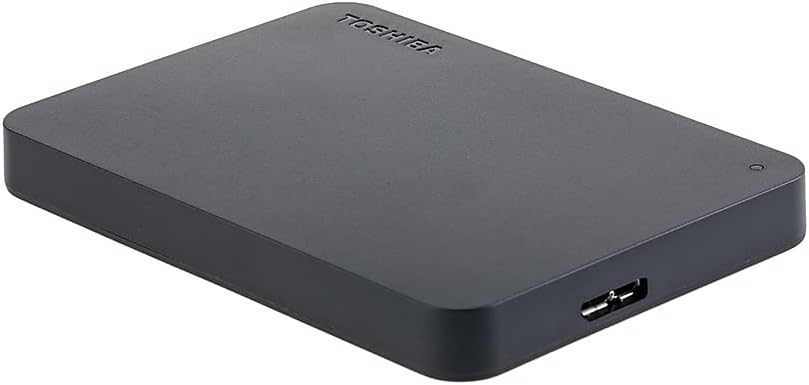


The Canvio Basics portable external hard drive allows you to collect your files and take them anywhere, offering high storage capacity, simple plug and play operation, and reliable performance. It features a compact design with a classic matte, black finish that is USB 3.0 and USB 2.0 compatible. [Note]: (1) One Terabyte (1TB) means 10{12] = 1,000,000,000,000 bytes using powers of 10. Actual formatted storage capacity may vary. For details, please visit Toshiba’s Consumer HDD website (2) Drive formatted NTFS for Windows PC. Reformatting required for Mac computers. Compatibility may vary depending on user‘s hardware configuration and operating system. s Consumer HDD website. (4) Product specifications, colors, features, software, and availability are subject to change without notice.Max. transfer rate: ~ 5.0 Gbit/s.
Sleek profile design with a matte, smudge resistance finish.Specific uses: Personal, gaming, Business
Plug and play; Easy to use with no software to install. Requires reformatting for Mac OS v10.12 /OS X v10.11 / v10.1
Quickly add more storage capacity to your PC and other compatible devices
USB 3.0 and USB 2.0 compatible with no external AC power cord needed
Compatible devices: Desktop
13 reviews for Toshiba Canvio Basics 2TB Portable External Hard Drive USB 3.0, Black – HDTB420XK3AA
Add a review

$12.99
richard vititoe –
works great
great External Drive to have makes storing easy
Noah Schreiber –
Works questionably good for having it for a few weeks now.
I do a lot of gaming and one of the big problems I have with my xbox series s is storage. The game console comes with 300 gb of storage for gaming which is terribly very small. An easy work around to this is to redownload games and back up data to the cloud but the problem with that is it requires internet to be able to do that and to back up games to the cloud takes forever compared to backing them up on a drive. Backing them up on a drive has 1 gb/s where transfer speeds of my wifi router to the xbox are about 0.2 gb/s making storing them on a drive 5 times faster in terms of transfer speeds and such.This is not my first toshiba drive. I bought a 1 tb drive last year but I chose to get rid of it because 1 tb is just not enough storage for game transfer. I have already used up 2.7 tb of the 4 tb drive I bought from this seller.Pros:1. Dirt cheap drive.2. Stores what you want.3. Transfer speeds greatly out perform my wifi router making it more ideal for gaming in my opinion because the xbox series s is hugely impacted by the number of different games you can play.Cons:1. Unlike the 1 tb version I can feel the 4 tb version vibrating while in use suggesting that there is a spinning disk inside. As other people reviewing this have pointed out it is more prone to failing than a ssd drive. Just something to keep in mind. I haven’t had this drive fail on me yet.Conclusion:I have repeatedly transferred back and forth repeatedly numerous terrabytes worth of data and it has not failed on me yet. Just remember to keep backups of backups always. Good day!
Milford –
Terrific cheap way to keep your data files save from a crash and still use them every day
Wonderful product, works seamlessly with my PC as a second hard drive, I just turned off my computer, plugged it in, turned the computer back on and did a few things and logged back in, back at my station in less than five minutes and presto, I had a two-terabyte hard drive installed on my computer. The drive is the size of a pack of playing cards, and I keep all my data files on it, if my computer ever crashes due to old age, my data is still safe. Just $125.00 and I don’t have to worry ever again about a data loss that way. Silent, easy to install, lightweight, just a USB port to add to your PC. My last one is two years old, getting hard use and still going strong. Very durable.
ForeverYOUNG –
external hard drive
I purchased this to save my recorded programs/movies from my Dishnet Hopper 3. Worked great. I wasn’t clear if it came with a usb or not, so I purchased one… DON’T…. It comes with one that works perfectly. I keep it hooked up to the hopper, so the nice short cord is useful… (about 1 ft). If you need a longer one, then perhaps you’ll want to purchase one – but not necessary otherwise. It was super easy – plugged it in, a box came up on my TV that asked if I wanted to update and format – I clicked yes and that was it. It was ready for transfer of saved material. The drive itself is approx 5:x4″x 3/4″. It is black and has a little flashing light when it’s being used. I had things sorted on my Hopper in “files”. So far, I cannot figure out how to make folders on the hard drive, so everything is just mixed on the hard drive – that means looking thru about 200 titles – Eh – but the point of the hard drive for us is to save the content if we have to replace the Hopper at some point. It is easy to move the files back and forth.. And you can play the movies from the hard drive. It did take quite a while to transfer, we had about 50% of our Hopper memory – a number of hours. But no biggee to me. So far, I am happy with my purchase, however, time will tell. Having said that, I never hesitate to update my reviews should new info seem useful.
Yvannelis Agramonte –
Es bueno
Es bueno y muy útil además tiene muy buen almacenamiento
Amazon Customer –
eliable & Spacious – My Go-To Portable Storage
The Toshiba Canvio Basics 2TB HDD is a fantastic external drive! It’s compact, lightweight, and plugs in effortlessly via USB 3.0 for fast transfers. Perfect for backing up photos, videos, and work files.
Edilia Ramirez –
La calidad.
Maravilloso 💯👏👏👏👏.
cookie’s mom –
Smaller than my phone and worked fine
I bought this 2T portable hard drive to back up my 6-year-old desktop computer before I take it into the shop for repairs. I ran into some of the same issues mentioned in the one-star reviews, but I am convinced those were not the fault of the Toshiba drive. To start, it was easy to attach the drive to my computer with the included cable, and my computer recognized it right away. However, it may have been because I am running Windows 10, or because I had to attach the cable to a USB 2.0 port, or because the Toshiba drive is formatted as NTFS and my system drive (C:) is formatted as FAT32, but the Windows backup software was convinced that the Toshiba drive was corrupted and would not write to it. At one point it looked like it had, but the folders on the Toshiba drive were all empty. I was going to reformat the Toshiba drive as a FAT32 to see if that would solve the problem, but I am always afraid I will inadvertently wipe out the wrong thing when I format a drive, so I chickened out and used File Explorer to send copies of my folders (Documents, Photos, Music, etc.) to the Toshiba drive instead. They wrote to the drive with no problem, although it did take over an hour to copy my 14,961 photos. I have confirmed that the files are there and I can open them, so I think the drive is fine, it was just an issue of compatibility with an older computer. I like this drive and its small size a lot–it’s smaller than my phone–so I am strongly tempted to use something else for future backups and to add the Toshiba drive to my laptop bag.
Fabián Martínez –
El producto es muy bueno, ya llevo con el 7 años y me sigue funcionando sin problemas
Lenemy Caelian –
Good product well packed & fast delivery..thank u amazon
Richard Lee –
Love the fast next day delivery. Good product in original packaging. Tested write speed above 110 MB/sec
Mohamed Gabr –
Very Good Product
Andy –
The disk would not operate properly, every 1-10 mins showing that it was again and again ‘located’ by other devices (PC, media player, etc.), all the playback would stop, and on the 2nd day of use went almost still