

USB C Docking Station Dual HDMI Monitor, USB C to Dual HDMI Adapter with 2HDMI Ports, PD Charging, SD/TF, USB A&C 3.0 Ports, Laptop Docking Station for Dell XPS/HP/Lenovo/Surface/Yoga etc
$5.99
Related Products




Product description
Ensure your computer supports Thunderbolt protocol or full-featured USB-C ports. 
Please note before purchasing:
1.Docking stations require a Thunderbolt or full-featured USB-C port
2.MacOS only supports mirror mode(SST)/system restrictions, not a product defect.
3.Full dual monitor extended mode (MST) requires Windows DP1.4. You can ask us for help with confirming compatibility
The video showcases the product in use.The video guides you through product setup.The video compares multiple products.The video shows the product being unpacked. USB C Docking Station Dual HDMI Monitor Merchant Video
All in One Station – Selore&S-Global Premium 8 in 1 USB C Docking Station 
One device to 8 ports, all wirelessly: Dual 4K60HZ HDMI ports+a 100W PD charging port+a USB-C port up to 5Gbps+two USB 3.0 ports up to 5Gbps + TF/SD card slot up to 104 Mbps
USB-C data port does not support video transmission—only for charging/data transfer

For Mac OS(SST) —-Dual Display (4K@60Hz | 4K@60Hz)[Mirror A+A A] + [Extend A+BB] Attention: For Mac OS, extended displays are supported only via SST mode (A+BB), Can’t extend two different Screen, due to Mac OS limitation (NO A+BC)

*For Windows DP1.4 (MST)—-Single Display (4K@60Hz) [Mirror A+A]/[Extend A+B]; Dual Display (4K@60Hz | 4K@60Hz) [Mirror A+AA]/[Extend A+BB]/[Extend A+BC] *For Windows DP1.2 (MST)—-Single Display(4K@30Hz);Dual Display(1080P@60Hz | 1080P@60Hz )


Any part not working?
No worries, we’ll help you to solve it.
We have a tech team standing by and we got solution for every situation.


1 Widely Compatible
2 Compatible Laptop
3 Vivid 3D Video Sync
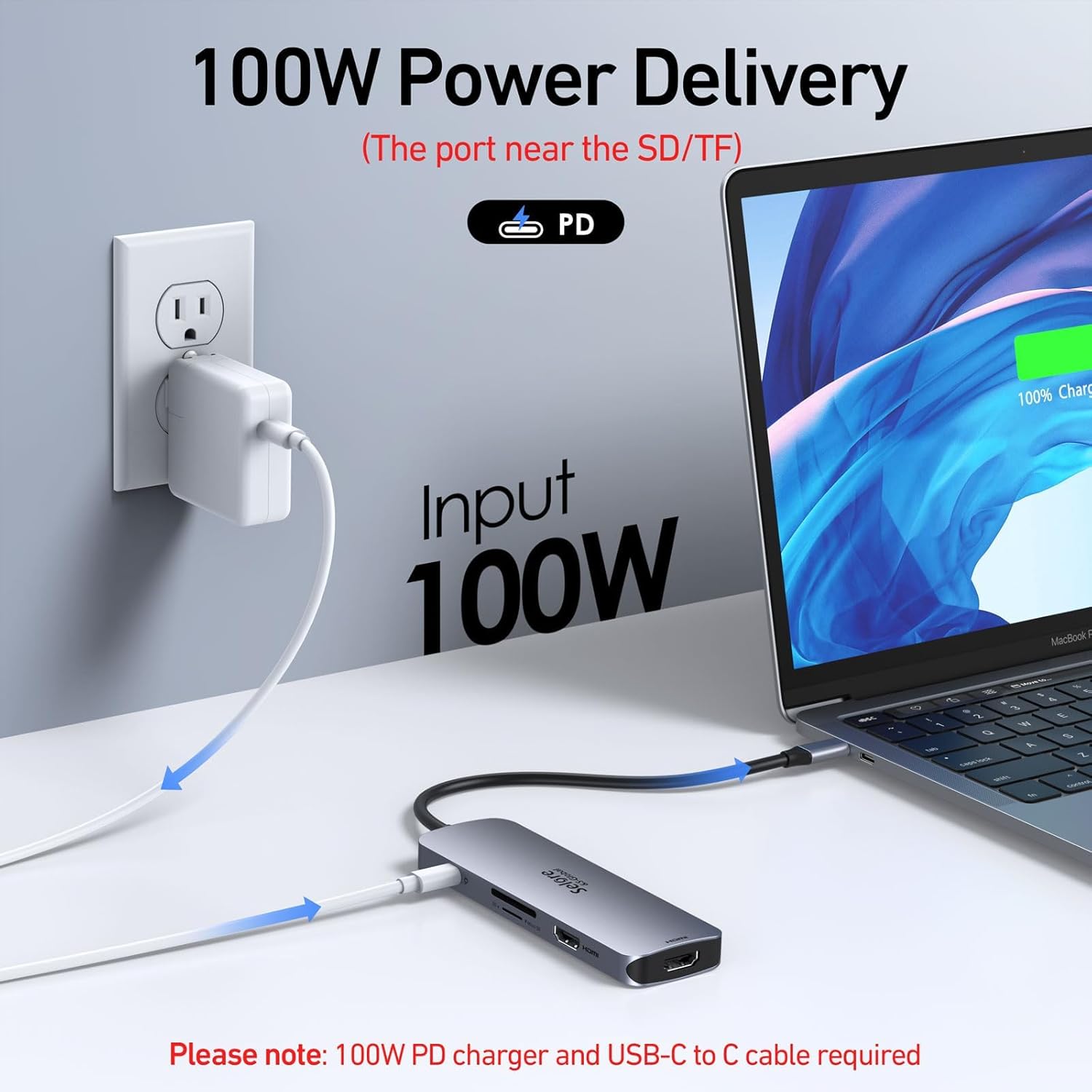
4 100W Power Delivery
5 5Gbps Data Transfer&SD/TF
Why is my HDMI port not working
Docking stations require a Thunderbolt or full-featured USB-C port.
If the USB C port you are using only has data function or charging function, then the video function will not be available
Can I use this dock with a Mac at all?
Yes, but only in mirror mode (SST).
How do I achieve dual 4K@60Hz output with this docking station?
– Your Windows PC must support DisplayPort 1.4 (DP1.4) or HDMI 2.0 protocols.
– Use HDMI 2.0 or DP1.4-certified cables.
Why can’t I get dual 4K@60Hz to work?
Common reasons include:
– Incompatible GPU: Older GPUs may not support dual 4K@60Hz.
– Low-Quality Cables: Non-certified cables may cap resolution at 4K@30Hz.
– System Settings: Check display settings to ensure refresh rate is set to 60Hz.
Key Notes for Buyers
– Windows Users: Full support for dual 4K@60Hz + MST extended mode.
– Mac Users: Mirror mode only; check our [Mac-compatible solutions].
– Need Help? Contact support for personalized troubleshooting.
[8 in 1 USB C Hub Dual HDMI] Transform your laptop with this latest upgrade Selore 8-in-1 dual monitor hub featuring dual 4K60HZ HDMI ports, a 100W PD charging port, a USB-C port up to 5Gbps, two USB 3.0 ports up to 5Gbps and TF/SD card slot up to 104 Mbps. Versatile and all-in-one hdmi adapter for dual monitors,suitable for home and office use for effective work (Docking stations require a Thunderbolt or full-featured USB-C port)
[Dual Monitors Made Easy for DP1.4 Laptop] Note for Mac Users: This adapter only supports mirror mode (repeated display), dual screen extension with two different screens (MST) is not available on macOS! With our advanced intelligent technology, the 2 HDMI to USB C adapter provides temperature control and stable performance. Boost productivity with our usb c dual hdmi supporting MST mode under Windows Laptop for extending two monitors simultaneously
[Speedy charging 100W] This dual hdmi adapter for 2 monitors with a USB-C power delivery port(near the SD/TF) can charge your laptop anytime; hdmi hub for multiple monitors input 100W, output 85W. Please Note: Power charger & charging cable is not included in the package. Note:The second USB C port is only for data transfer
[Fast Speed USB C Dock] 1xUSB C 3.0 &2xUSB A 3.0 port not only allows you quick transfer of data with a speed up to 5Gbps,but also supports to connect to peripheral devices such as mouse keyboards.USB C to SD/TF card reader(speed up to 104Mbs) allows you to easily browse and copy photos and videos from your cameras, and quickly share your beautiful moments
[Universal Compatibility] Note: Docking stations require a Thunderbolt or full-featured USB-C port. If the USB C port you are using only has data function or charging function, then the video function will not be available. Our plug-and-play docking station with 2 HDMI ports is compatible with a wide range of USB C or Thunderbolt 3/4 laptops,including MacBook Pro/Air(only supports mirror mode (SST)). Ideal for home and office use, maximizing productivity and efficiency
13 reviews for USB C Docking Station Dual HDMI Monitor, USB C to Dual HDMI Adapter with 2HDMI Ports, PD Charging, SD/TF, USB A&C 3.0 Ports, Laptop Docking Station for Dell XPS/HP/Lenovo/Surface/Yoga etc
Add a review

$5.99
MagnumMan –
Works Just as Well as the More Expensive Counterparts
Love my MacBook but hate the fact it has just a couple USB-C ports on each side and no SD card or standard USB slots.I’ve had dongles before that increased the MacBook’s capacity but they were attached with USB-C cords that dangled and tangled. In the long run, you sacrificed portability for convenience.This unit plugs into the 2 USB-C ports on the side and adds a variety of USB and memory card functions to the mix.In my case, I attached it to the right side ports so it technically faces upside-down. Even though I can’t see the power-on light, I know it’s working because I can see the green glow of the power light shining down on my desktop.And it’s designed to look like it came with the MacBook (unless you have the newer, colored versions) and even fits nearly flush to the side.One thing to keep in mind, though, is that this is a hub/dongle and merely plugs into the USB-C slots on your MacBook. It provides no power on its own unless you plug in a power source.To that end, it has a pass-through charger port (it’s the first USB-C port available) so if you’re attempting to power yet another port off of this dongle be aware of that.Worth noting, this will NOT work if you have a cover on your MacBook. Covers that come up the side will interfere with plugging this in.As for pricing, it was the lowest priced one I could find at the time and works just as well as the more expensive ones I’ve used in the past (these were originally $100 or more at one time).
Jitendra Chandna –
HDMI port worked well on mac
The product is good and it worked really well on Mac I have used hdmi port so far and that worked well
Amazon Customer –
Worked well
Super small and portable. Worked exactly as promised.
tw_kw –
Good Value / Would prefer 60w
it works well and is a good value. The only issue is that my laptop won’t let me restart using the port because it doesn’t have 60 watts. So when restarting I have to make sure it’s unplugged then I can plug it back in after the restart. Not a big issue but worth mentioning.
Nikki –
Great Adapter for Apple laptop
Only had it a few days but so far, it’s great. All the various sized ports are so much better than the adapter that came with my Mac.
Dale in Tennessee –
Connectivity and Ports
Update: 11/2025 The ethernet port failed after 5 months of use, the support I received from Solare was outstanding. It took a few emails to verify that it was indeed a failure of the internal circuit. The concern and care of the support staff was superlative. Marina was especially helpful and took care of the issue, professionally and quickly. In this day and age, it is hard to find good support of product, yet this company and staff went above and beyond to make sure that the situation was remedied. And it was. Thanks to the team at Solare. Updated to 5 stars for the support. OutstandingThis device has the connectivity I was looking for on my new laptop (Dell 288V). It drives both monitors with the lid closed on the laptop which is what I was looking for.There is no apparent lag, stutter, or blinking of the monitors with this unit which I would find very annoying. This unit is a keeper.UPDATE: This worked fine for about 2 weeks, now the stutter has appeared. The mouse is all over the place and the keyboard disconnects frequently. Yes, these work through another port on the laptop. I’ll try it a bit longer, then unfortunately, I’ll have to return it.UPDATE 2: The lag referenced in the above appears to have been related to load on the USB-C interface to the laptop or the laptop itself. I was running two monitors (not 4k), audio on web browser and a backup to a SAN over the ethernet connection, along with the keyboard/mouse combination through the USB-A ports. I’ve moved the keyboard/mouse connection and managed the load. Note again, the lag could have been the interface on the PC, not the unit. Hence, I’ve upgraded the review to 4 stars.
Melissa –
Worked perfect
Perfect!
SMart –
Unable to send signal from USBC to Displayport to monitor
I bought this to replace a smaller hub whose USB 3 port failed … this has lots of USBA USBC and HDMI ports, so I thought it would work well with my newer HP laptop … some yes, some no.The multiple USBA ports work well with Logitech usb wireless sender, scanner, misc USBA devices, and PD power in and charging laptop is good … but the display doesn’t work at all. “Beep” shows that Windows recognizes the signal, but the USBC port does not send a signal through the high quality USBC-Displayport adapter cable … no display. Other cheaper/simpler hubs have … darn.I thought I had an all-in-one.Guess it will have to be returned.
Narán Villegas Olvera –
Funciona bien el adaptador, solo el USB que está solo en un costado se traba y el adaptador no funciona si planean usar un protector o case para su Mac, pues no alcanza a conectarse correctamente.
FERNANDO GONZALEZ LOYA –
Te da bastante productividad al poder conectar 3 dispositivos al mismo tiempo, puedes cargar la Mac.
chaqchaq –
I bought this USB‑C adapter for my MacBook Pro (M1, 15″) and it’s been a lifesaver. The MacBook only has USB‑C ports, so having HDMI, USB‑A, and SD card slots all in one hub makes daily work so much easier. The HDMI output works flawlessly with my external monitor—no lag, no flicker, and crisp 4K resolution.The build quality feels solid, with a sleek aluminum finish that matches the MacBook design. It’s compact enough to carry in my laptop sleeve, and it doesn’t get hot even after hours of use. I also appreciate that the USB ports transfer files quickly and reliably.If you’re tired of juggling multiple dongles, this hub is a great solution. It’s plug‑and‑play, no drivers needed, and everything just works. Highly recommend for anyone with a newer MacBook Air or Pro.
Sarai Lopez –
Funciona muy bien pero si la Mac tiene funda el adaptador no funcionará a menos que se quite la funda
Denise Ryser –
Very happy with this purchase! It is very sleek and blends in with my laptop, not bulky at all. Does exactly what its created to do. Adapts!!