

WALI Single Monitor Mount, Gas Spring Monitor Arm for 17-34 inch Screens, Adjustable Computer Monitors Stand up to 26.4lbs, with Clamp and Grommet Base, Mounting Holes 75 and 100mm (GSMP001N), Black
$24.69
Related Products



From the brand


Trusted Monitor Solutions
WALI strives to bring ultimate comfort and efficiency, both at home and in the office. It has been established in the United States for more than 5 years. Since its establishment, it has sold more than 5000000 pieces of goods, and its product quality has been recognized by most consumers.
We have multiple product support team members, email 12 hours to answer any questions you may have. To provide you with the best shopping experience.
WALI Single Monitor Arm
WALI Dual Monitor Mount
WALI Triple Monitor Mount
WALI Ultrawide Monitor Arm
WALI Quad Monitor Mount
WALI Laptop Arm Mount
WALI TV Mounts
Compatibility: The WALI Single Monitor Arm is designed to fit most flat or curved LCD/LED screens ranging from 17″ to 34″, max load capacity 26.4 lbs for flat screens and 19.8 lbs for curved screens, with standard Mounting Pattern mounting holes (75x75mm and 100x100mm)
Full Adjustable: This monitor stand allows for full adjustment; it swivels +180°/-180°, tilts +70°/-45°,and rotates 360° for optimal workspace organization and efficient use of desk space. Its sturdy construction ensures long-term usability
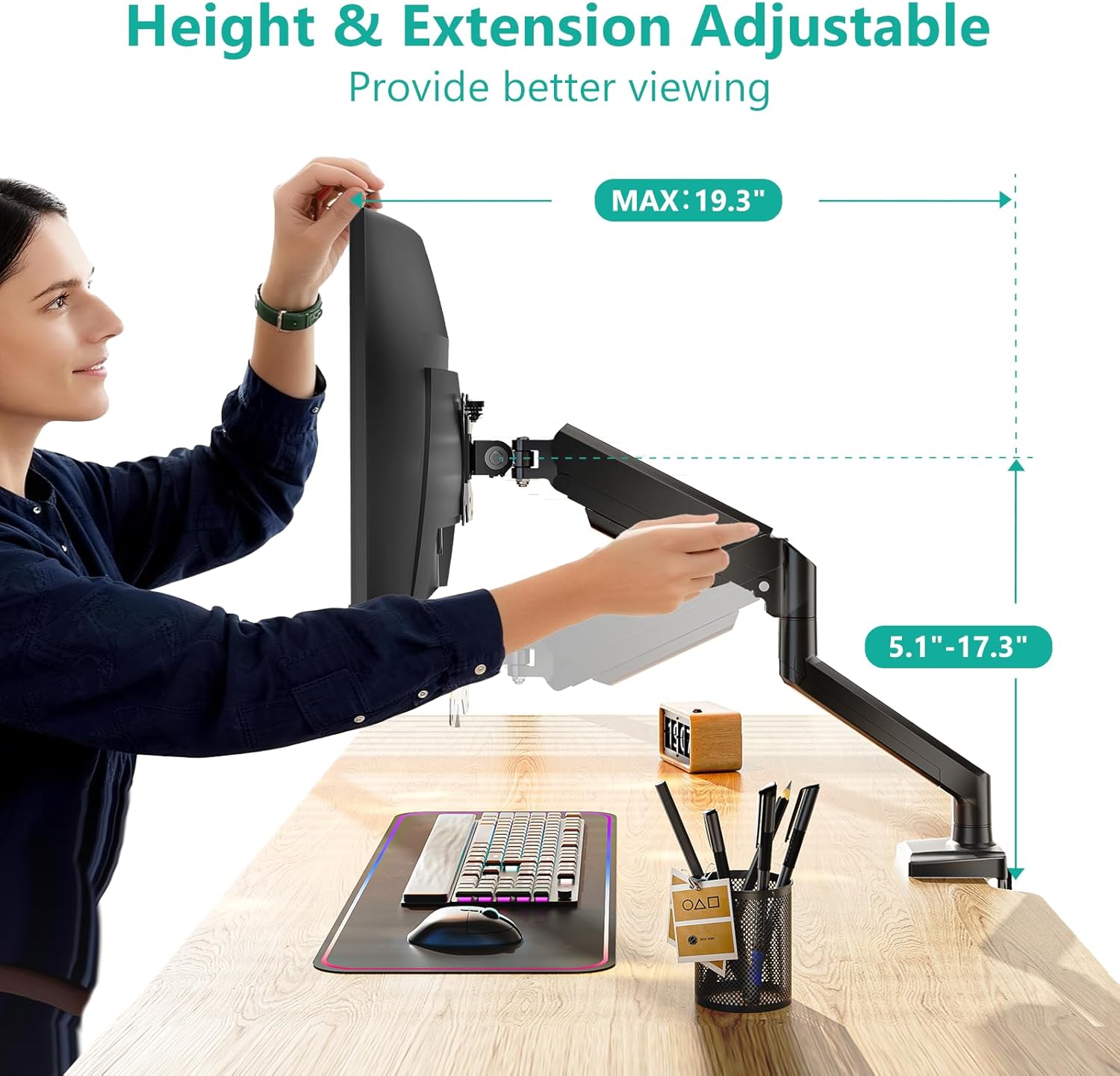
Ergonomic Viewing Comfort: WALI single monitor mount allows you to extend your screen out by 19.3″ and raise the arm up to 17.3″ above the desktop by adjusting gas spring, allowing optimal screen positioning for reduced neck, eye and back strain
Easy Installation: The WALI Single Monitor Arm comes with two installation methods: clamp and grommet base. With straightforward instructions, you can set up your monitor arm effortlessly, making it a hassle-free addition to your desk
Package Includes: 1 x WALI Single Monitor Gas Spring Mount (Black), Mounting Hardware Kit, User Manual, experienced and friendly US based customer support available to assist 7 days a week
12 reviews for WALI Single Monitor Mount, Gas Spring Monitor Arm for 17-34 inch Screens, Adjustable Computer Monitors Stand up to 26.4lbs, with Clamp and Grommet Base, Mounting Holes 75 and 100mm (GSMP001N), Black
Add a review

$24.69
Nav –
Definitely worth it for the price, minimal hassle setup and high build quality
High quality and sturdy mount without breaking the bank. I’m using this to mount a 24″ AOC monitor and it works exceptionally well. I love how easy it is to adjust the height and it holds it perfectly. It was a bit confusing to figure it out at first but mainly because I was trying to raise/lower it without the monitor mounted yet and it needs the extra weight to actually begin to move up/down after a certain point. Would recommend 🙂
Jenna –
Good solution for dual monitors
I tried several dual monitor mounts before using these two single Wali monitor mounts. I have two 27 inch monitors, but the monitors are not the same. One is Dell and one is LG. I also do not have a deep desktop so I needed them to be as close to the wall as possible. My desktop is 20 inches deep and 24 inches wide. Using these two separate monitor mounts I was able to install them on each side and adjust them individually, something I was having a hard time doing with the dual monitor mounts. They were easy to install and seem very sturdy. I do wish the cord concealment was a little better but I think I’ll be able to conceal them a little more on my own. Overall, good product.
Vanessa Ostermann –
Solid product, worth the money.
I got the WALI triple monitor mount that says it’s for 13–27 inch screens but I’m using it for three 28 inch curved monitors and yeah I definitely had to get a little creative with the setup because the sizing they list is accurate and the curves make it a bit awkward at first, but once I figured out the angles and tightened everything down it actually holds them really well, I’ve had this thing up for like six months now with zero issues besides tightening the bolts one time, it’s sturdy, doesn’t sag, and honestly does the job better than I expected for something not technically meant for my exact size.
Cat Mandu –
Priced right, works just fine, clear instructions, but not without issues.
Easy to assemble, adaptable for thru hole or table, cord management contrivance cause some problems, in that the plastic piece designed to cover cords broke… I used zip ties in its place… suboptimal, but OK.
Stone –
it is pretty good
i bought it for the additional height of the side monitors and it is exactly as i expected. It has significantly cleared desk space for me along with that the mounting brackets it uses makes it relatively easy for you to add or remove monitors without having to take the whole thing apart like my last double monitor mount. The packaging and instructions are very clear and are pretty much self explanatory, and the mount comes with absolutely everything you need including mounting screws, stand offs, and plenty of extras.the mount itself is very lightweight but sturdy, and the arms are ease to move but hold your monitors in place very well. for the price i got it at, it was the absolute best price for a 3 monitor mount with vertical adjusting arms.the over all look of the mount is very good, but that only after i added my own cable management with zip ties surely it wouldn’t have been too much more for them to add additional cable management for the side arms this is really the only area of improvement that i can critique.along with that I am really not a general fan of gas arms,, they work fine and seem to hold in place solely due to the weight of your monitors, my main gripe about it, is how long are these things expected to truly hold up, solid metal just does way better even if its heavier, it lasts longer
Seeking Peace –
Well Made and Sturdy Monitor Stand
Easy to put together and holds my 34″ curved monitor with no issues. Will probably buy another for a second monitor.
Geronimo553 –
Supports the Samsung G9 Odyssey
I bought this based on other reviews. The only known mount option for the G9 Odyssey costs $400. I bought this mount as opened box for $70 making it quite the cost difference between the two choices. For other odyssey owners out there this mount will cover your needs, the reviews are accurate. However you will need to follow a couple quick steps.Before mounting the monitor, assemble the arms together on your desk. Be careful not to lose the little metal tabs between the arm shrouds they fall out easily when you take the arms apart later. Next take the provided tool and spend a minute rotating the middle of the arm adjustment screw towards the + symbol. You will question if the bolt will fall out from the amount of turns needed. Doing this is required or the gas piston won’t hold up the monitor! Next the problem child of this mount is the vertical up/down tilt at the end of the arm. The included bolt won’t hold the odyssey up and its a pain to deal with when the monitor is mounted. So trash it. Now take the heavy piston arm to your garage or hardware store. I found that a 13mm bolt head fit the hole and threads. Add a washer on both sides followed by a castle nut. You will need two 13mm wrenches or socket wrench to tighten the new bolt down, it won’t take much pressure. Next reattach the arm onto the mount, without the monitor. Use a level or eyeball it to tighten it down evenly leaving the tilt at 0 degrees. Though it might be best to tilt it back or upwards 10 degrees due to how the arm mounts into the monitor bracket. Lastly mount the back plate to your monitor and attach the piston arm. If you’re mildly strong pick up the monitor with the screen facing you then drop it into the mount on the desk. Really it’s a two person job! If the monitor is tilted incorrectly you are going to need a friend to hold it or adjust it as you tighten/loosen the new bolt again, a major pain. I had it sitting on the desk and it was a thirty minute fight trying to get the tilt right. Turns out the mount itself on the arm tilts forward about 10 degrees making the monitor tilt down a little. Ughh just bring a friend the tilt adjustment is an all or nothing ordeal. Too Loose the monitor flips down and too tight it won’t budge. It was terrible juggling this thing with tools in hand with this heavy thing… And that’s all the extra work you need to do! Tighten the piston adjustment bolt towards the + and buy a new bolt for the vertical tilt.Oh pro tip: test without the monitor attached sitting down and see if you like the placement. Originally I had mine mounted center on the desk and well that didnt work at all. Now its off center to the right. Also use the included package foam to check clearences. I balanced the foam on the end of the arm and it worked great as a reference piece.As for mount itself, the mounting plate included does fit the odssey’s metal cup plate, use the included black screws with a screw driver. Just be sure to tighten “everything” down. Don’t skimp on this or locktight if you have it. Overall everything is thick aluminum or cast aluminum so its solid metal. The pressure plates are thick steel and well painted. Everything fit together without any extra work. The desk pressure plate is only held on top of rear vertical bolts by gravity. Its very jank but works the part when tightened. The plastic cable covers were a pain but doable.The biggest gripe I have is the janky L bracket. There are four thick screws holding it together and its not flush or a perfect 90 degrees in the back. So if your desk is against a wall like mine, it won’t be the most ideal… I didnt add the plastic cover to save on an extra half inch clearence against the wall. I really dislike the screws on the L bracket. I had two of them strip out with mild pressure. In the future I’m going to redrill the holes and add proper bolts to secure it.The extra added effort was worth saving $300 over the other expensive option. I’ll update this review if anything changes. For better or worse.
Mickqqe05 –
It does not support monitors 32″ and lighter than the 15kg advertised, returning it, don’t buy it
Raafat Hussein –
The mount not fitting into the screen back it’s biggerWhat could I do ??Samsung g9 49 inch curved
Martin C –
I purchased the WALI Triple Monitor Mount a year ago to overhaul my computer setup, and I couldn’t be happier with the results. This mount is a game-changer for anyone looking to optimize their workspace.The installation was straightforward, and the gas spring arms are incredibly helpful. They make it easy to adjust each of my three 27-inch monitors to the perfect height and angle. This not only improved my posture and comfort but also freed up a ton of valuable desk space that was previously taken up by clunky monitor stands.The build quality is solid, and I feel confident that my monitors are secure. The integrated cable management clips are a nice touch, helping to keep all the wires organized and out of sight for a clean, professional look. Overall, this mount has transformed my setup into a much more organized, ergonomic, and aesthetically pleasing workspace. I highly recommend it to anyone with a multi-monitor setup.
Emisario Zeksual –
Firme como la riata de mi tío 😤🍆Este soporte aguanta más que mis ganas de textearle a mi ex a las 2am.Le colgué un monitor que pesa más que mis problemas y ni se despeinó.🔩 No tiembla, no truena, no se raja.Es más estable que mi salud mental con terapia y chochos.🔥 Si algún día me muero, que este soporte cargue mi ataúd.
Bernard ong –
Very strong.it has been bery long time. Holding my 49″ monitor.