

WAVLINK Video Capture Card, 4K HDMI Capture Card for Streaming, 4k@30Hz Capture& Loop-Out, Single 4K@144Hz Display, 100W PD, Compatible with PS5/Xbox/Switch, OBS, Windows/Mac
$7.99
Related Products




From the brand


WAVLINK docking station
WAVLINK Docking
WAVLINK USB C HUB

WAVLINK Laboratory

Warm Consultation

Modernized Factory
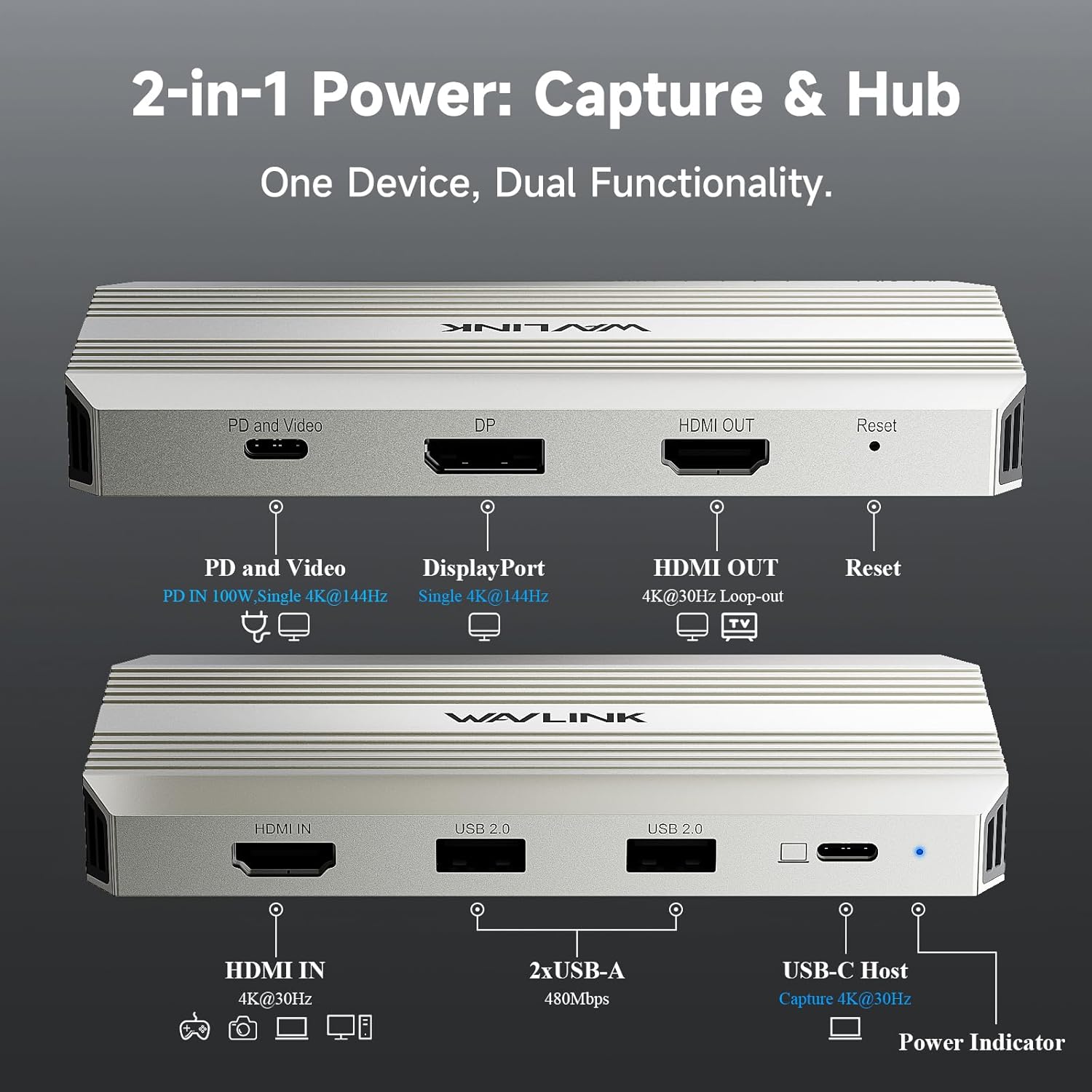
Professional Efficiency Improvement – If you are a personal creator, gamer, remote worker or need to work in multiple scenarios, then you have to take a look. There is such a Video Capture Card that can provide you with 4K@30Hz Capture& Loop-Out, Single 4K@144Hz Display, and 100W power input, USB2.0 for wireless devices. It can greatly improve work efficiency and keep the desktop tidy. What do you think?
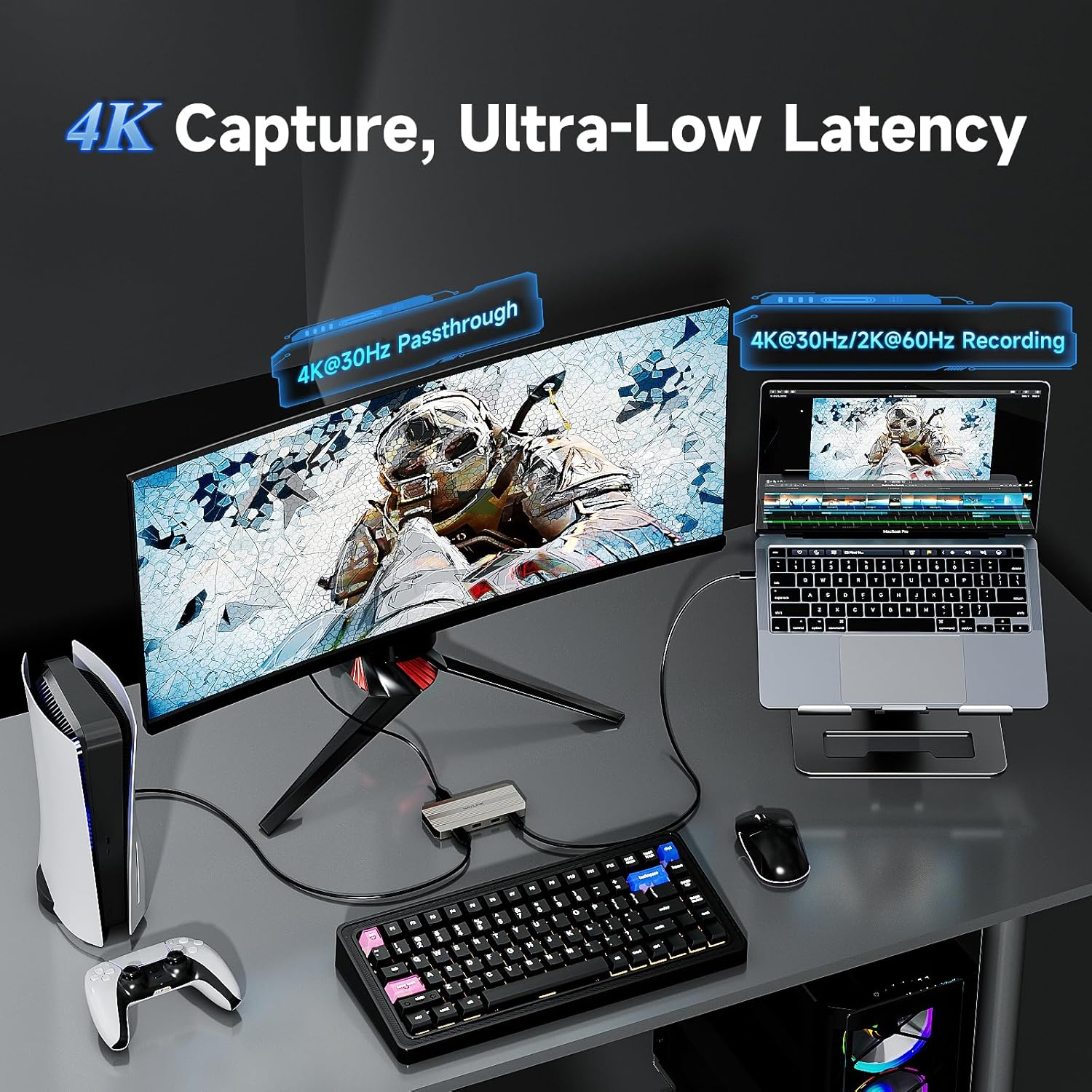
4K HDMI Capture Card for Streaming – Experience crystal-clear 4K@30Hz video capture and an ultra-responsive, low-latency 4K@30Hz HDMI loop-out for uninterrupted gameplay or real-time monitoring. Supports high-fidelity YUY2 uncompressed video for superior image quality from your PS5, Xbox, Switch, or camera.
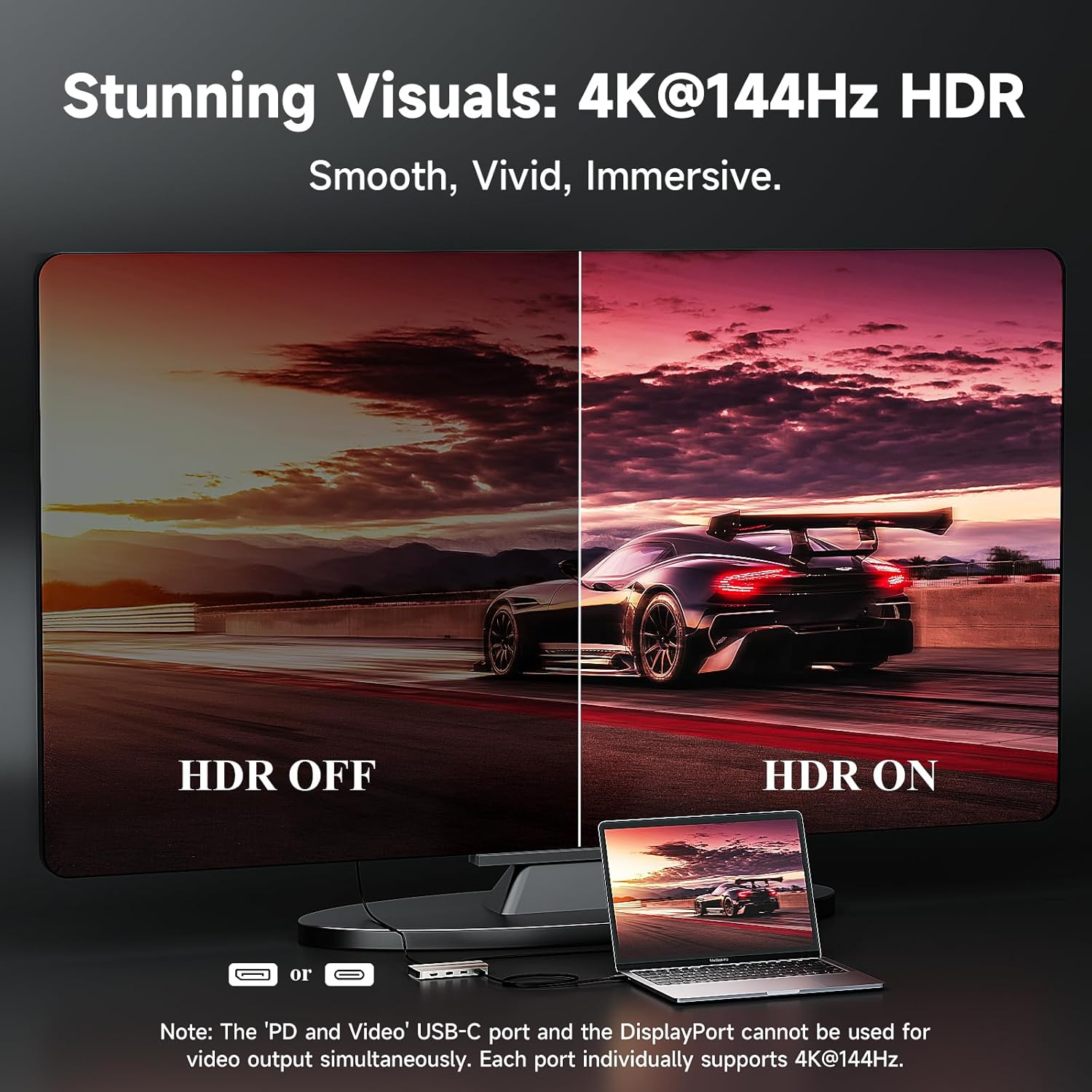
4K@144Hz HDR – If you are a gamer or video producer, you know what 4K@144Hz means. This capture card transform your laptop into a workstation with stunning single 4K@144Hz HDR display output via DisplayPort or the “PD and Video” USB-C port(under DP1.4).
Video Capture Card with 100W Power Delivery – Say goodbye to low battery! Video capture card with 100W power delivery, 90W for laptop charging. Our products do not come with a charger, please use a 20V/5A/100W charger. Please confirm your computer charging power, it will not charge if it is higher than 90W.
Pls Note – Please make sure that the computer’s Type C port supports charging and video output. The USB-C Host and HDMI IN cannot work simultaneously, if they are connected at the same time, the HDMI IN captures the video first. If you have selected the DP port to extend or mirror your computer’s screen, the PD and Video port can only act as a Power IN. Computers with Mac OS can only extend one different screen and prioritize HDMI capture
10 reviews for WAVLINK Video Capture Card, 4K HDMI Capture Card for Streaming, 4k@30Hz Capture& Loop-Out, Single 4K@144Hz Display, 100W PD, Compatible with PS5/Xbox/Switch, OBS, Windows/Mac
Add a review

$7.99
KittyCatSeniors –
Captured My Attention… and My Video Feed
I got this capture card to grab clean stills and clips from my monitor — primarily for work-related stuff like manuals and visual documentation. I’ve got six 4K monitors in the mix and used one for this capture card. For context, my workstation isn’t some RGB-blasted gaming battle station — it’s a high-end workstation that spends its days wrangling data, making videos, and not slaying dragons.First off, the 4K passthrough is solid. I haven’t noticed any image loss or lag, and I’m picky about that sort of thing. It doesn’t mess with the signal chain —a small miracle these days. I even use it with a matrix switcher setup for my security feeds—capturing stills from surveillance footage for marketing posters and manuals. Nothing like seeing a blurry raccoon become a sharp raccoon in print.Setup is easy. It needs a good USB-C power source, not some leftover charger from a Kindle in 2012. Plug it directly into the machine with a USB 3.0 or better port, and use a quality HDMI cable (if your HDMI cable looks like it came out of a cereal box, upgrade it). Once everything’s connected, OBS picked it up with no fuss.It’s not exactly plug-and-play magic — more like plug-and-read-the-manual-once-then-play. But once it’s running, it stays out of the way and just does its job. I do a lot of frame freezing and still capture, and it’s been reliable for that. I’ve used it across different feeds, different content, and it just chugs along like it knows what it’s doing.Build quality seems fine. It’s light, doesn’t get toasty, and hasn’t made any suspicious noises. That’s about all I ask from electronics I plug in regularly.The cost? Reasonable. Especially compared to some of the overpriced name-brand ones that promise 4K and give you “Kinda-K.” I haven’t tested it on all my other machines yet because when something works, I’ve learned not to poke it unless I have to.If you need to capture clean 4K or just want a still shot of your PS5 crashing mid-boss fight for evidence, this card will do it without complaining. It’s already earned its spot on my desk.
Buen producto pero 3 estrellas por su poca precisión y sensibilidad –
No es plug and play
Solo funciona si se pone exactamente en 4k a 30fps
Random Viner –
WAVLINK Video Capture Card, 4K HDMI Capture Card for Streaming
The WAVLINK Video Capture Card, 4K HDMI Capture Card for Streaming did exactly was I was expecting. Setup was easy, plug it in, select it in your software, and you’re ready to go. The 4K pass-through is smooth and lag-free, and the captured footage looks crisp, vibrant, and professional.I’ve used it for streaming and recording gameplay, and it’s handled everything perfectly. No dropped frames, no weird artifacts, and no frustrating configuration issues.The build quality is solid and compact, making it great for portable setups. For the price ($59.99 at time of order/review), the performance is seriously impressive. If you’re looking for a reliable, high-quality capture card, this one is a fantastic choice. Just make sure you understand the power requirements or you will have issues with it working properly.
Nathan –
Tidy Setup, Pro Results
Plug-and-play win. I’m using this capture card for streaming and recording, and it’s been rock solid—OBS picked it up instantly, no drivers, no fuss. The passthrough feels snappy (no noticeable lag), and being able to capture at 4K30 while looping out plus run a single 4K144 display is clutch for gameplay and editing.Why it works: the picture looks clean (uncompressed YUY2 support helps), audio stays in sync, and the desk stays cleaner since it powers my laptop through the same hub (PD in up to 100W, ~90W charging). Also love that it doubles as a little I/O base so I’m not juggling extra dongles.Tiny tip: use a proper 100W USB-C charger and make sure your computer’s USB-C supports video/charging; otherwise you’ll think something’s “broken” when it’s just the port.Bottom line: tidy setup, crisp capture, buttery passthrough—exactly what I wanted.
Ridin Bicycles –
Great for video/streaming composition or recording for cloud video publishing
I picked this video capture box to help with podcast and training course recordings and because the price was excellent for the features. This box is solidly made and lightweight ideal for travel and impromptu training sessions. The box is automatically recognized as soon as the USB is connected so the only learning is for the recording software you choose, like the open source (no cost) OBS Studio (Video 5). The recorded resolution for me is 4K@60Hz and that is more than enough for streaming services and video publishing cloud services. This is a useful and efficient video recording solution that fits into a laptop bag pocket, has HDMI pass-through to a real monitor for slides and USB hub features all in one device.
Derek S –
I ordered this WAVLINK video capture card as part of the Amazon Vine review program, and here are my thoughts.I tested this extensively with a PS4, PS5, Xbox, and a Blu-ray player, and overall, it does a pretty good job of capturing video. Setup was simple: just connect your console to the HDMI In, HDMI Out to your TV, and the USB-C cable to your computer. The driver was preinstalled, so all I had to do was open OBS, add a new video capture device, and select the UVC03 capture device very straightforward.This card only captures in MJPEG, so it doesn’t offer different capture modes like some other cards that have less compression artifacts. Still, despite using MJPEG, it performed well. I was pleasantly surprised that it could even capture video from my Blu-ray player, which normally would be blocked. I didn’t test it, but you could likely capture from a cable box as well since it doesn’t seem to enforce HDCP copy protection — a nice bonus.It also has USB 2.0 ports, which you can use to connect a keyboard, mouse, or headset. While USB 2.0 is slower than USB 3.0, it’s perfectly adequate for peripherals, especially on laptops with limited ports.The build quality is solid, and I disassembled the unit to check the internals. There’s a main chip under a heatsink, but I couldn’t find any information about this chip online despite searching by the model number it seems to be undocumented.In terms of performance, it captures 4K at 30 FPS, and if you lower the resolution, you can get 1080P at 60 FPS by adjusting the settings in OBS. Occasionally, I had to disconnect and reconnect the HDMI cable from my PlayStation or other device to get it working, but this happened very rarely.Overall, this is a well-built capture card that just works, easy to set up, and versatile across multiple devices.
Tom –
Cette carte de capture WAVLINK est une excellente solution pour streamer ou enregistrer du contenu en gardant une qualité d’affichage haut niveauLe passthrough en 4K jusqu’à 144 Hz fonctionne parfaitement : aucune latence visible, l’image reste fluide et nette même en jeu rapideLa capture elle-même est propre en 1080p/60 et fonctionne sans problème sous OBS, que ce soit sur Mac ou WindowsLa présence du Power Delivery 100 W est un gros plus, surtout si on utilise un laptop : un seul câble USB-C et tout est alimentéLa construction est solide et le boîtier chauffe peu, même après plusieurs heuresCompatible sans souci avec PS5, Xbox et SwitchPour 59,99 €, c’est clairement un excellent choix pour un setup streaming simple et efficacePoints positifsPassthrough 4K 144 Hz fluideCapture propre et stablePD 100 W très pratique pour laptopCompatible OBS sans réglages compliquésFonctionne avec PS5, Xbox, SwitchBoîtier solide et peu de chauffeÀ améliorerLe câble USB-C fourni est un peu court
El PRO-bador –
Llevo tiempo buscando una tarjeta de captura que realmente me ayudara a mejorar mi flujo de trabajo, y esta ha sido un acierto total. Si eres creador de contenido, jugador, trabajas de forma remota o, como yo, te mueves entre varios escenarios, esta tarjeta es una auténtica aliada. Desde que la uso, mi escritorio está mucho más ordenado y mi productividad ha mejorado notablemente.La captura HDMI 4K a 30 Hz es nítida y estable, perfecta para grabar o transmitir sin perder calidad. Además, la salida en bucle 4K a 30 Hz funciona con una latencia tan baja que puedo monitorizar en tiempo real sin retrasos incómodos. Probada con mi PS5 y con la Switch, y la calidad YUY2 sin comprimir se nota.Pero lo que realmente me sorprendió fue la salida 4K a 144 Hz HDR. Para juegos y edición de vídeo es una maravilla; básicamente convierte tu portátil en una estación de trabajo de alto nivel. Solo por eso ya merece la inversión.Otro punto clave es la entrada de energía de 100 W. Gracias a eso puedo mantener el portátil cargándose mientras hago directos o grabo contenido, sin preocuparme por la batería. Solo hay que usar un cargador adecuado (20V/5A/100W) y verificar la compatibilidad, pero una vez configurado, es comodísimo.Algo importante: conviene leer las notas técnicas. Por ejemplo, el puerto USB-C Host y la entrada HDMI no pueden capturar simultáneamente; si conectas ambos, la HDMI tiene prioridad. En Mac OS solo se puede ampliar una pantalla, pero aun así funciona perfecto para captura. No encuentro esto un problema, simplemente hay que tenerlo en cuenta.En resumen: gran calidad de imagen, funciones avanzadas, potencia suficiente para sesiones largas y una versatilidad que facilita muchísimo el trabajo y el juego. Estoy encantado con esta compra y la recomiendo totalmente si buscas una tarjeta de captura profesional sin complicaciones.
MakiCita –
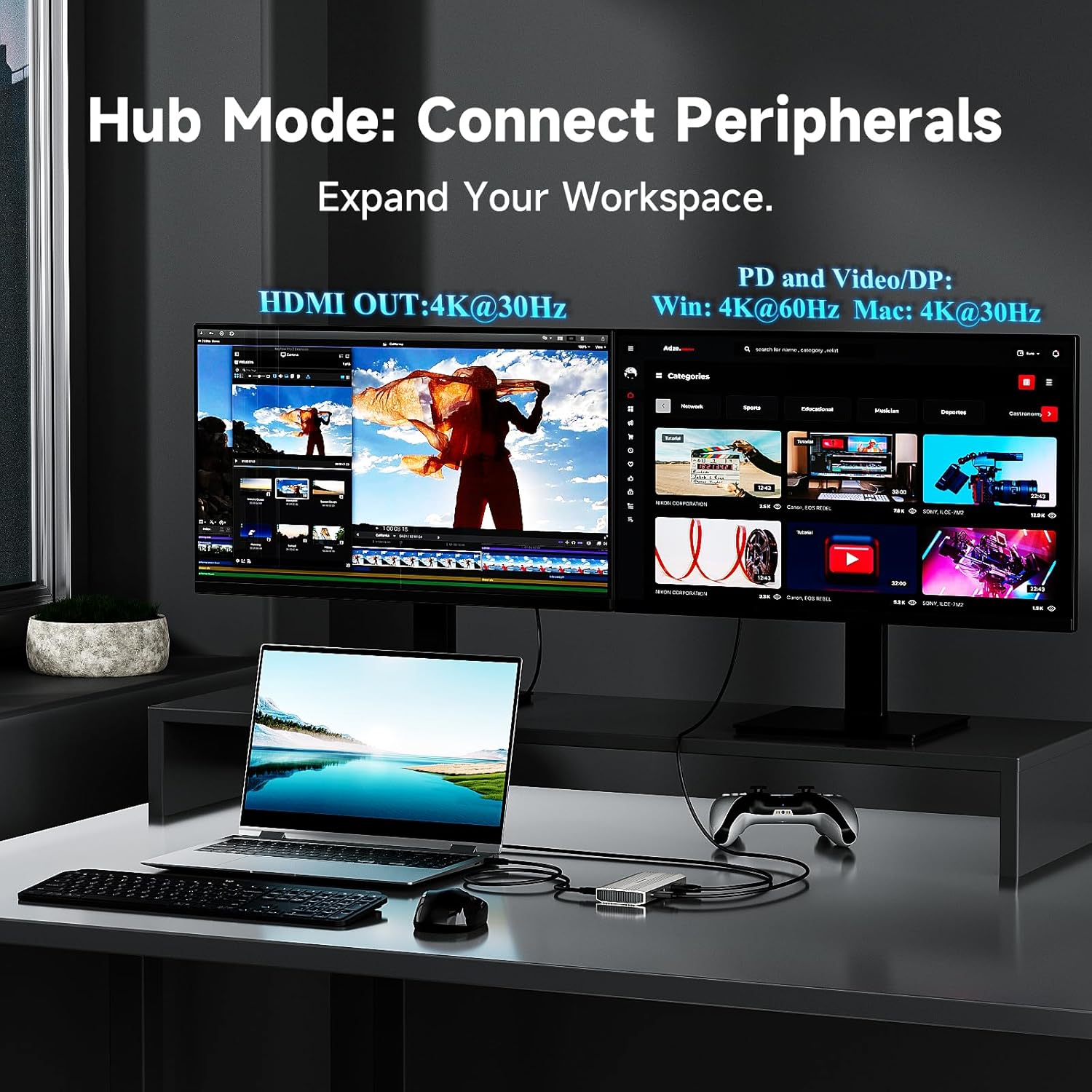
Ich bin mir nicht wirklich sicher, ob die Produktbeschreibung Erklärung genug ist, denn hier hat WAVLINK etwas sehr Interessantes gebaut. Wir bekommen hier eine Capture-Lösung und ein Mini-Dock in einem, welche in verschiedenen Modi verwendbar ist. Wenn man diese Vielseitigkeit einmal durchschaut hat, und weiß welche Einschränkungen es gibt, wenn man es so oder so verkabelt, dann könnte das für den ein oder anderen zum Must-have im Rucksack werden.Wir können diese Kästchen in zwei Modi benutzen, als Capture-Card, dann wird der PC mittels USB-C-Kabel an den Host-Port angeschlossen, die Videoquelle an den HDMI-Eingang und der Monitor an den HDMI-Ausgang. Capturing ist bis 4k mit 30hz möglich und benötigt keinerlei Treiber oder ähnliches. Das kennt man ja. Damit das ganze funktioniert, muss der Host-PC aber DP-Alt beherrschen.Im zweiten Modus können wir einen klassischen Hub konfigurieren, hier wird der PC wieder mit dem Host-Port verbunden, der HDMI-Eingang bleibt natürlich frei. Jetzt darf man bis zu zwei Monitore nutzen. Einer allein wird mit bis zu 4k und 144hz betrieben, bei zweien gibt es 60hz für den einen und 30hz für den anderen. In diesem Dual-Betrieb hat man die Wahl zwischen dem USB-C Port für PD & Video und HDMI-Out oder DisplayPort und HDMI-Out.Video kann nur an einem Eingang eingespeist werden, PD & Video oder HDMI-In, eigentlich klar, dass nicht beides geht. Wenn der DisplayPort-Ausgang benutzt wird, kann der PD & Video-Port ausschließlich als Eingang für eine Stromquelle genutzt werden, etwa um dem Host PC per PD mit Strom zu versorgen, denn ja auch das kann man noch mit einplanen.3 Monitore kann man hier dran übrigens nicht gleichzeitig betreiben, und natürlich sind die Bilder gestochen scharf, ist ja alles digital. Die Capture-Funktion ist nicht wirklich revolutionär, aber sehr guter Standard und ausreichend für viele spannende Dinge, ob nun Streaming von Konsolen oder Kameras. Daran gibt es weder etwas zu nörgeln noch ein besonderes Feature hervorzuheben. 4k mit 60hz wären schön gewesen.Puh, aber ja, das wirkt erst mal kompliziert und bedarf etwas Planung, oder Experimentieren. Irgendwann hat man den Dreh aber raus und seine zwei, drei Setups gefunden, versprochen.Mir gefällt vor allem die Kombination aus PD und Video-Capturing, so spart man sich beim Streaming von Konsole oder Kamera über das Notebook schon einmal ein extra Kabel und hat ein portables Streaming-Setup. Nebenbei kann man aber auch jederzeit switchen um ganz normal einen oder zwei Monitore als Desktop-Erweiterung zu nutzen.Die zwei USB-A Ports sind dann aber auch schnell zu wenig um hier drin einen vollwertigen Hub zu sehen. Es ist aber nachvollziehbar, dass hier ein Engpass besteht und der Kompromiss notwendig war um die spezielle Idee zu realisieren. Immerhin reicht es für einfache Peripherie.Die Verarbeitung des Gehäuses ist eigentlich Top, es gibt robustes Metall. Jenes sollte man aber am besten im Extra-Fach des Rucksacks aufbewahren, denn die Kanten bleiben hier scharf und könnten durchaus für einen Kratzer an teuren Geräten sorgen. Auch sitzen HDMI- und DP-Ports etwas straffer als gewohnt, was sich durch ein minimales, aber spürbares schleifen bemerkbar macht.Wirklich gut hingegen ist, dass hier kein fest verlötetes Host-Kabel die Hoffnung auf Langlebigkeit trübt, sondern diese Kästchen einfach nur Ports bietet die auf Anschluss durch ein Kabel warten. Ein USB-C zu USB-C Kabel wird beigepackt, in ordentlicher Qualität und von ausreichender Länge sogar.Es ist definitiv ein Nischen-Produkt, dessen beide Modi man zu nutzen wissen muss. Sieht man Sinn in beiden Verwendungsmöglichkeiten, dann kann man sich Platz und Kosten sparen.
Big Steve –
I acquired this piece of hardware with the specific goal of capturing high-quality footage directly from my XBOX Series S console. Initially, I encountered some friction when trying to pass the video through my desktop computer; I suspect the issue lay with my older PC’s components rather than the capture device itself, as connecting it to a more modern laptop immediately resolved all issues. Once the setup was stable, the frame rate and fidelity proved to be more than adequate for my current requirements, resulting in crisp and fluid video output perfect for producing my basic YouTube content.The capture device itself boasts a minimal and professional aesthetic, and it feels exceptionally well-made. While I consider its construction durable, it’s not the type of peripheral intended for rough use, but its compact and solid build suggests it will last. This unit has become an indispensable, reliable link in my creative workflow, offering a high-performance solution for transferring console gameplay onto a compatible machine for editing and streaming.