

WD22TB4 Dell Thunderbolt 4 Dock 40Gbps USB-C/USB-A 1 Year Warranty – Docking Station with 180W, HDMI, DisplayPort Cables & Cleaning Cloth – Supports Dual/Triple Monitors & 4K Displays
$30.99
Related Products





From the brand


Dell Docking Stations
Lenovo Docking Stations
Zebra Printers & Scanners
Dell Monitor & Fujitsu Scanner
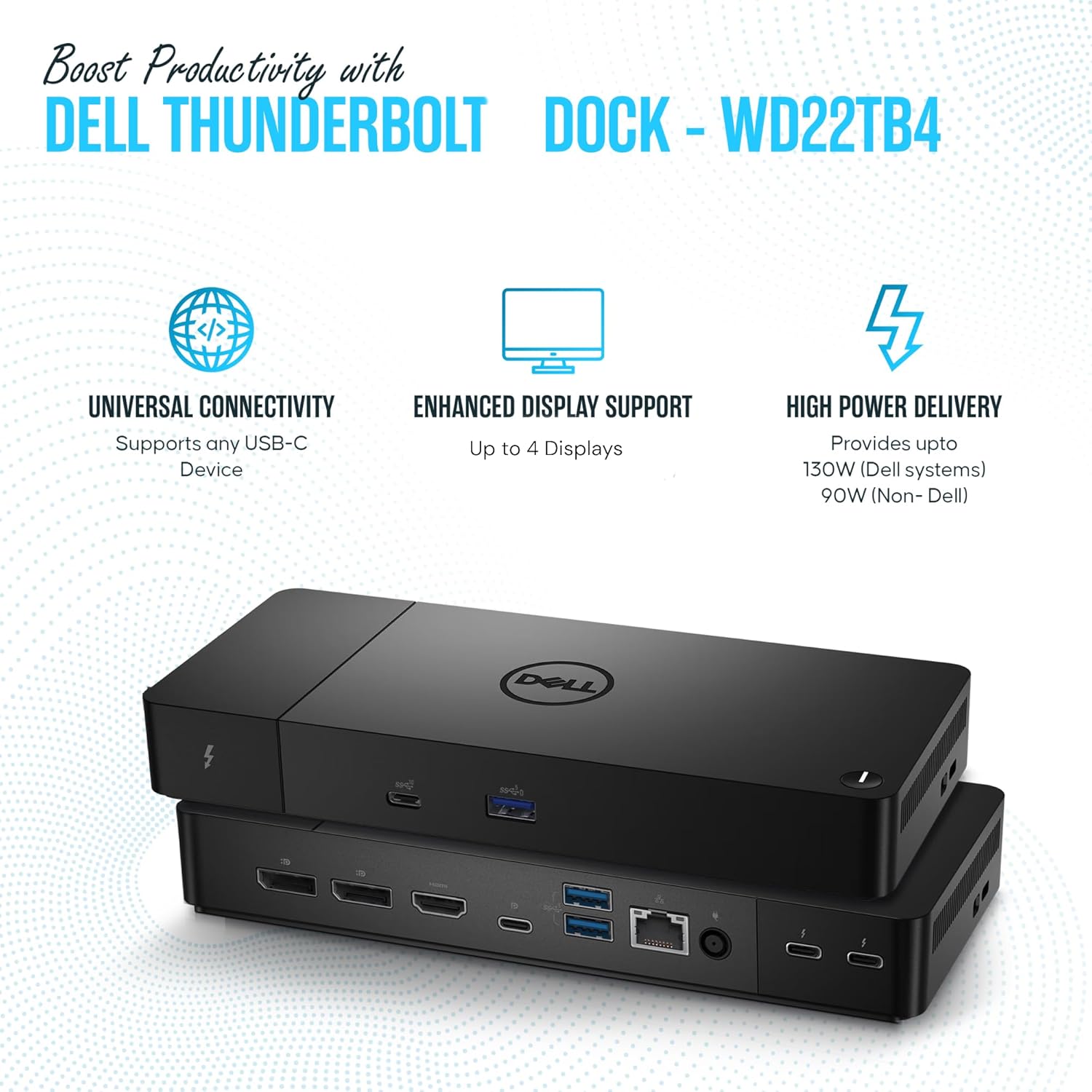
[13 Ports for Versatile Connectivity] – The Dell WD22TB4 offers 13 ports, including 1 Thunderbolt 4 host port (40Gbps, 130 energy delivery), 2 Thunderbolt 4 ports (40Gbps, 15), 2 DisplayPort 1.4, 1 HDMI 2.0, 1 USB-C multifunction port (10Gbps, video), 1 USB-C 3.2 Gen 2 (10Gbps, 15), 3 USB-A 3.2 Gen 1 (5Gbps), 1 RJ45 Ethernet (Gigabit), and a 3.5mm audio combo jack, ensuring seamless compatibility for diverse workflows.
[130 Energy Supply] – The Dell WD22TB4 delivers up to 130 of energy delivery, making it perfect for Thunderbolt or USB-C host devices, including laptops with larger screens. With a single cable, you can supply energy to your laptop while seamlessly supplying energy to multiple connected devices for an efficient and clutter-free workspace.
[Flexible Display Support] – The Dell WD22TB4 supports up to four 4K 60Hz monitors for Windows users, offering vibrant, high-resolution multitasking. macOS users can connect a single 4K 60Hz display natively, while dual displays may require DisplayLink. For M1 Pro and M1 Max Macs, dual 4K 60Hz displays are supported, but original M1 and M2 Macs are limited to a single external display due to macOS constraints.
[Reliable Gigabit Ethernet] – The Dell WD22TB4 features a Gigabit Ethernet port, providing a stable and fast wired network connection for seamless streaming, downloads, and online collaboration. Fully compatible with standard 1GbE networks and devices, it ensures reliable performance for all your connectivity needs, making it ideal for work or entertainment.
[Universally Compatible] – The Dell WD22TB4 works seamlessly with Thunderbolt 4, Thunderbolt 3, USB4, and USB-C devices, supporting Windows PCs, Intel-based Macs, and macOS systems with M1, M2, and newer chips. It is also compatible with Chrome OS devices and tablets featuring Thunderbolt or USB-C, ensuring broad connectivity for a variety of setups.
8 reviews for WD22TB4 Dell Thunderbolt 4 Dock 40Gbps USB-C/USB-A 1 Year Warranty – Docking Station with 180W, HDMI, DisplayPort Cables & Cleaning Cloth – Supports Dual/Triple Monitors & 4K Displays
Add a review

$30.99
Gary Withers –
Excellent Docking Station.
Works perfectly
Dr. Magi Smith –
Good device
I bought a cheaper hub that got hot and gave out in a couple months. This one costs more, but lasts much longer and works good.
Jared Still –
Not just for Dell Machines
This is the second of these docking stations I have purchased for a laptop. The first was an earlier model that is nearly identical.I do not work directly on laptops. They go into Betty Crocker cookie racks that are perfect for holding laptops.Laptops are connected to an 8 port KVM, and I use a standard monitor, USB keyboard and USB mouse.This docking station has HDMI, USB, and an ethernet port, all of which I needed for use with a new Windows Surface 2 laptop.It all works great.There are a couple things you should know:- unlike its predecessor, this unit does not have an audio output. not essential, but would have been nice.- it may still be necessary to connect the laptop to its own charging power supply, as Thunderbolt charging may be insufficient, as is the case the the MS Surface.All in all, well worth the expense to get wired LAN and KVM capabilities.
Dalton Bell –
Product works perfectly
Great docking station. This is the second one I have purchased for my PCs and I am very pleased with its functionality and performance. The station came well packaged and worked right out of the box with no issues. 10/10 would recommend this!
Travis –
No Image Display
I have used these stations in the past and loved them but my last one was purchased in August, delivered on 8/16/25 and no longer pushes any sort of image signal out. I have tried using display port, HDMI and USB c, I have confirmed the cables are working and I have power cycled the unit, holding the power button down to disperse any residual power after unplugging it from the supply. This only has a 1 month return/replace window so there $300 down the drain.
Timothy Chillers –
The right device
After purchasing and receiving another device that was supposed to work with my laptop I ended up returning.While doing some careful research I was able to find, purchase, and connect this device to my laptop…and connect all my monitors successfully.Now I have no issues with quickly disconnecting just one cable and I’m on the move.
chelpiper –
Works perfectly.
I use these docks at work for my job. My wife has been wanting to switch to dual monitors for a while so we got another monitor and ordered this same dock as I use at work. It worked perfectly, had all of the cables and everything we needed. FYI you may need to download the latest driver for this dock from Dell’s driver website, especially if you are going to use 3 monitors.
Nick T –
So far I have a good desktop conversion
I have had this for a short while. I use this in conjunction with my Dell XPS17. So far this dock is performing very well. I use my laptop for photo and video editing as well as for school work and other misc. tasks. For power output it advertises up to 130 watts which is sufficient for my laptop which has a graphics card installed.The display transition is easy, and only requires you to change the lid settings if you want to close your laptop and leave it to the side.I think I only really have two complaints about this particular dock. My first issue is that the thunderbolt 4 cable comes out the end. Kind of makes it not able to place in certain areas. The way I wanted to wire up my desk won’t work with the cable coming out, and secondly I don’t like that it is fixed to the product. This makes it so that if the cable is ever damaged it’s not something I can replace and instead will have to replace the whole unit as opposed to just the cable. Other than that so far it is a good product and I’ll update this in the next few months as I get more hours under my belt working with it.