

CZUR Portable 12MP Document Scanner, USB Document Camera, Fast Scan 1s/Page, Capture Size A4, OCR Function, Travel-Friendly Mobile Scanner for Mac & Windows, Lens1200 Pro (Not for Books)
$23.99
Related Products




From the brand



Professional Book Scanner
Elegant Book Scanner
Portable Document Scanner
Mobile Document Camera
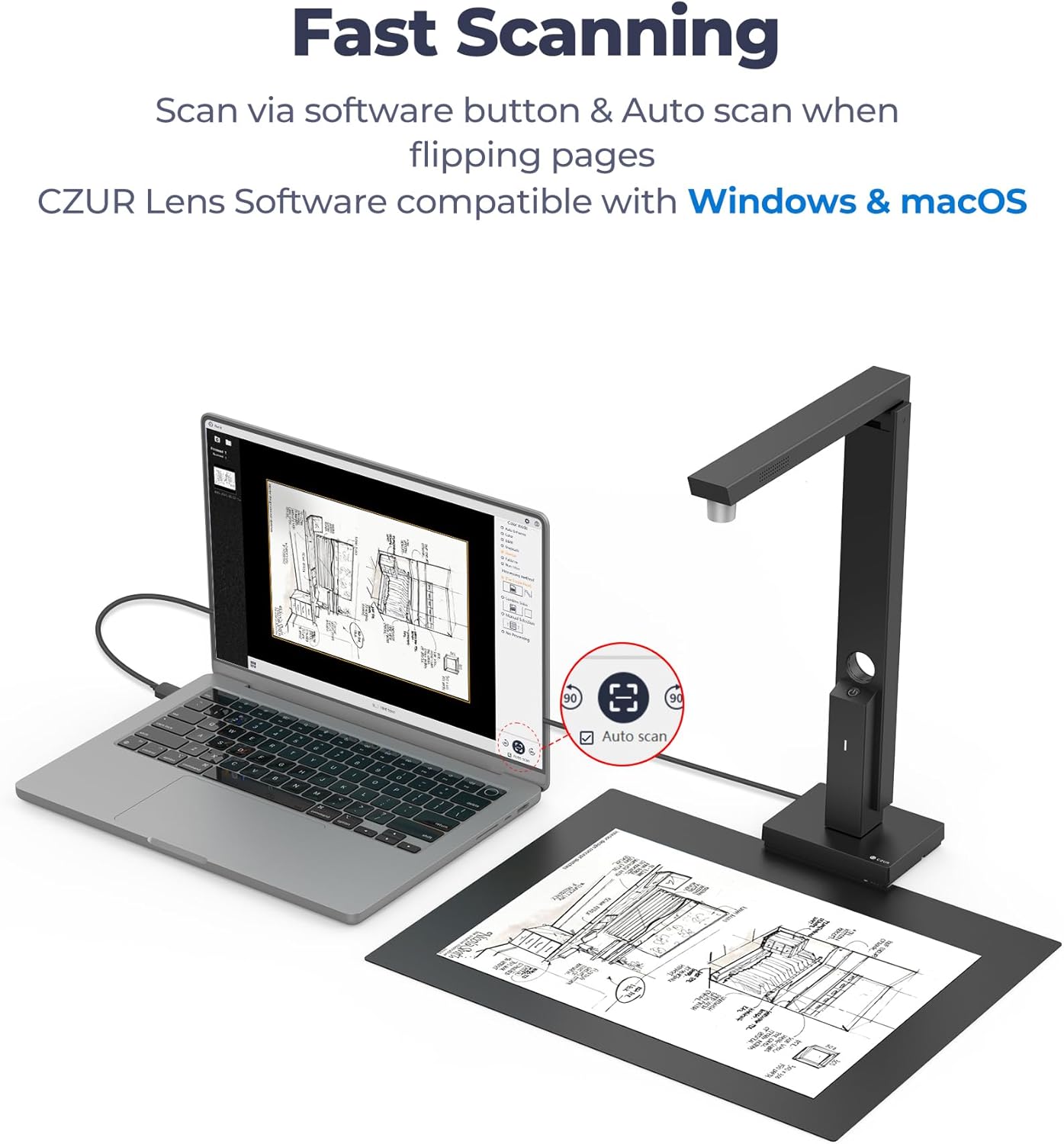
Powerful Software: CZUR Lens’software has various document processing functions like, watermarking, combining the front and back sides, intelligent cropping and filling, etc. Note: Please download software “CZUR Lens” for scanning,”CZUR Camera” is just an optional software for Lens Pro
Excellent Performance: 12MP HD Camera, 330 DPI, Resolution: 4032*3024, Scanning Size within 8.27*11.69 inches
Fast Scanning & Multi-Targeting: Ultra Fast Scanning Speed 1s/page and catch multiple targets(cards). Not Recommended for very Glossy Paper and Books
Innovative Web Camera: We love innovation. Spin your Lens to make it an external webcam
File/Card Protection: No need to feed nor touch your files/cards,Won’t JAM, No damage to your documents
OCR Recognition: CZUR’s software can convert documents into Word/Excel/PDF/Editable PDF, recognizing 180+ languages
Single USB Connection: One single USB connection provides power & data
Versatile: Lens Pro can scan various type of Documents; Medical Forms; Certificates; Contracts; Business Cards; Letters, etc
Compact & Portable: 13.88”*4.13”*3.09”, 0.93 lb (Roughly the Length and weight of 2 mobile phones), Small and Foldable for EASY ON-THE-GO Scanning
13 reviews for CZUR Portable 12MP Document Scanner, USB Document Camera, Fast Scan 1s/Page, Capture Size A4, OCR Function, Travel-Friendly Mobile Scanner for Mac & Windows, Lens1200 Pro (Not for Books)
Add a review

$23.99
Saucy –
Easiest scanner I have ever used
I used to be pretty tech savvy in my youth, but as a 40+ year old business owner that works in the trades, tech has quickly catapulted past my desire to keep up with learning new things. I struggle constantly with my all in one printer/scanner/copier. It’s always having network issues, it’s a hassle every time i get a new laptop to get the software to work, and to be honest I just don’t have the desire or time to figure it out.This thing worked flawlessly right out of the box, is small and compact and can be put away when I dont need it. 10/10 Recommend.
Frank T. Hall –
Great scanner and workable webcam
I get excellent document images by this comparatively inexpensive device. It’s fast too! I have also used it as a webcam, although it does not adjust to low light nearly as effectively as my 4K webcam. It needs good lighting to work in that capacity. As a scanner, it’s great so far.
Mick –
Easy Return – subpar machine and horrible software
The machine is subpar; they sell the idea that you could also use it as a webcam (maybe), but it is not practical. I tried the scanning features. Glossy paper, forget it. I would have still kept it, if at least I could get some good scans without having to restart the software every one or two papers “fed” to the scanner. The software was a deal breaker for me. It’s an early 2000 software kit passed to you in 2025.
Natalie –
Easy and works
This was a lot easier than I thought it would be to set up. It works great. I love how slim and compact it is. It’s easy to use and it doesn’t take up a lot of space in my office which is a major plus I can also take it along with me when traveling if I need to scan anything it really is very user-friendly and synced up with my computer with very minimal effort.
facw –
Pretty neat device
This document scanner fills the gap between just taking pictures with your phone, and a dedicated flatbed scanner (and in some ways may be easier to use than a flatbed).The setup is simple with a camera and a light that fold out from a rotating tower. The tower base contains a USB C port (and some cable channels so it will sit flat with the cord connected), and fits into a notch on the scanning mat. The scanning mat doesn’t lay especially flat out of the box, but it’s mostly just there to provide a neutral background so that is fine, and it is flattening out with use. There is a power button that turns the light on and off. The tower can also be rotated to use the camera as a webcam.You will want to use their software with the device. The camera does not appear as a scanner in Windows (even after installing their software) so you can’t use normal scanning tools. It does appear as a camera, but with the light turned on everything is overexposed.Their software is decent. In a bit of a blast from the past, they include a copy on CD, but I found it easier to just download it. In another somewhat dated feeling maneuver it requires you to enter the long serial number from the base of the unit to license the software. Once that is done things are pretty good. Going into scan mode allows you to quickly and easily scan documents and for single pages the autocrop seems to work well (though it fails to detect orientation from the text, which I thought it was supposed to be able to do). It doesn’t like scanning from books with facing pages, being unable to identify a single page, and with no facing pages option even if a book is small enough to fit in the scan area (see photo). There is an autoscan option that can be useful for flipping though single page content but it won’t give you a chance to scan facing pages or backsides of pages so things can quickly get out of order or lost. Still could be useful for getting trough a bunch of single sided pages quickly.Scan quality looks decent, though is only available in jpg which isn’t great from an archival standpoint.
sandy jeon –
High quality scan
Although there are some holes, it does the job, and overall, given the price, I am happy. So far, I have scanned a number of enormous old volumes and discovered the following. The foot pedal is essential, and the scanner functions well overall. You definitely need sidelights as well because the single overhead light is insufficient, and even then, it would be preferable if they were noticeably stronger. I’ve experimented with other light sources, but I haven’t yet discovered a workable solution.
PS –
Nice portable scanner
Used this for taxes with my MacBook for scanning all the different forms. Downloading from the website the software was close to a gig. User interface is easy to use and allows conversion to pdf. It take little time to scan the document and provided great quality images. Couple things I would improve is a more heavier scanning bed as other wise the roll has creases. Also possibly. If there was a zoom option it would also be great.
Robyn miller –
I recommend buying it!
I often need to scan contracts and documents when I am on a business trip. I could only take photos before, but the effect was very poor. Since I got this scanner, I can easily scan anytime and anywhere, with clear images and accurate text recognition. I highly recommend it to friends who travel frequently!
yuk –
Livré dans un beau coffret en noir. Il y a un scanneur pliable en noir (en matière plastique et métallique), avec un tapis pour le format A4, accompagné d’un câble USB-C et un CD et une notice rapide.Pour ceux qui n’ont pas de lecteur CD, on peut télécharger l’application sur le site de fabricant (qui est indiqué sur la notice). Il y a 2 logiciels: un pour le scanner, et l’autre pour la caméra.Le logiciel de scanneur est très volumineux qui a près de 600 Mo. Avec ce logiciel, on peut cadrer l’image à scanner, puis remodifier l’image, et le choix de sauvegarde de format, etc. Le logiciel est bien au complet. Lors d’installation, il demande de saisir le numéro de série qui se trouve en dessous de l’appareil.Le scanneur s’allume automatiquement quand on le déplie, et la lumière s’éteint quand on referme. Sinon, on peut éteindre la lumière en appuyant le bouton.L’appareil peut être utilisé comme une caméra (webcam), qui est aussi équipé d’un micro. C’est bien pratique pour faire la lecture ou montrer les documents en directe, car le support est bien fixe.Quand on ne sert pas, on peut ranger dans un coin du bureau, qui ne prend pas la place.C’est un appareil très complet et pratique pour les tâches bureautiques.
Agostino –
Veloce, leggero, estremamente portatile. La scansione dei documenti è sicuramente più rapida della all in one che uso in ufficio, inoltre, sulla scrivania, dà un bellissimo tocco di professionalità, ricorda vagamente un video ingranditore, lato software funziona bene, ogni tanto, come tutti, l’ocr fa qualche capriccio, ma nulla di catastrofico, forse la gestione del pdf è migliorabile, anche scegliendo la versione più compressa, occupano più spazio rispetto alle stesse versioni di scanner concorrenti, come sopra, problema risolvibile. La cosa simpatica è poter uscire col portatile in borsa e lo scanner, o comunque farli viaggiare insieme, diventa un ufficio portatile!!!!
Luis Jesús García granda –
Tenía ganas de probar un escaner vertical , ya que me llama la atención el poco espacio que ocupa , por lo que he tenido la oportunidad de probarlo .Éste es un escaner de los llamados veticales , que como se ve en la descripción no ocupa nada de espacio , además se pliega por lo que no ocupa nada de nada .En realidad es una cámara de fotos de 12 megapixeles , con un buen software , que te hace un escaneo en muy poco tiempo , cosa que no pasa con los que son horizontales , que tienes que meter lo que quieras escanear dentro y que tarda bastante mas .Aquí le das al botón y ya tienes echo el escaneo .Me parece que además de tardar poco , para libros por ejemplo es super rapido de escanear , ya que no tienes que andar pasando la pagina sacandolo y volviendolo a meter , aquí solo pasas página y le das al botón .La calidad de las imágenes es muy buena yo diría que mejor que la de los horizontales .La unica pega que le veo es que no trae instrucciones , pero en linea se pueden encontrar tutoriales sin buscarte mucho la vida .Solo por eso le daré mis 4 estrellas .
Client d’Amazon –
Excellente qualité !Idéal pour scanner ou montrer des documents en ligne dans un format réduit et transportable.Dommage qu’un éclairage ne soit pas intégré ou meme fourni en supplément.
Paolo B. –
Avevo già uno scanner analogo, a marchio Jourist, del quale ho sempre lamentato la modesta risoluzione e, più in generale, la qualità d’immagine non paragonabile a quella di uno scanner con piano in vetro.Questo modello CZUR, invece, è provvisto di una fotocamera con una risoluzione tale da offrire un’immagine di notevole livello, spesso equivalente a quella di uno scanner piano per documenti, di ottima qualità.Validissima anche l’illuminazione offerta dal potente LED bianco, che contribuisce al raggiungimento di un risultato quasi sempre molto soddisfacente.Valido anche il software proprietario per la gestione delle scansioni, che consente di ritagliare e regolare le singole immagini, ma anche di riscansionarle sostituendole singolarmente ove necessario.Interessanti anche le funzioni di auto-ritaglio delle pagine, che le individua decisamente bene, e di auto-raddrizzamento delle stesse, che riesce a capire quale sia la parte alta e bassa del foglio (probabilmente sulla base dell’orientamento del testo).Buona ma migliorabile la funzione di riconoscimento dei caratteri (OCR), che rileva quasi sempre i caratteri corretti anche in presenza di scritte molto piccole o poco leggibili, ma che talvolta sbaglia l’impaginazione nel caso di testo misto ad immagini o scritte a penna (come le fime).Questo limite, comunque, è comune a gran parte dei sistemi OCR e quindi non può essere considerato un vero lato negativo di questo prodotto, soprattutto perché la funzione di effettivo riconoscimento del testo funziona bene ed è decisamente affidabile: ho verificato con italiano ed inglese, con ottimi risultati in entrambi i casi.L’impaginazione può sempre essere corretta successivamente, sentra troppo incomodo.Altro aspetto importante per chi desideri scansionare documento è quella della creazione dei file PDF.Il software in dotazione consente di regolare automaticamente le scansioni effettuate, così da migliorarne l’esposizione ed in contrasto ai fini del salvataggio.Inoltre, consente di impostare molti parametri come il livello di compressione (e quindi di qualità) del file PDF, la compatibilità con lo standard ISO, l’autoritaglio a dimensioni standard (ad esempi all’A4).L’unico aspetto parzialmente negativo che riduce un po’ la mia valutazione, che altrimenti sarebbe certamente massima, sta nelle dimensioni dei file PDF: in fase di salvataggio è possibile scegliere tra tre “qualità” del file PDF, ma anche selezionando quella più compressa e meno esigente in fatto di spazio si ottengono file un po’ troppo grandi: per 19 pagine in bianco e nero (2 bit) a soli 200 dpi siamo quasi a 4 MB.Con gli scanner piani Canon ed Epson che uso per lavoro ottengo file dalle stesse dimensioni ma con risoluzione a 300 dpi. Inoltre, la qualità complessiva dei PDF prodotti dagli scanner piani appare leggermente migliore, con totale assenza di artefatti della compressione, che sono invece presenti in quelli generali dal software CRUZ Lens in questione.Il problema suddetto, che è comunque di modesta entità e non compromette assolutamente una buona esperienza d’uso, potrebbe essere risolto con un aggiornamento software, in ogni caso.Lo scanner è, infatti, un valido prodotto, dalle notevoli prestazioni, che spesso si avvicina ad uno scanner piano nella resa concreta.Il prezzo di 99 Euro è ottimo in relazione alle qualità del dispositivo.Allego alcune scansioni di esempio: si tratta di due pagine con testo ed immagini, scansionate a colori, in bianco/nero ed in scala di grigi.