
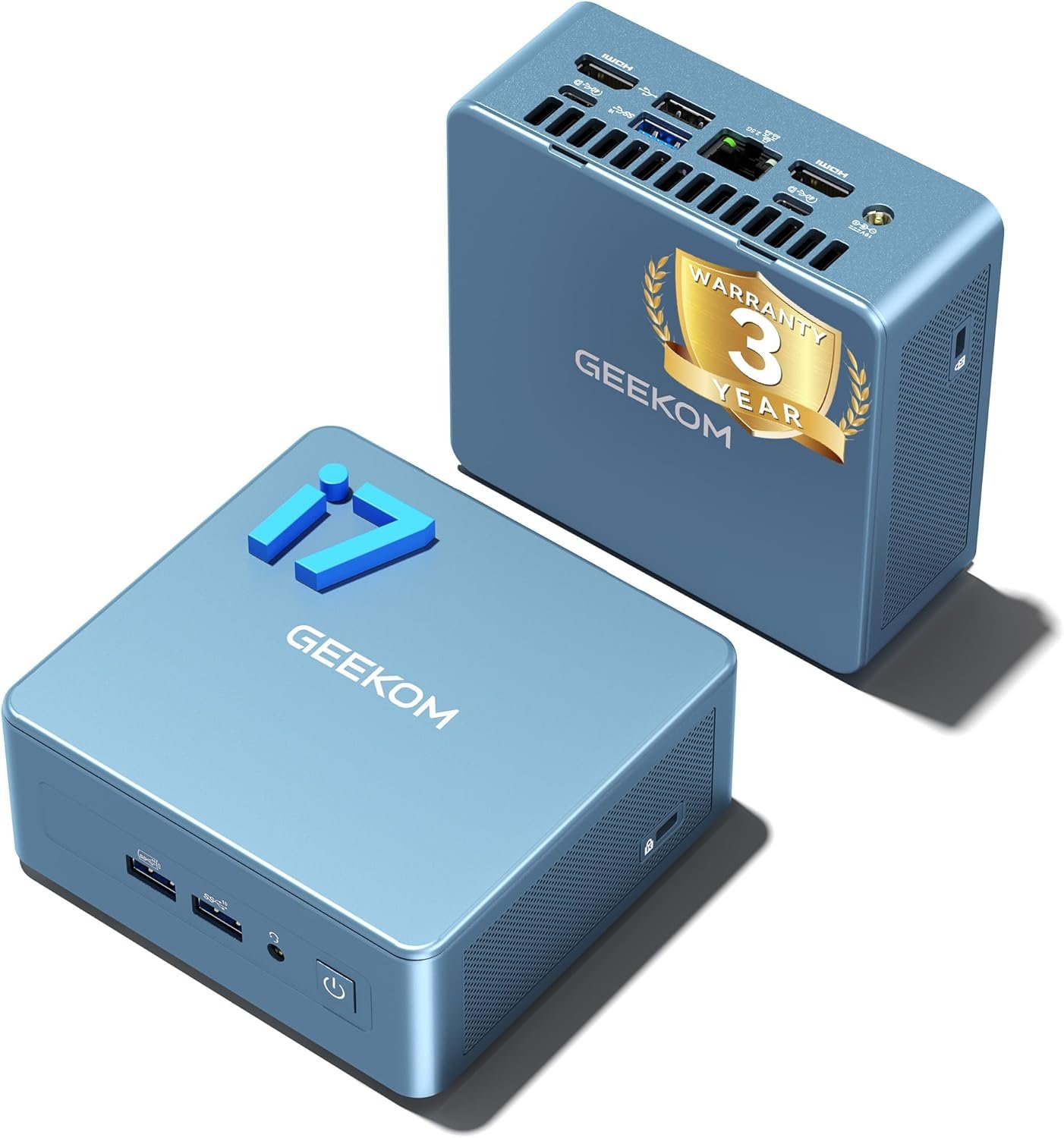
GEEKOM Mini PC IT12[Best Intel NUC12 Alternative],3-Year Quality Support,with 12th Gen Intel i7-1280P Mini Computers,32GB RAM/1TB NVMe SSD Windows 11 Pro Desktop PC,USB 4.0/2.5G LAN/8K/SD Solt
$64.99
Related Products


From the brand




➊【Excellent Performance】GEEKOM IT12 Mini PC NUC12 is equipped with Newest 12th Gen Intel Core i7-1280P processor(14cores, 20 threads), 24MB Cache, up to 4.80 GHz.GEEKOM Mini IT12 series the power is only 90 Watts, which is only 1/4 of other desktop, let you to spend less electricity to support 24 hours work of every day, suitable for Gaming, home working, business offices, servers, school education, and billboards. 𝙂𝙚𝙣𝙪𝙞𝙣𝙚 𝙋𝙧𝙤𝙙𝙪𝙘𝙩𝙨 𝙎𝙖𝙛𝙚: 𝙊𝙣𝙡𝙮 𝙤𝙣 𝘼𝙢𝙖𝙯𝙤𝙣 & 𝙂𝙀𝙀𝙆𝙊𝙈 𝙊𝙛𝙛𝙞𝙘𝙞𝙖𝙡 𝙒𝙚𝙗𝙨𝙞𝙩𝙚 | 𝘼𝙫𝙤𝙞𝙙 𝙁𝙖𝙠𝙚𝙨.
➋【3-Year Quality Support】The geekom nuc12 mini PC computer is preinstalled on Windows 11 Professional Edition and can be used out of the box. Your mini PC is backed by a hassle-free 3-year warranty and dedicated US-based technical support, with full certification including CE, FCC, CB, and CC for guaranteed safety and compliance. From initial setup to hardware troubleshooting, we keep your systems running smoothly year after year—ideal for business and education volume purchases.
➌ 【32GB 3200MHz RAM & 1TB NVMe PCIe4.0 SSD – Expandable】The mini pc windows 11 pro come with high-speed dual channel 32GB 3200MHz DDR4 RAM(expandable to 96GB) and a 1TB NVMe PCIe 4.0 SSD(expandable to 4TB), plus additional slots for SATA and HDD expansion. Get 20% faster data speed than 2666MHz RAM and 40% more efficiency than PCIe 3.0.
➍【Advanced Cooling + Durable Metal Chassis】The IT12 Mini desktop upgraded IceBlast cooling system (52% more efficiency, 40% quieter) with all-copper module prevents overheating even under full load. Housed in a robust PC+ABS metal frame that resists wear and supports stacking—built for reliability in demanding environments.
➎【USB4 > Oculink: Secure 8K Quad Display】The GEEKOM Mini PC dual USB4 (40Gbps, 8K DP1.4) and dual HDMI 2.0 (4K@120Hz) support quad-screen output. Unlike Oculink—which requires internal mods—USB4 offers encrypted, hot-swappable connectivity with one cable for data, display, and power. Transfer 10GB 4K files in 2s.
➏【2.5Gbps LAN High-speed Stable Connection】The GEEKOM mini computer features 2.5Gb Ethernet (2.5x faster than Gigabit) and anti-interference WiFi 6E, enjoy lag-free online collaboration, 4K streaming, and cloud-based workloads. Bluetooth 5.2 supports peripherals seamlessly.
9 reviews for GEEKOM Mini PC IT12[Best Intel NUC12 Alternative],3-Year Quality Support,with 12th Gen Intel i7-1280P Mini Computers,32GB RAM/1TB NVMe SSD Windows 11 Pro Desktop PC,USB 4.0/2.5G LAN/8K/SD Solt
Add a review
![GEEKOM Mini PC IT12[Best Intel NUC12 Alternative],3-Year Quality Support,with 12th Gen Intel i7-1280P Mini Computers,32GB RAM/1TB NVMe SSD Windows 11 Pro Desktop PC,USB 4.0/2.5G LAN/8K/SD Solt](https://deviceden.co/wp-content/uploads/thumbs_dir/71iSmNsGgGL._AC_SL1500_-rf6znf6w98nsklwyomy1oe7bb5un5bo6f3o7iq6t9w.jpg)
$64.99
Dale Park –
What a Marvelous Mini !!!
I recently bought this GEEKOM Mini PC IT12, and I must say it’s just what I needed. After being a Dell fan since 1992 (Yes that when Windows 3.1 came out), I’ve owned several Dell’s. My last Dell XPS 8500 lasted me what, 12 years. I say all this because I’d never thought about getting another brand. The Answer was this GEEKOM Mini PC IT12. I did a months worth of research and found this to be the best in price, best built, quality and power. It came very nicely packaged and unscathed during shipping. Considering all the USB ports this has and for my needs it fit the bill. The graphics on the new card are making my older monitor look great, and coming from sata drives to SSD is well, if you’ve not made the switch it’s pretty ineradicable if you ask me. I’m not a big tech guy, but it connected to my wi-fi in a snap, the sound is good that this machine creates and all the other specs this mini has all work to expectation. I honestly don’t do a lot with my new GEEKOM, but when I do, it’s fast and seriously a joy to have for this 67 yr old. I’ve not felt it to ever be hot, stays cool, and for the price I’m really glad I was able to get this mini computer.
Rob Janusch –
A GREAT LITTLE COMPUTER!!
I bought this to replace my wife’s old computer, which was about 10 years old, and Windows would no longer support it.This unit is surprisingly robust, at 4 1/2 inches square! The are LOTS of places to plug in her printer, keyboard, and mouse.This is perfect for her, to play her Windows puzzles that she likes, and she can check her email and stores for specials and coupons.It was SUPER EASY to install and to start up, and transfer her stuff she saved to the Cloud.I would recommend this to anyone has simple needs of a computer!!
Brian J. Schmidt –
Small and mighty graphic design computer for a fraction of the cost
We just got some of these at work (sign company) to replace some aging computers that were not compatible with Windows 11 (it was time to upgrade to remain compliant with security updates, etc.). I’m a designer there and use Adobe apps on them. InDesign, Photoshop and Illustrator. Coming from an iBuyPower Slate MR gaming PC circa 2018/2019 with a 9th gen Core i7 processor with 16 GB RAM and an Nvidia 2080 Super graphics card (8 GB).I haven’t noticed any issues and it seems to perform identically, except I am now on Windows 11 Pro, and this sucker is a fraction of the cost of many gaming PCs these days. I did a TON of research before suggesting these to work (and getting our IT guy’s stamp of approval).As others have mentioned, this is not a dedicated graphics card, so be aware of that. What you are getting is onboard graphics that are much better than the old UHD 770 standard. This type of graphics processor *shares* RAM with the system. So, while it shows 128 MB VRAM for the “graphics card,” that’s not really all you’re getting. Remember that it uses the system RAM to complement that. And this thing has 32 GB of RAM out of the box. That is more than I had in my previous system, which had 16 GB of physical RAM and 8 GB on the graphics card. And it supports up to 64 GB of RAM, so the more you throw in there, the happier it’ll be.While not a gaming PC by hard-core gaming standards (you really need a dedicated graphics card for that), I have a feeling this thing could handle some casual games (you might need to check or adjust some settings to make sure you’re maxing out your RAM utilization in-game — another comment on here mentioned a performance mode; I suspect enabling that would be what is needed to allocate enough RAM to those hungry apps). I have not tested that because this is my work computer. I don’t play games on it.However, there is also the option of connecting a graphics card externally via USB 4, from what I understand.For what I use it for — graphic design work — it works great so far, out of the box. Navigation has been smooth and seamless, my Adobe apps open pretty quickly, and there’s no delay or lag, as I’m working, even in high-quality display mode. I do see a possibility of wanting more RAM before long, as I start to work with it more and put it through its paces, but so far I’m very happy with it.
Grumpy Goat –
Fast and upgradeable but noisy and has poor WiFi speed
When my laptop did not meet the needs for my video editing (not enough memory leading to crashing in Davinci Resolve working with simple 4K/30 videos), I decided I needed an upgrade. Passed through a phase of considering Mac Mini before deciding that switching over operating systems was not worth my time, and besides, the Apple upgrade model was not something that I could accept. I am not a gamer and not even *remotely* interested in games and I long outgrew the need for a huge desktop box. So I decided to go with the mini PC form factor. After some research on Google and YouTube I decided to give this GEEKOM GT1 Mega a try.Packaging: Simple and straightforward and well packaged.Setup: Again, straightforward with no issues. This was the first time buying a Chinese-branded computer (I have been buying HP for the past decade or more) so having Windows 11 Pro bundled with no OS included except on the computer and with no software key or authentication information was new to me – I hope it never needs re-installation. BIOS setup needed no change since it came in “Normal” mode (as opposed to “Quiet” or “Performance”. Booted right up normally per Windows 11 routine and I was able to get all the latest updates etc. just as normal. Size is excellent and it has plenty of ports although for my needs the second Ethernet port is superfluous.Operation: I still have my laptop as my main computer since it can travel with me, but I am relegating this mini PC to main video and photo editing duties, and since it will be running most of the time, I am also using it for web browsing and watching videos.Under light usage (such as typing this review) the computer is quiet, and the fan does not appear to be running. Navigate away from this browser page even to a non-video intensive page like a forum web page (you know, lots of messages and no auto-playing videos) and the fan starts to wake up, spinning slowly but just audibly. Go somewhere more video intensive like a YouTube Video and the fan speed can start to increase. Editing my simple YouTube 4K videos occasionally brings the fan up to full speed, and the fan can be left running if you walk away from the computer with Davinci having a video loaded and doing nothing and the blank screensaver is on! That said, for my usage the fan keeps the machine cool enough – it never feels warm to the touch and the exhausted air only feels slightly warm at its worst, so that persistent fan is at least efficient if distracting at times. I will admit that I expected the fan noise issue before buying the GT1 Mega.Operationally, the good news is the previous crashing during Davinci Resolve editing does not occur anymore thanks to the 32GB RAM. Rendering speed is also increased although not as much as I expected over my 3-year-old Intel Core i7 HP laptop.WiFi: Here is my biggest disappointment with this computer. I have Xfinity internet at home and can attain speeds of up to 350 Mbps (download) on my laptops (home and work) which are right next to the GT1 Mega (but only one is awake at a time, so no interference). All are the same distance away from my router and all tests are run within a couple minutes of each other so time of day usage fluctuations are the same for all. The GT1 Mega can only achieve 100 Mbps when the laptop right next to it is hitting 300 Mbps lid open. Lid closed, the laptop download speed drops but is still faster than the GT1 Mega at over 150 Mbps. Upload speed is a consistent crappy 41 Mbps for all 3 computers. See the attached file for the latest results I got while typing this up and with no other load on my home WiFi.As a content creator *upload* speed is more important to me as long as video playback is not buffering I am happy. At the attained WiFi download speed with the GT1 Mega I have not experienced buffering *yet*, but I am still disappointed that the WiFi performance is this poor, especially given the upgraded WiFi specs of the machine.I contacted GEEKOM Support and the person said to get the latest WiFi drivers from their site, and to install it even though it was like a year older than the one on the computer! Needless to say, there was *no difference* so I reverted since I prefer to have the latest updates on all my machines. I replied to Support telling them of my results and they have gone quiet. Maybe this review will wake them up.I have heard that mini computers tend to have poor WiFi due to antenna placement and while that could be the case it should still be better than my older laptop with WiFi 6 specs. For the money I paid for this I expected better.UPDATE:Since the above review on the original unit, I was contacted by GEEKOM Customer Support regarding this issue.Let me say right away – GEEKOM Customer Support has been EXCELLENT throughout this issue, and *could not have been better*. Very fast and very responsive with emails and solutions, much better than larger manufacturers would have been, I am sure.First, they guided me though opening up the computer to check that the antenna wires were properly connected, which initially they were but since these wires have press-on connectors to the adapter card they came loose and could not be effectively reconnected. So at that point I lost all WiFi functionality. GEEKOM Customer Support stepped up, and in an effort to ensure my satisfaction promptly sent me a replacement GT1 Mega! Again, the setup and updating of this replacement GT1 Mega was effortless and smooth, but WiFi performance was no better than the first unit, with max download speeds being typically no better than 120 Mbps. *However* when the GT1 Mega was placed on its side with the bottom of the miniPC facing the direction of the router in the next room, the download speed instantly jumped up to about 220 Mbps! That was proof that the antenna design and/or placement inside the enclosure needs improvement.For the excellent customer support I have bumped this rating up to 4/5 stars, but the overall rating cannot get a 5th star due to the WiFi performance issue. If they continue to work [with me] to improve the actual design I will certainly reconsider the rating.
M. Köse –
Nachtrag 2:Es war nur ein Sprachpaket für Kasachstan!Alles gut soweitNachtrag 1:Es ist eine Software installiert mit kyrillischer (russisch?) Schrift. Ich weiss nicht was das zu bedeuten hat. Deinstallation lässt sich nicht durchführen.Ich behalte das im Auge und werde versuchen eine Lösung zu finden. Nicht verständliche Spamsoftware(?) heisst für mich erstmal ein Sicherheitsrisiko im gesamten Netzwerk.Bis dahin 1 Stern.Ursprüngliche Rezension:Als jemand, der bereits andere Windows- und MacOS-Geräte verwendet und mit diesen zufrieden ist, war ich gespannt darauf, wie der Geekom Mini PC mit einem Intel i9 Prozessor abschneiden würde. Nach dem Auspacken war ich bereits sehr positiv überrascht:sehr klein und toll verarbeitet!Die Konnektivitätsoptionen des Geekom Mini PC sind lobenswert! Mit einer Vielzahl von USB-Anschlüssen, HDMI-Ausgängen sowie einem Ethernet-Anschluss bietet dieser Mini PC alle erforderlichen Anschlüsse für verschiedene Peripheriegeräte und Bildschirme. Die Möglichkeit, mehrere Monitore anzuschließen, ist besonders nützlich für Produktivitätssteigerungen und Multitasking. Zudem arbeitet der interne Speicher schnell:Die Einrichtung hat ca. eine viertel Stunde gedauert, das kenne ich auch anders!Die Verarbeitung des Geekom XT12 Pro ist solide und robust. Das kompakte Design ermöglicht eine einfache Platzierung auf jedem Schreibtisch oder in jedem Büro. Trotz seiner geringen Größe vermittelt der Mini PC einen Eindruck von Qualität.Ein weiterer Pluspunkt ist die Vielseitigkeit dieses Mini PCs. Obwohl ich bereits andere Betriebssysteme verwende, bietet der Geekom Mini PC die Flexibilität, entweder Windows oder Linux zu installieren. Dies ermöglicht es Benutzern, das Betriebssystem ihrer Wahl zu nutzen, ohne auf die Leistung des Intel i9 Prozessors zu verzichten.In Bezug auf die technischen Details bietet der Geekom Mini PC eine beeindruckende Spezifikation. Neben dem Intel i9 Prozessor verfügt er über großzügige Speicher- und RAM-Erweiterungsoptionen. Die Möglichkeit, RAM und Speicher einfach zu erweitern, macht diesen Mini PC zukunftssicher und anpassungsfähig an sich ändernde Anforderungen.Abschließend kann ich sagen, dass der Geekom Mini PC mit Intel i9 Prozessor meine Erwartungen übertroffen hat. Die Leistung, Konnektivität, Verarbeitung und Vielseitigkeit dieses Geräts machen es zu einer ausgezeichneten Wahl für Benutzer, die nach einem leistungsstarken und vielseitigen Mini PC suchen. Ob für den Heimgebrauch, das Büro oder anspruchsvolle Anwendungen – dieser Mini PC bietet die Leistung und Zuverlässigkeit, die man sich wünscht.
黒瀬 –
プロセッサー:インテル Core i9-12900Hメモリ:デュアルチャネルDDR4-3200 SODIMM、最大容量64GBM.2 2280 PCIe Gen 4 x4 SSD、最大容量2TB、M.2 2242 SATA SSDスロット、最大容量1TBグラフィックス : Intel Iris XeOS : Win11 ProLAN : 2.5GHzディスプレイ : HDMI×2、USB4(8K)×2、同時4出力USB3.2 : 3個WiFi : WiFi 6EBluetooth : BT5.2すでにMacBookを持っていますが、ゲームなんてぜんぜんダメから、ゲーム用のパソコンを購入しようと考えています。事実はどれも高価で、お金も足りません。偶然このミニpcを見つけたが、ゲーム用のパソコンよりもずっと安いです。クーポンもあるから、¥9.6万だけで買いました。さらに本体がとても小さいので、最初は不安で騙されるかもしれませんと思いました。数日使ってみると、性能も良くて、ほかの問題もないし、実にいい物と思いますよ。
Sébastien –
Mini pc de qualité aux performances haut de gamme. Ideal pour proxmox , je suis enchanté du produit.Excellent produittop
Glendon McEwen –
Very easy to setup, I run some large Video/Photo Corel software and drafting 2d/3d (Progecad) products, high resolution monitors and Microsoft office. I am impressed, I think I will add the 32 gb of ram. This is the second mini I purchased from Amazon. both have done what’s required of them. I do have 4Tb portable drive connected to it for storage. Right now, all’s cool.
HeliLove –
Windows11Proの初回セットアップがPINの作成で入力画面が出ず、そこから先の設定及びWindows11Proの起動が行えなかった。※2024/12/12に解決、解決方法は下記記載。Windows11Proのプリインストールのミスか、SSDの不良か、メモリの不良か、CPUの不良か判らないが、セットアップが進まず使用できない初期不良ですので返品手続きをし、再購入しました。この点はAmazon様々です。届くまでに6日かかるようです。今度は動く事を祈っています。2024/12/8追加:問い合わせしたところ、この不具合は周知の不具合だったらしく、初期化を続行させる方法を連絡して頂きました。まだ再購入した物が届いてないですが、もし同じ不具合なら回避方法が判りましたので安心しました。同じ現象が発生した場合は、以下をお試しくださいとの事です。※メールの転載許可は取っていませんが、販売してるなら、自らこの情報は載せるべき事項と思いますので掲載します。なお、商品の見た目の感想を書いて無かったですが、返品後、直ぐに再注文した程に良かったです。——–PINの画面がでましたら、「Shift」押しながら「F10」を押していただけますでしょうか。コマンドプロンプトの表示画面が出てきます。(こちらはこのまま放置ください)そこで「Alt」+「Tab」を何度か押していただけますでしょうか。PINの入力画面が表示されましたら、入力し、設定を進めてください。 設定が完了しますと、Windows11のサインイン画面が表示されます。(すみません。。こちらはサインインができないかと思います)「Shift」キーを押しながら画面右下の電源マークから「再起動」を選択してください。 「オプション選択」という青い画面が表示されます。「トラブルシューティング」を選択します。「このPCを初期状態に戻す」を選択します。「個人用ファイルを保持する」を選択します。「ローカル再インストール」を選択します。このPCを初期状態に戻すを選択し、初期化をスタートさせます。 初期化が完了しましたら、設定が完了です。Windowsサインイン画面からサインインしてください。2024/12/13追記:上記の手順を行い、Windowsの起動は出来たが、深刻な問題が発覚。Windows11pro の起動直後、DefenderがOFFになっており、ONにしてウィルスチェックを行うとWin32/Sality.ATに感染していた。感染ファイルはCドライブ直下のAutorun.infとijmrv.pifで、Autorun.infは起動したらプログラムを動作させるファイル、ijmrv.pifはWindow起動中に読み込まれ、読み込まれるファイルやプログラム動作をコントロールする事が出来るファイルです。また、Win32/Sality.ATはセキュリティソフトなどの一部のソフトやツールの起動を阻止し、繋がれたドライブに増殖するウィルスです。製造過程でCドライブがWin32/Sality.ATに感染しており、Windows初期設定時、すでにWindowsが改変されて不具合が発生していたようです。私が直面した不具合内容は以下です。① Windows初期設定時、PIN設定から先に進まない。②ウィルスソフトがインストールできない。③日本語の一部文字化け修正方法は、上記のWindows11pro サインイン画面で「Shift」キーを押しながら画面右下の電源マークから「再起動」を選択し、「オプション選択」「トラブルシューティング」で「このPCを初期状態に戻す」を行う。この時、個人用ファイルを保持しないとし、ディスクも初期化して、真っ新の状態にするように指示し「ローカル再インストール」を行う。私の場合、これでもPIN設定時、操作は止まりませんが、2回エラーが出ました。「キャンセル」を選択してリトライで3回目にPIN入力画面となり、そこから問題なくWindowsの設定は終わりました。DefenderはONで起動しウィルスチェックもウィルスなしで終了、もちろん文字化けやウィルスソフトのインストールも完了しました。メーカーとしての管理体制には問題はあり、不具合が解決するまでに非常に働力がかかりましたが、不具合解決を自力で行おうとする程、魅力のある商品だった事、実際使って満足しましたので、正常に動作した 製品としてらの評価として、1→5に変更します。運悪く不具合に当たったら回復に手間がかかりますが、それでも良かったら、非常に良い製品です。