

HP Compact Desktop Duplex USB Mobile Document & Photo Scanner with Auto-Feed Tray for Portable 2-Sided Digital Scanning, Model HPPS200, for Home & Office, PC and MAC, HP WorkScan Software Included
$33.99
Related Products




Product description
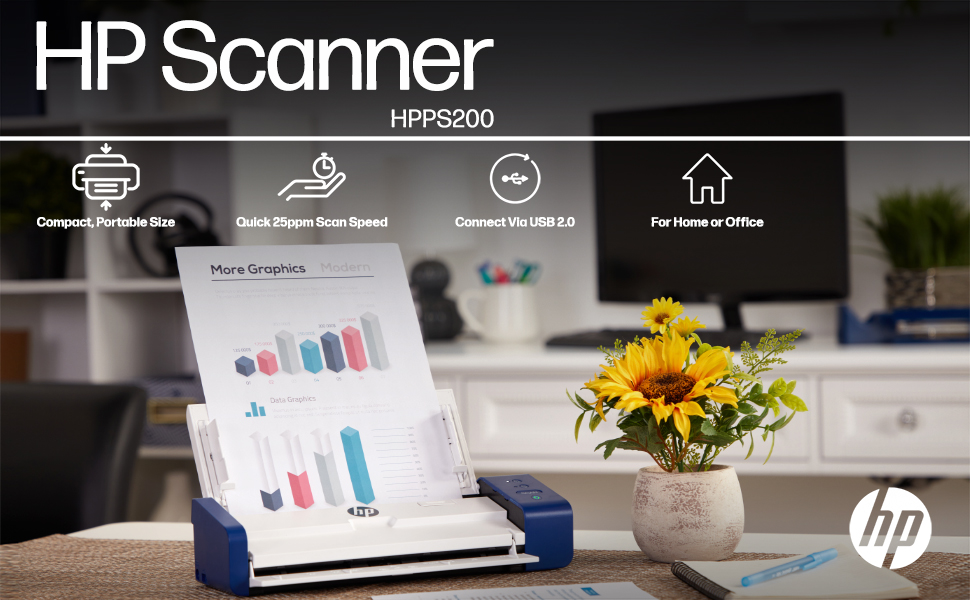
The professional’s affordable alternative.
When the papers start piling up, the HPPS200 Document Scanner steps up to the plate! Scanning documents is a joyful task with a device designed for home bookkeepers, humble paper-pushers, and other ‘regular’ people looking to convert a handful of files (leave the huge archives for another machine!). But don’t underestimate its powerful output, as users convert all kinds of documents, photographs, receipts, cards, bills, and other important papers in a single pass. And thanks to its slim profile, compact footprint, lightweight portability, and wide compatibility, you’re finally free to scan, save, organize, and share files anytime, anywhere—and even on the go. Whether you plug into your workspace PC or take it with you on your next business trip, productivity is the HP signature. Add an HPPS200 Scanner to your cart today!

Quick and Simple
25ppm scan speed is perfect for everyday productivity, so you can continuously feed and be done in minutes.

Amazing Resolution
HP’s state-of-the-art scanning technology delivers stunning 300 dpi resolution for beautiful blur-free results every time.

Ready for WorkScan
Use HP WorkScan software on your PC? Our Scanner lineup pairs efficiently and smoothly for easy operation.

Pick Your Paper
The scanner’s universal feeder receives documents of various dimensions from full size pages to small cards and receipts.

It’s your personal secretary (and travel buddy) all in one!
Documents piling up on your desk? Trying to get your papers together for tax time? Whether your scanning struggles are professional or personal in nature, HP saves the day. Designed for the occasional scan or ‘once in a while’ batch of documents, our versatile scanners adapt to your unique lifestyle and tech requirements with wide compatibility across today’s most popular PC and Mac computers.
From receipts and invoices to business cards and personal photographs, just pass your paper through the automatic feeder for crisp, clear, accurate digitization—nothing fancy about it! And whether you’re in need of wireless convenience, built-in battery, duplex capability, or travel-ready styling, HP has the solution. Browse our entire compact scanner lineup, and welcome home the newest addition to your workspace!

Rear Feed Tray
Stay organized with multipage batch scanning! Load a stack for convenient auto feeding, then fold down for storage.

Take the office with you
HP Scanners are ready for takeoff! Small, discreet, and TSA-friendly, they’re great for traveling workers, processing documents in the field, and other on-the-go applications.

Scan to PC or Mac
Digitize files and send to your preferred Windows or MacOS powered workstation for organizing and safekeeping.

Duplex Capability
This special feature saves you time and stress! Duplex mode scans two-sided documents in one pass, no problem.

Scanning made simple with HP WorkScan software
Easy auto-scan & size detectionFull color & black & white scanningResolution selection up to 300 dpiLarge scan preview with sliding zoomCrop, rotate & straighten toolsAuto-exposure with custom settingsAdjustable brightness, contrast & midtoneClean up edges, holes & backgroundSupports PDF, JPG & other major formats

Specs & Details
Max paper size: 8.5” x 14”Min paper size: 2” x 2.9”Speed: 25ppmResolution: 300 dpiPower: AC wall adapterCompatible with: Windows, MacOSDuplex mode: yesSoftware: HP WorkScanWiFi to router: noDimensions: 11.8” x 2.9” x 4.1”Weight: 3.3 lbs.
Add to Cart
Add to Cart
Add to Cart
Add to Cart
Customer Reviews
4.1 out of 5 stars 259
4.0 out of 5 stars 33
4.1 out of 5 stars 32
3.8 out of 5 stars 83
Price
$119.99$119.99 $169.99$169.99 $199.99$199.99 $229.99$229.99
Wired Only
✓
X X
✓
Wireless
X
✓
✓
X
One Sided Scan
✓
✓
X X
Two Sided Scan
X X
✓
✓
Battery Powered
X
✓
✓
X
Single Feed
✓
✓
✓
X
25-Page Feeder
X X X
✓
Fits In Your Bag
✓
✓
✓
X
Dimensions
11.6” W x 1.4” D x 2” H 11.6” W x 1.9” D x 2” H 12.3” W x 2.6” H x 1.9” D 11.8” W x 2.9” D x 4.1” H
Weight
0.8 lbs. 1.1 lbs. 1.3 lbs. 3.3 lbs.
ON-THE-GO SCANNING MADE SIMPLE | Meet the Fastest & Lightest Sheetfed Scanner in its Class! | The HPPS200 Mobile Document Scanner With Automatic Feed Tray Lets You Convert Stacks of Papers Into Digital Files—No Heavy, Expensive Equipment Needed! | Wide Compatibility Makes it Easy to Send Docs & Images to Your PC or Mac Computer, Laptop, or Similar Windows/MacOS Devices for Amazing Versatility
SAVE TIME WITH DOUBLE SIDED SCANNING | Despite its Slim Profile, This Office Essential Offers Reliable 25ppm [25 Pages Per Minute or 2.4 Seconds Per Page] Operating Speed for Small- to Medium-Batch Jobs in Black & White & Color | Convenient Duplex Feature Scans Both Sides of Your Document in a Single Pass, Speeding Up Scan Time & Improving Your Productivity When Converting Invoices, Contracts, Plans, Reports & Letters
DESIGNED FOR LIGHTWEIGHT PORTABILITY | Slip Inside a Bag or Briefcase, Then Travel from Home to Office to Business & Beyond! | Compact, Portable Styling Suits Your Busy Lifestyle While Providing All the Capabilities of a Professional-Quality Document Scanner Including Beautiful 1200 dpi Resolution, Versatile Paper Size Ranging from 2” x 2.9” (Minimum) to 8.5” x 14” (Maximum) & Versatile Conversion to PDF, JPG & Other File Formats
STUNNING MULTI-PAGE SCANS IN SECONDS | Device Easily Connects Via USB [Cable Included] & Powers Via Basic AC Wall Adapter | Integrated Rear Tray with Auto-Feed Lets You Stack Multiple Pages for Fast, Organized Scanning in Batches, Then Folds Down Neatly When Not in Use | Perfect for Commuters, Small Business Owners, Legal Practices, Tax Preparers & Unique Tasks Such as Cards, Photos, Reports & Receipts
WORK SMARTER WITH HP WORKSCAN | Download Our Free, Easy-to-Use Software or App for Windows & MacOS to Start Scanning! | Simple, Intuitive Platform with Auto-Scan & Size Detection Allows You to Easily Adjust Document Settings; Preview & Zoom in on Scans; Crop, Edit & Optimize Image Quality; Clean Up Background, Edges & Holes; & Save to Destination with Just a Few Clicks—No Tech Savvy Required!
BIG OFFICE EQUIPMENT COMES HOME | Whether You’re Always On the Go or Always Work from Home, HP Supplies You with Affordable, High-Quality Office Essentials that Strike the Perfect Balance Between Personal & Professional | For Your Low to Medium Volume Digitizing Tasks, or a Smart Gift for Administrative Professionals, Students or Avid Travelers, Shop Our Complete Line of Scanners Scaled for Everyday Productivity
13 reviews for HP Compact Desktop Duplex USB Mobile Document & Photo Scanner with Auto-Feed Tray for Portable 2-Sided Digital Scanning, Model HPPS200, for Home & Office, PC and MAC, HP WorkScan Software Included
Add a review

$33.99
PEARLAND Texan –
Software is not available from HP for this device.
Apparently there is no ‘official’ software available to operate this device. I am not going to complain and I am not in the business to disparage this scanner but the lack of software make it unusable and I don’t want to use software that will not be updated.
Chelsea Evans –
Works great
Great scanner
Amazon Customer –
Doesn’t scan higher than 200 dpi; 2 sided scanning not working; auto-crops photos inappropriately;
I really wanted to like this scanner because it is so portable and it does scan quickly, but there were too many issues. I bought this to scan 40 years of photos and sadly, this will not be my solution.I can’t believe HP allows someone to use their logo and trusted brand name on such a terrible product, yet not providing any technical support. This scanner does not even exist on the HP website.I am returning this scanner, and here’s why:*** 1200 ppi is a complete lie – it won’t scan anything over 200 ppi no matter which size you choose.*** Auto-cropping is SO FRUSTRATING! The scanner sometimes ignores dark or bright parts of the photo, cropping them out; other times, it was just randomly cropping the sides or top/bottom out. I tried using the specific photo dimensions, and it still cropped sections out.*** Five days after the last time I used it, I received an error message: “ADF Bulb rear Error,” after which two-sided scanning only worked about 5 percent of the time.*** Clicking the two-sided/one-sided buttons on the machine do nothing.*** If you change any of the settings, they don’t take effect unless you close then open the app. (specifically, the image size and two-sided scanning.)*** When you click on “Save As,” then change the folder location, the app freezes then returns an “unknown error” that won’t resolve and requires you to “end task” in the task manager, thus LOSING ALL OF THE SCANS you were trying to save.*** Random paper-jam errors when nothing is in the scanner; sometimes would not resolve until performing several attempts to open and close the cover.I removed then re-downloaded the application – twice, I turned the scanner off, waited 5 minutes and turned it back on, I restarted my computer, Everything works for a short time (except for the 200 dpi) then it starts with paper jam errors, etc.sending it back.
hrslvngl –
Works As Described
Have only had the scanner a few days and have scanned personal documents and about 100 photos. This little scanner does what I wanted it to do. Easier to use than the flat scanner on my printer. Quality of scanned pictures is directly proportional to the quality of the picture being scanned. I’m not looking for perfection; if you are, you should find another alternative. 🙂 Scanned photos are just as good as those scanned from my HP Printer which was much more costly.
S MacDonald –
Works well…when the computer recognizes it
I have been incredibly frustrated with this scanner. I have used it with my MacBook Pro, and it works well when HP gets around to updating their software to match the latest macOS version. However, if you regularly keep your computer up to date, it may be another few months until HP releases compatible software, and therefore another few months until you can use the scanner again. Without the HP updates, the app completely fails to recognize the scanner and the scanner becomes completely useless. Other apps, such as Adobe, will not recognize the scanner for importing documents either. Before purchasing this scanner, I used to use a Fujitsu ScanSnap, which was at least a little more reliable until they too stopped creating regular updates. So glad I spent all this money for a scanner that I have only successfully been able to use twice in the last 9 months.
Kay –
Easy to Use
This portable scanner was very easy to set up on my laptop and use. I was able to efficiently make scans of multi-page documents while traveling for work.
Eduardo M. –
Awful product
I bought this to be able to scan multiple pages. 2-side scanning does not work with the “Auto scan” setting. At times, it gives a “feeder jammed” error message when there is no paper in the scanner. I also get the error message “unknown error” when I try to scan multiple pages.If you need a scanner for simple documents, this device would be enough, but for bulky work, it does not meet the capability advertised by HP.
M. Hubbard –
HP scanner
Love that this scanner was so easy to set up. Its so small and compact, but yet so functional. Scans on both side in black and white and color.
ZAJDA Ludivine –
Exactement ce qu’il me fallait pour gagner un temps précieux
Brian Van Waes –
It’s very quick and easy to use. Well worth the money. Only thing it’s missing is a Bluetooth option would make it totally awesome
Amazon Customer –
Cannot recommend.I purchased this because it’s an HP. I’ve owned lots of HP equipment and in general have always found them to be of a high quality. However the same cannot be said of this one. It appears to have been value engineered to an extreme degree. The ADF was flimsy and not robust enough to stop scans coming out wonky. The quality of the scans was poor, even at the maximum dpi. And the software continually crashed, rendering the scanner unusable.Also as an aside, the EULA process stated that the software would share details of my scans and retain my email address for marketing purposes. It was not possible to opt out of this, even in the software configuration tabs. (My recollection is that this is not consistent with GDPR, but I may be wrong.)Your mileage may vary, but I ended up returning this and opting for a ScanSnap instead.
TONY L. –
L’adresse donné ou prendre le driver ne fonctionne pas. Très mauvaise information.J’ai trouvé le driver sur internet mais la définition est à maximum de 600 DPI au lieu de 1200 DPI comme écrie dans votre desciption pour cette appareil
Pierre Yves Leclercq –
Produit tres compact;Impossible de scanner plus de 4 à 5 pages.Ne repond pas au besoin d’impression de 10 pagesImpossible de le retrourner – Amazon indique avoir envoyé un QR code – rine recu.Impossible de contacter Amazon.La date limite approche.Je suis acheteur de livres – RAS.Mais je Je ne recommande pas l’achat de produits electroniques sur AmzaonThuerry