

HP OfficeJet Pro 8139e Wireless All-in-One Color Inkjet Printer, Print, scan, copy, fax, ADF, Duplex printing Best-for-home office, 1 year Instant Ink trial included, AI-enabled (40Q51A)
$28.99
Related Products


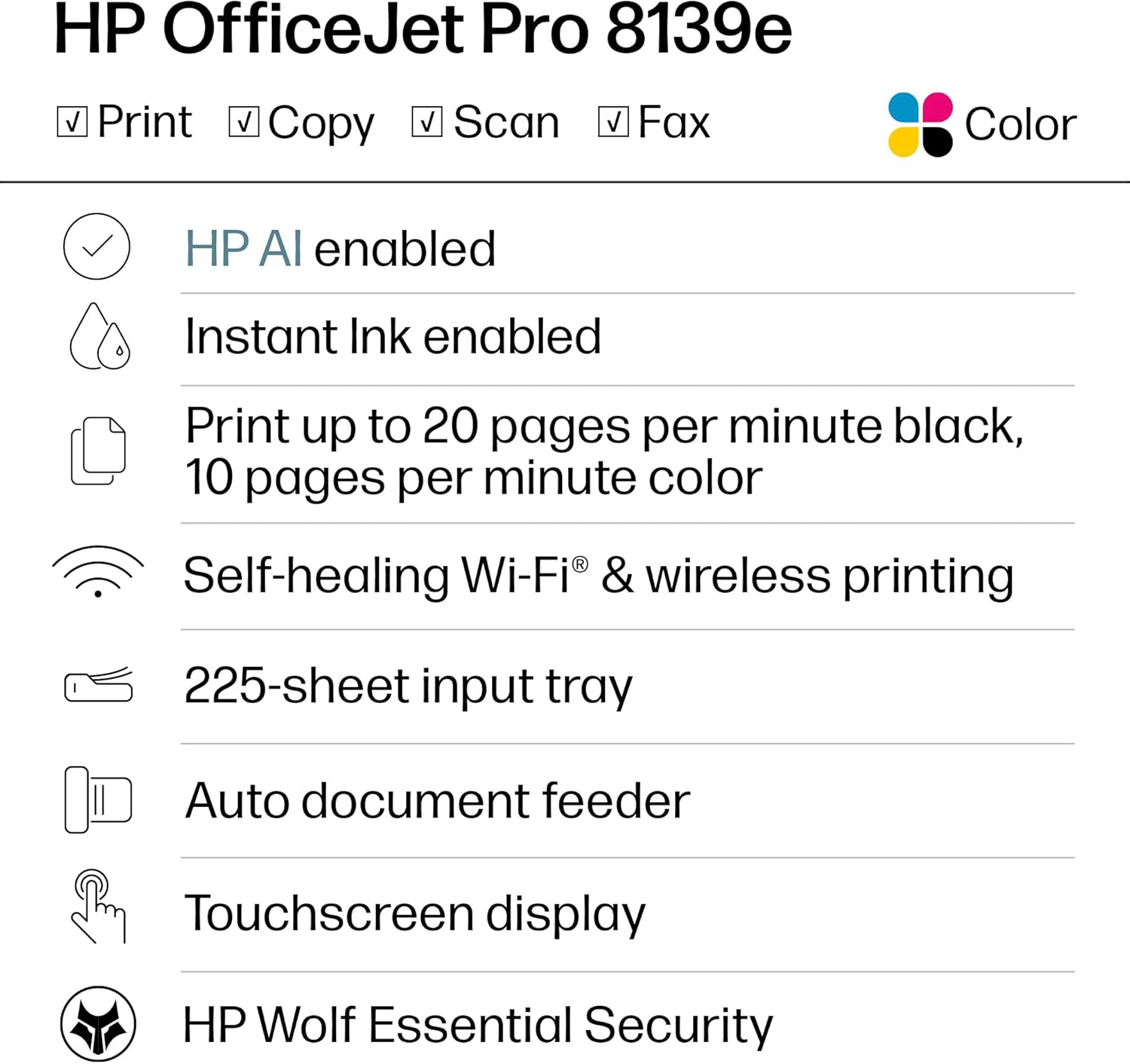


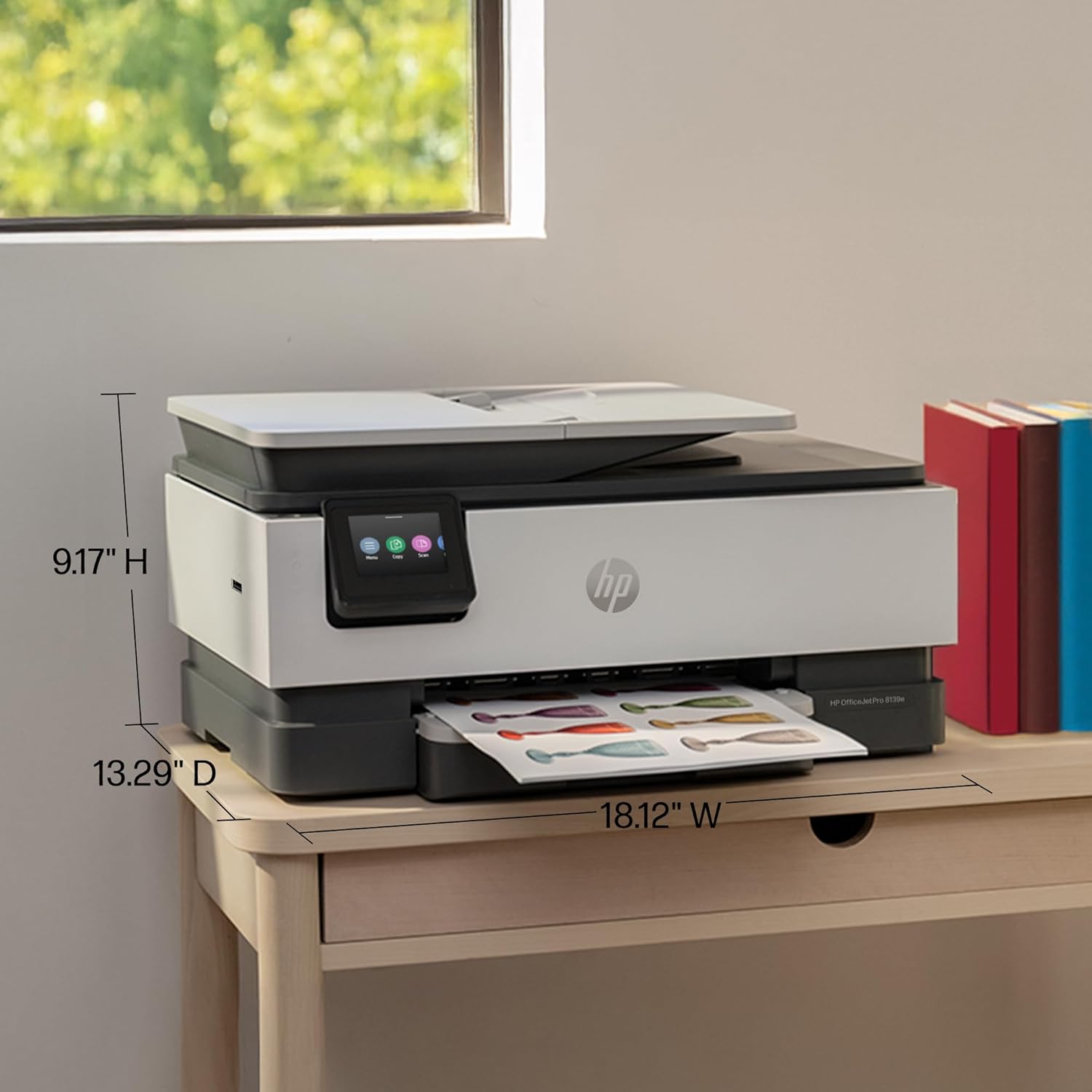

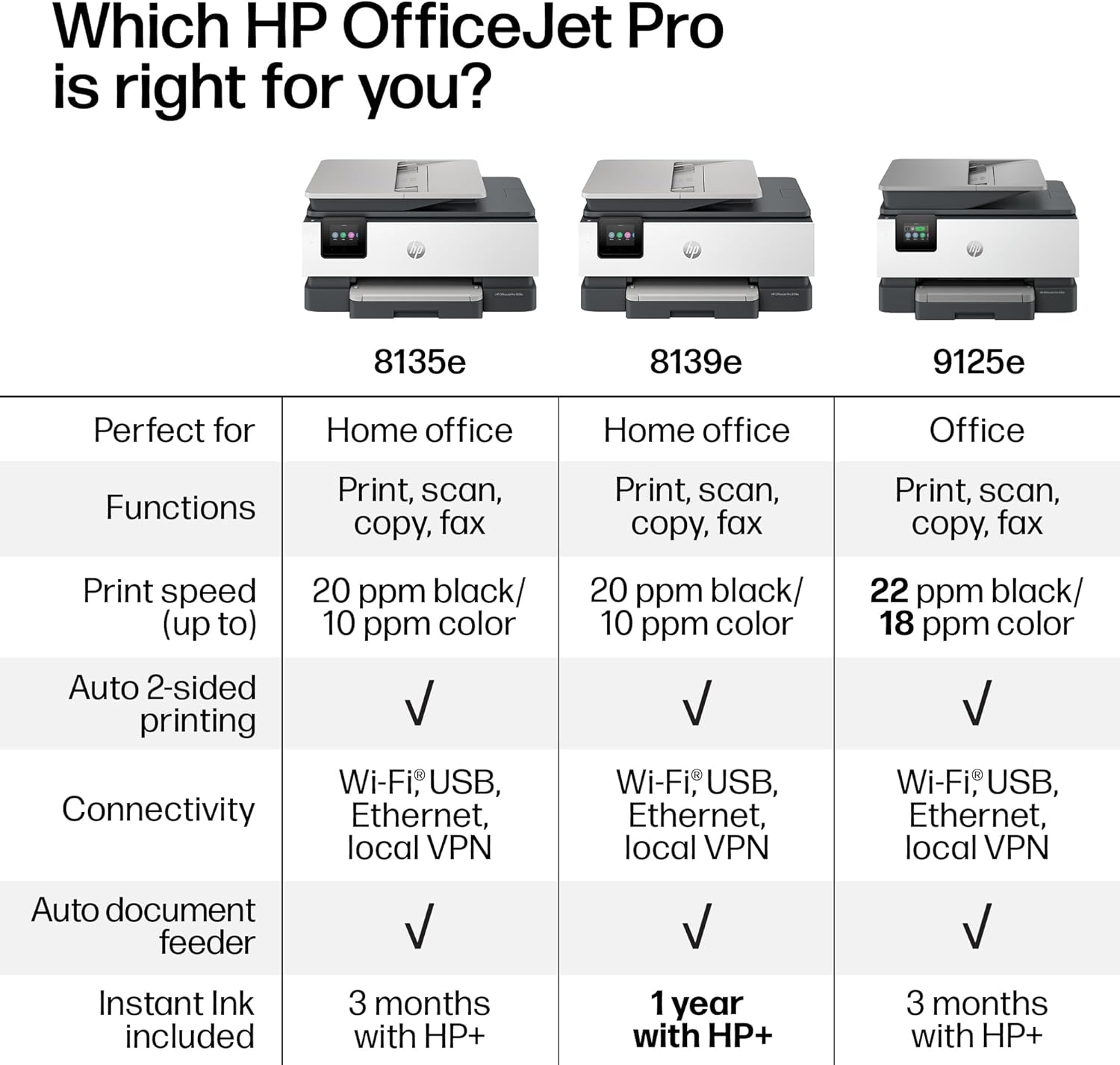





The HP OfficeJet Pro 8139e delivers fast color printing, 225-sheet paper capacity, and scan, copy and fax capabilities. It includes wireless and printer security features to keep your multifunction printer up to date and secure.
The OfficeJet Pro 8139e is perfect for home offices printing professional-quality color documents like business documents, reports, presentations and flyers. Print speeds up to 10 ppm color, 20 ppm black
PERFECTLY FORMATTED PRINTS WITH HP AI – Print web pages and emails with precision—no wasted pages or awkward layouts; HP AI easily removes unwanted content, so your prints are just the way you want
UPGRADED FEATURES – Fast color printing, scan, copy, fax, auto 2-sided printing, auto document feeder, and a 225-sheet input tray
WIRELESS PRINTING – Stay connected with our most reliable dual-band Wi-Fi, which automatically detects and resolves connection issues
HP APP – Print, scan, copy, or fax right from your smartphone, PC, or tablet with the easiest-to-use print app
1 YEAR OF INSTANT INK WITH HP+ ACTIVATION – Subscribe to Instant Ink and create an HP+ account to get ink delivered directly to your door before you run out. After 1 year, monthly fee applies unless cancelled
PROTECTS YOUR DATA – HP Wolf Essential Security bolsters security and helps keep your network protected from cyber threats
2.7-INCH TOUCHSCREEN – Quickly navigate your printer with a large color touchscreen and a phone-like user interface
SUSTAINABLE DESIGN – Made with more than 45% recycled plastic
This printer is intended to work only with cartridges with HP chips or circuitry and will block cartridges using non-HP chips or circuitry. Periodic firmware updates will maintain the effectiveness of these measures
8 reviews for HP OfficeJet Pro 8139e Wireless All-in-One Color Inkjet Printer, Print, scan, copy, fax, ADF, Duplex printing Best-for-home office, 1 year Instant Ink trial included, AI-enabled (40Q51A)
Add a review

$28.99
Kyle –
Solid Unit and Quality
Using the wireless connection and connected to home network with no issues. Setting up the printer was simple. The only concern or slight issue is printing using the private function. Been trying to turn off the private print function as you need to go to the printer and hit print. Other than that no issues or printing errors. Great quality thus far when printing. Have tried a few photos as well and quality was great. Use proper print paper thou.
Scoby –
The Worst HP Printer Ever!!!
I’ve been a loyal HP customer for years, but this printer was a total disappointment from the start. It lasted only nine months before the print head failed — pure junk for the $180 I spent.Setup was a nightmare and took hours. I could never get the scanner to connect to my computer, so I only used it for printing. After just a couple of ink changes, the color of my company logo went from a crisp teal to a dirty blue. I dealt with it because I couldn’t afford a replacement at the time.Then two weeks ago, it started printing with blank lines through everything. Even though the ink wasn’t low, I replaced it anyway — no improvement. After researching, I found it might be clogged print heads, so I bought a cleaning kit and followed every step, another $25 wasted. Once I reinstalled the cartridges, I got a print head error message and it completely stopped printing. Since I run a small business and rely on daily printing, I had no choice but to buy a new printer immediately. That means the $180 I spent on this HP model was a total loss. I’ve always trusted HP, but this is by far the cheapest, most unreliable printer I’ve ever owned. Buyer beware — I won’t be purchasing another HP printer again.
Emma –
Winner, Winner, Chicken Dinner!
So far so good! This printer is being used exclusively office/business use.Setup was easy and wireless communication with the laptop was seamless. I was surprised how fast the printer connected to the computer and had already retrieved the WIFI info on its own. I barely had to do anything.The double sided printing takes a bit to get used to because I’m always trying to grab the printed page before it gets sucked back into the printer to complete the print job on the other side of the page. Print times are adequate and not slow. The print quality is crisp and colors are accurate. I have not experienced any of the problems brought up in the one star reviews.If you’re looking for a decent all-in-one printer that you wont have to search for cords, this one is a very good option.
Banacek –
Slow but reliable
Got this because my old HP printer finally started having problems after a number of years. Like all the previous ones I have owned, this one is slow and seems to go through a lot of mechanical motions before it actually starts printing, but it has been reliable so far and the printing is flawless. I think it’s well worth the price, and the slow startup speed is what you have to expect in this price range. The most important thing to me is a quality of the printing, and the reliability of the printer. So I’m happy with it.
Kindle Customer –
Great
A step up from last HP printer, ink doesn’t last as long, had problems with set up, Great printer once in operation
Kelly M. –
Works great, no problems at all!
Really enjoying this printer. It makes great copies, prints double-sided, and has fax. It’s amazing for the price I paid!
Elleindeed19 –
Worst Printer I Have Ever Owned!
This is the worst printer I have ever owned. It is very disappointing because the one previous to this I had for about 14 years and it was HP. It worked like a charm until I think the Wi-Fi got too advanced for it and it just didn’t always air print. So I searched through the reviews and did a bunch of research to buy this one. I’m so disappointed because when I got it, I almost returned it that day because it wouldn’t set up. You set this up on an app and it does it wirelessly versus pressing any buttons on the actual printer. I tried for about two hours and it just wasn’t working well Then all of a sudden I finally had a breakthrough and got it to set up. However, from that point on it was touch and go on whether it was going to actually print from my iPhone or my iPad. I had a good run where I didn’t have many problems at one point. I would occasionally have to unplug it, power it off and reset the Wi-Fi, but that generally would make it print again. However, over the last couple months, it just stopped working and then I spent four hours on the phone with product support. This printer only has like a one year warranty and so I knew that in a couple months I wouldn’t be able to call to get support on it not printing. I just don’t have the time to sit there and try to make this printer work. The second guy I got on the phone said that it was my Wi-Fi service and I needed to contact my Internet provider to get help. However, I’ve never heard of such a thing because everything else that I have that is Wi-Fi works completely fine. I basically have a smart home with over 80 devices attached to the Internet. This is the only one that doesn’t function properly. So… The only thing that doesn’t work consistently is this printer. I got so frustrated that I boxed this thing up, and I put it in the donation pile to send to paralyzed veterans. I then bought a competing brand which oh by the way is working perfectly and printed right off the bat. It also set up like a charm. I read some other reviews to see if other people had problems with printing from my iPhone and iPad. It looks like over the reviews online that this problem I was experiencing is not just one that I had. It may be the Internet provider or it could be the actual compatibility with iPhone and iPad products. I am not sure exactly because you don’t get all that information in the reviews of others to be able to distinguish if it’s just one factor. I have AT&T as an Internet provider and I can tell you that I had real troubles with this particular model. I know that I set up the Wi-Fi 1 million times. I also defaulted it back to the original settings. I deleted the app. I reinstalled the app. I let it be unplugged. I did everything trying to make this work. I spent probably 40 hours or more trying to get this printer to work so take this information as you would like to make an informed decision for yourself. I’m trying to save others from wasting their money on this printer.
Graceful Giraffe –
Happy with this purchase!
I’ve been using this printer for a few weeks now and it’s been very reliable. The price was right, being reduced from the original probably only because it’s not the most recent model. It took a bit to connect it wirelessly. I had to call for help but the agent was patient and finally got it working! Also, since it came with the Instant Ink offer, I was able to get 12 months of free ink which will be another huge savings!