

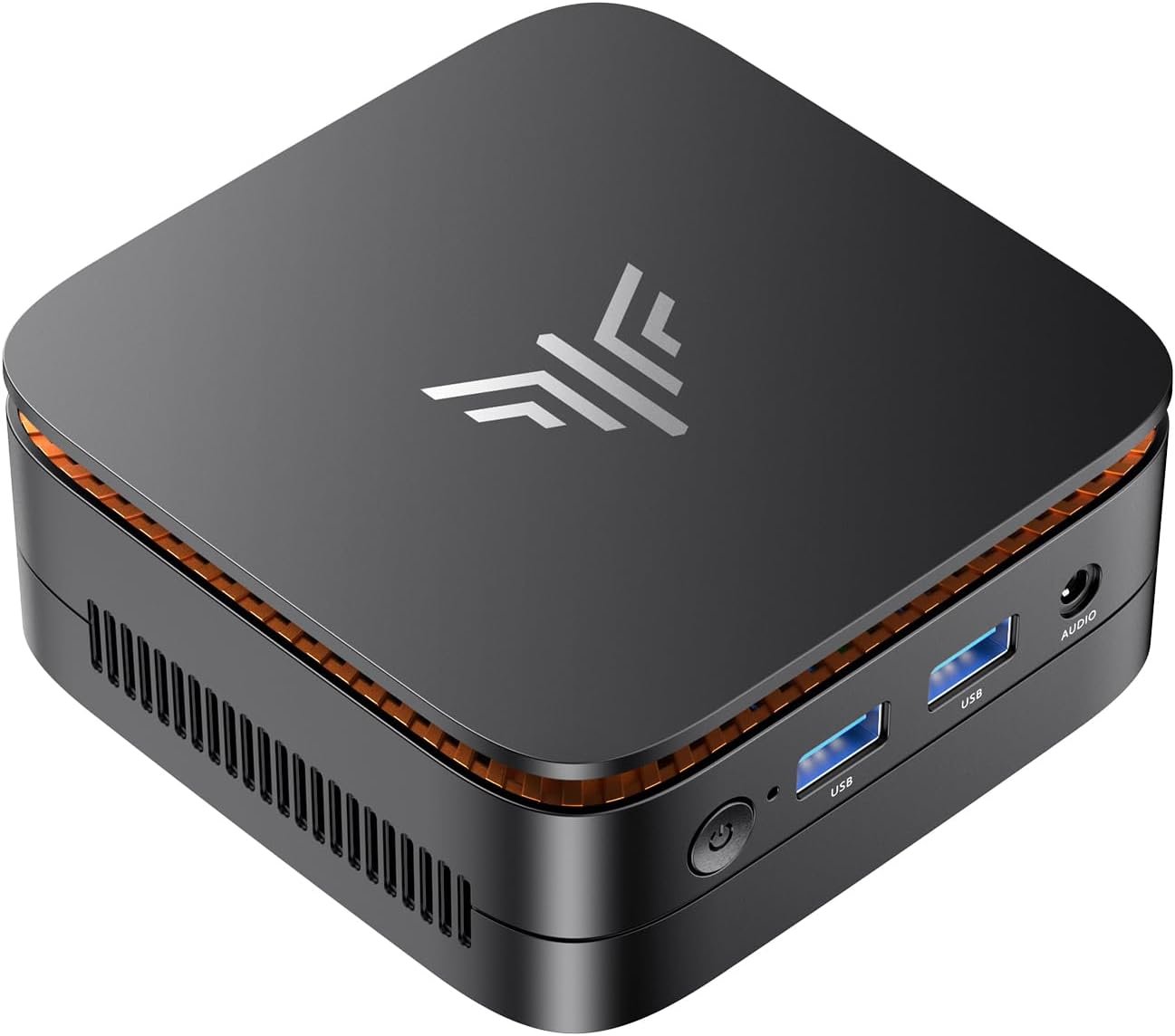
MINISFORUM UN1290 Mini PC 12th Gen Core i9-12900HK(14C/20T) Mini Computer 32G RAM+512GB SSD, HDMI/DP/USB-C 4K@60Hz Outputs, 2.5” HDD Slot, WiFi 6E/BT5.2/2.5G LAN, 4xUSB Port Desktop Computer
$60.99
Related Products


![GEEKOM Mini PC IT12[Best Intel NUC12 Alternative],3-Year Quality Support,with 12th Gen Intel i7-1280P Mini Computers,32GB RAM/1TB NVMe SSD Windows 11 Pro Desktop PC,USB 4.0/2.5G LAN/8K/SD Solt](https://deviceden.co/wp-content/uploads/2025/11/71iSmNsGgGL._AC_SL1500_.jpg)


From the brand


MINISFORUM was born among a group of computer engineers who are passionate about advanced technology. Since its inception in 2012, MINISFORUM has been committed to innovation and production of outstanding products.
We listen to every user’s opinions and understand customers’ needs. So, a large number of innovations have been carried out and innovative ideas have been injected into every product.
High Performance Hot Products
MINISFORUM Popular Products
MINISFORUM Reliable Products
MINISFORUM Other Intel Series
MINISFORUM Other AMD Series
Explore More Options
Explore More Options
Explore More Options
【Powerful Performance】The MINISFORUM NAB9 Mini PC is equipped with Core i9-12900HK(14 cores/20 threads/up to 5.0GHz) Processor. With Intel Iris Xe Graphics eligible (the graphics frequency up to 1.45GHz), it offers an excellent performance of Internet and Office applications, Monitors, Projects and TVs.
【Triple Video Screen Output】 This i9 Mini PC is Equipped with HDMI, DisplayPort, USB-C (4K@60Hz) Outputs, you can connect ultra HD screens to 3 displays at the same time. Increase work efficiency by expanding multiple workspaces.
【Large and Expandable Capacity】This Mini Computer comes with DDR4 16GBx2 memory(up to 64GB) + M.2 2280 1TB PCIe 4.0 SSD storage (up to 2TB). It supports ultra-high speed PCIe 4.0 SSD, the read and write speed is about 4 times faster than SATA SSD, the operating system and games will run faster. It also equipped with one 2.5-inch SATA HDD (SATA 3.0 6.0Gb/s) slots.
【Strong Wireless Function 】This Micro Computer has 2.5G Ethernet port, 2.4+5G Dual Band WiFi and Bluetooth 5.2, you could connect your wireless application without problem.
【Multiple Connections】This MINISFORUM Mini PC equipped with 1x 2.5G RJ45 Port, 1x HDMI, 1x USB3.2 Type-C, 1x DisplayPort, 2xUSB3.2, 2xUSB 2.0, 1x Audio Jack, 1x DMIC Port. The weight is only 570g and the size is 5x5x2inch. With the included VESA Mount, it can set up an all-in-one computer and free up the desk space.
【Package Contents】 1x UN1290 Mini PC, 1x HDMI cable, 1x US Power Adapter, 1x Manual.
11 reviews for MINISFORUM UN1290 Mini PC 12th Gen Core i9-12900HK(14C/20T) Mini Computer 32G RAM+512GB SSD, HDMI/DP/USB-C 4K@60Hz Outputs, 2.5” HDD Slot, WiFi 6E/BT5.2/2.5G LAN, 4xUSB Port Desktop Computer
Add a review

$60.99
MMcQuain –
Better than expected
This unit replaced an Intel NUC 13 Pro that had an issue and ASUS (who took over from Intel) really screwed up the repair (I’ll never buy from ASUS ever again). Originally, I had bought Intel since I hoped for reliability and good service and was skeptical of the various Chinese brands/models that make up the majority of the mini PC market. So, this time around I decided to give someone else a try and, after reading lots of online reviews and forum postings, I settled on MinisForum. I debated the NAB9, NAD9 and MS-01.I’m not a gamer and wanted to stick with Intel, even though AMD gets all the praise for their better graphics. I teach I.T. industry certifications (A+N+S+) and need a system that can run up to 4 virtual machines (VMs) like Linux, Windows Server, etc. I also wanted one with various features that I could demonstrate during my online classes (throttling, overclocking, multicore, hyperthreading, etc.).I already had a Samsung 980 SSD (2 TB M.2 NVMe) that I planned to put into the system and so I purchased the barebones kit and installed the SSD and RAM myself (also wanting to see just how easy it would be as this would give me a chance to look inside of the unit). It was a breeze… 32GBx2 SODIMMs (G.Skill) and the Samsung SSD installed in just a couple of minutes. I debated adding an active fan cooler heatsink to the SSD since MinisForum usually uses one when they provide the SSD. However, I ended up just using the passive heatsink that came with the NAB9. If you do plan to add a fan, then make note of the mini connector power plug on the motherboard (it is not the larger 3 pin connector found on many motherboards).Since my SSD already was fully loaded with Win10 Pro and my data, etc. I knew I might need to reinstall the OS since the drivers, etc. would not match those of the MinisForum motherboard and hardware. But I was happy to see that almost all of the drivers (Intel ARC, Intel wired NIC, audio, etc.) did match. This is because the NUC Pro and MinisForum are both based on Intel chipset. The only 2 drivers that gave me problems were the Bluetooth and WiFi NIC. For some reason, MinisForum uses MediaTek instead of Intel for these. Their website is a bit confusing since it only shows the AMD MediaTek drivers, but they seem to work just fine with the Intel 12900HK CPU.After verifying everything was working correctly in Device Manager, HWinfo, etc. I started doing some real work and kept a close eye on the internal temps. Since I’m not a gamer, I don’t get overly excited about all the benchmarks (Cinebench, CrystalDiskMark, et.al). I do look at these scores when comparing performance reports online, but I mainly just want to know how something is going to perform doing the things I do in the real world. I am happy to say that so far, the MinisForum NAB9 is doing great. I did push the SSD temp up to around 50C at one point under repeated heavy load but normally it sits right at 45C. And at one point yesterday I pushed the CPU into the 70s C range but today it is running in the 45-55C range with a high temp of 66C. Remember that I’m not a gamer so these numbers are more “real world” for me with a few apps and a VM or two running. If I ever really push this thing into the 70s or 80s for the CPU it would be very rare and unusual and I’m fine if it has to throttle back a little.I’m tested the WiFi, and all seemed good, but I normally run most of my network wired for security, etc. The two built-in NICs (2.5 Gbps) seem to work well and my SpeedTest results are to be expected with my 1 Gbps switch ports and current cable provider ISP service. But at least I have faster NICs should I need them in the future.So, the bottom line is that the NAB9 seems to be a solid performer that could easily manage the workload for many types of buyers. Gamers may look for something faster but if you just want a solid system that should last you several years then this may be the answer. Oh, and the fan is really quiet, which I like since this sits right in front of me as I’m teaching and talking into a webcam microphone, etc. And I did get the 3-year warranty from Amazon “just to play it safe” since I was taking a gamble on a Chinese system. I figure that IF I ever do need any kind of service then it can’t be any worse than my experience with ASUS and the Intel NUC 13 Pro… never again ASUS!!! MinisForum, please don’t let me don’t and you’ll have a customer for years to come!!!
Mauricio Orjuela –
Excelente Equipo
Excelente equipo , no corre bien……vuela . Lleno todas mis expectativas. Lo recomiendo .
Kindle Customer –
A Learning Experience
Before ordering this computer, I read the reviews, so was not uninformed when it came time to set it up. This is definitely not the type of plug and play I was used to, but, again, I knew not to expect it. Though I’m still in the setup process (I’m taking it a bit at a time,) I already see the difference from the mini-computer I am replacing. I am learning a lot while going through the process. Fortunately, I also have a laptop in my network so am able to compare the result of what I am doing with what I already have. I’m not a computer engineer by any means! I am seeing this computer providing a very beneficial experience in the weeks to come as I accustom myself and, most important of all, LEARN! I just wish the printed information available on this product was easier to understand. I did not find it helpful to pinpoint solutions.
Mark –
Using as Proxmox Servers
Purchases two NAB9 mini pc’s and am using as Proxmox servers for a home lab. So far the two computers have been running 24 hr 7 days week with no issues.
Alex –
good design, bad implementation or choice of electronic components, video card particularly.
Item MINISFORUM UN1290 Mini PC 12th Gen Core i9-12900HK arrives promptly. Setup was relatively easy and almost painless. Of all additional devices (third party) only HP printer connected.Problem started when I installed Chrome browser.Noticed running lines like a sea waves on the screen.I checked the display configuration and, to my surprise, I saw much lower settings compared to those indicated in the technical documentation: the screen resolution was 1920 instead of 3840, and the height was half as much. Reconnected display to my original PC and see expected size, no any disturbances on the screen. So it is defenatly problem with video card or processor itselves of this computer.I decided to work on this toy. After an hour of work, a headache and eye pain forced me to step away from the computer.Contacted techsupport on their site and email, provided on support page for this model, with the description of the problem – no responce at all for over 20 hours.Had to say, working for all that time (almost over 20 hours) – temperature of the box remain almost steady and low and I could bearly hear sound of cooling system or sense any vibration from this box.Have no choice but to buy new computer of different type and return this toy back to Amazon.
Joe G –
It’s worth the $$$
Worth the money spent. It’s fast, still works. I was hesitant at first, but quality is great. Ended up buying a second.
Kelly Chong –
Verified purchase. Barebones system purchased. Overall well made and compact unit. Had issues installing nvme drive. The screw holding down the nvme drive to the motherboard is so tightly torqued on to the motherboard it seems with loctite making it impossible to unscrew and use a nvme drive.Customer support not very helpful as I emailed them and they tell me to take the unit to a computer shop to remove the Nvme screw or find someone with an electric screwdriver to remove the screw. Other minipc don’t have issues with removing the nvme screw.I had to purchase a separate SSD drive to install instead of using Nvme. Also , the holder under the lid to attach the screws to the SSD drive seem to be missing a drilled out screw hole to attach the SSD.Other issues include a short SSD connector cable to the motherboard, and the availability of replaceable parts if needed. Other minor issues include driver issues. The included .bat file included to install drivers does not work. Especially for bluetooth functionality. So unless you know how to resolve drivers issues on your own OS, that might be a problem. Customer support is also lacking, not much help on the minisforum website.Update: Contacted by minisforum and they stated that they don’t put loctite on their nvme screws but blue paint. Blue paint???. They have blue paint on all the screws provided for this barebones system to install other devices like the SSD drive and computer mount. Overall, don’t purchase this system unless you’re technically proficient in hardware and software installation.Kelly Chong
Thabo –
Very fast and efficient for someone coming from intel inside
Hugo Montero –
Muy bien! esta mini PC cumple lo prometido es rápida, silenciosa y fue muy fácil hacer todo el setup… 32GB RAM y 512GB en disco, le coloque un disco extra de 512GB sin problemas, incluso el cable de conexionarme venia con el kit de la mini PC. Windows 11 Pro.Hasta ahora satisfecho continuo probando su funcionamiento…
JavierG –
Hasta el momento todo bien. Muy potente y con muy buen rendimiento. Yo adquirí la versión barebone lo cual significa que no viene con unidad de almacenamiento ni memoria RAM. Le instale un M.2 PCIe 4.0 de 512GB y 16GB RAM así como Windows 11 Pro y todo va perfecto.
carl b. –
je recommande tres bon eficace